

Adobe LLM Optimizer: Complete Guide to AI Brand Visibility

Your brand hasn’t disappeared from the internet, but it may have slipped out of the conversation where decisions are now being made.
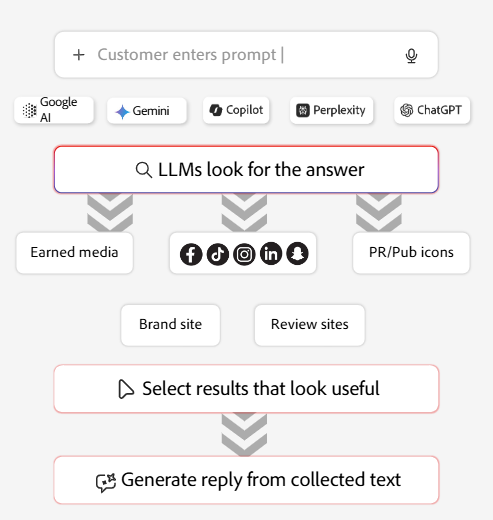
People are no longer typing queries into traditional search engines. They’re asking tools like ChatGPT, Perplexity, and Google AI Overviews for direct answers.
According to Bain & Company, 80% of consumers rely on AI-generated responses for at least 40% of their searches. This isn’t an early signal. It’s an active shift in behavior.
But the real issue is.
Brands no longer control what they have to say. When someone asks an AI tool about your product or service, the response is shaped by large language models (LLMs), not by your messaging. These systems decide what information is surfaced, what sources are cited, and which brands are trusted.
What makes this even riskier is the lack of visibility. You may not even know how your brand is being represented at all. Your name could be missing from AI answers, incorrect details could be circulating, or competitors could be cited while you’re ignored. And if this continues, you’ll lose visibility.
This is exactly where Adobe LLM Optimizer comes in.
In this guide, we’ll cover:
- What Adobe LLM Optimizer is and why it matters for AI brand visibility
- The key features that set it apart from other AI SEO tools
- How the platform works in practice
- Pricing considerations and who should invest
- Real-world results from brands already using it
Let’s get into it.
What Is Adobe LLM Optimizer?
Adobe LLM Optimizer is an enterprise-grade AI SEO platform designed specifically for generative engine optimization (GEO). Introduced in October 2025 and now generally available. It helps organizations understand how their brand appears across five major LLM-driven experiences, including ChatGPT, Gemini, Copilot, Perplexity, and Google AI Overviews.
The platform goes beyond basic mention tracking. It analyzes how AI agents crawl, read, and interpret website content, then delivers practical, prescriptive recommendations to strengthen AI visibility. It also reveals which types of user search intent trigger your brand or pages to surface across different AI tools.
A key differentiator is accuracy validation. Adobe LLM Optimizer connects AI-generated responses back to official sources such as your website or approved content, making it possible to spot incorrect or misleading outputs.
This allows teams to address issues early, before misinformation influences how customers perceive the brand.
What Sets Adobe LLM Optimizer Apart From Other AI Search Visibility Tools
Most AI SEO optimization tools only give you surface-level information. They might show if your brand pops up in an AI answer or give you a basic “thumbs up or down” on sentiment, but they don’t offer much depth beyond that.
Adobe LLM Optimizer tool takes a completely different approach. It looks at real data from your Content Delivery Network (CDN) logs to see exactly how AI agents are interacting with your site. This is very important because AI agents don’t browse the way humans do.
While a person usually starts on your homepage or a landing page, an AI bot goes straight for FAQs, technical documentation, and old blog posts. They aren’t there to shop; they are there to get facts to answer a specific user prompt. This type of “invisible” traffic is usually missed by standard analytics.
Adobe LLM AI checker tool shows you exactly which page AI is getting the data and shaping your brand’s reputation.
The biggest difference is that you can actually do something about it. The platform doesn’t just hand you a report; it lets you push technical fixes directly through the CDN. This means marketing teams can update how AI sees their site in minutes, rather than waiting months for a spot on the engineering team’s calendar.
Now that we’ve seen why it is different, let’s look at the specific features that make this happen.
Key Features of Adobe LLM Optimizer for a Brand’s Presence in AI Tools
Adobe LLM Optimizer AI checker tool is designed around three specific pillars: Brand Presence Intelligence, Agentic & Referral Traffic Insights, and Optimization recommendations.
These three work together to solve the actual problems brands run into when they’re trying to figure out where they stand in AI search visibility and what to do about it.
Each piece handles a different part of the puzzle. Here’s what you’re actually getting with each one.
1. Brand Presence Intelligence
This gives you one clear picture of how your brand appears across five major AI search engines and different regions. You can track:
- Where your brand gets mentioned and how often across your product category
- Which pages are AI systems citing, and what context they’re using
- Whether the sentiment in those AI responses is positive, negative, or neutral
- How is your performance against your competitors
The competitive angle is especially useful. You get to see which other brands show up when yours does, where competitors are pulling ahead, and where you’re losing brand visibility. That makes it much easier to spot the gaps and figure out what needs fixing first.
Here’s what the brand presence view looks like in the Adobe LLM dashboard:
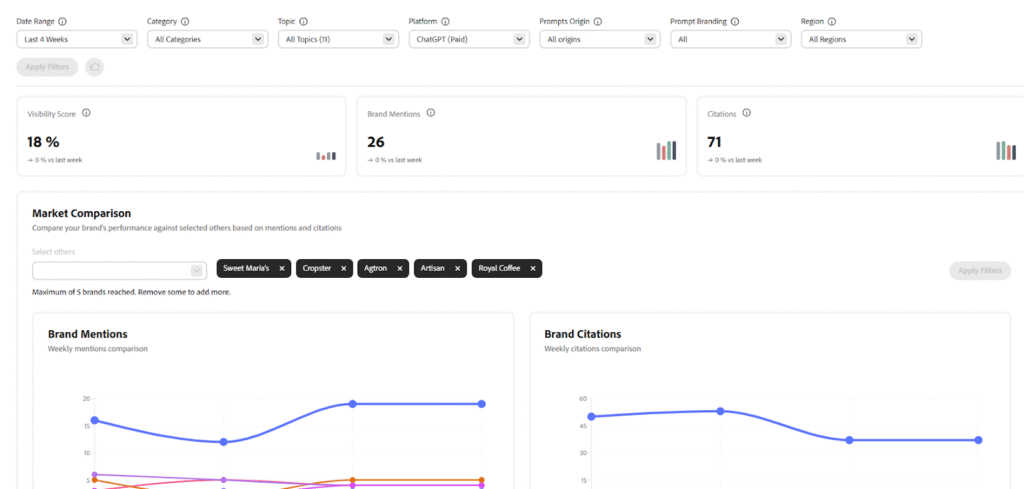
Wondering why this matters: Because AI search is a zero-sum game. When an AI picks your competitor’s page over yours, you just lost a chance to be seen.
2. Agentic Traffic Insights (Key Differentiator)
This is where Adobe LLM Optimizer really stands apart from other AI SEO tools.
Agentic traffic is all about how AI bots actually use your site. They don’t browse as humans do. They land on a specific page, grab what they need to answer a question, and leave. No clicking around, no exploring.
Adobe tracks this at the CDN level. Most analytics tools, including Google Analytics, completely miss it because AI bots don’t run JavaScript the same way people do.
What CDN logs show you:
- Which pages do AI agents hit the most
- When they’re crawling and how often
- What content are they pulling to build their answers
- Whether they’re getting blocked or hitting dead ends
Here’s an example of how agentic traffic breaks down by market, category, and page type:
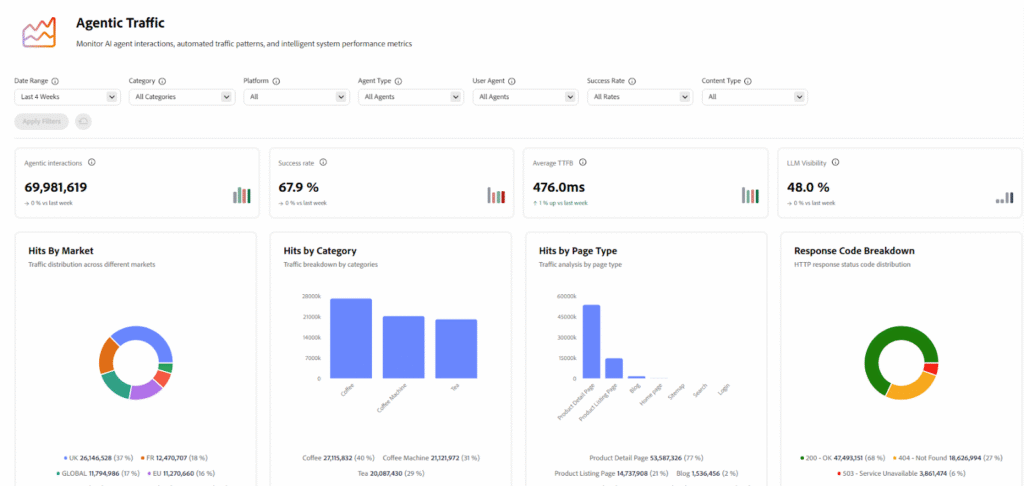
This data matters because it tells you exactly what’s shaping your brand’s story in AI. You can see which markets get the most bot attention, which page types they prefer, and which content actually influences what AI says about you.
For example, if bots are constantly hitting your FAQ pages but ignoring your product pages, that’s a red flag. A lot of AI tracking tools can’t handle complex or JavaScript-heavy pages. When they hit something they can’t read, they just move on. Fewer citations means less visibility.
3. Referral Traffic and ROI Measurement
Knowing your brand is visible in AI search results is just the starting point. But the real question is: does that visibility actually impact your business?
Adobe LLM tool tracks referral traffic that comes straight from AI-generated responses. When someone lands on your site via a Google AI Overview or a conversational tool, the platform logs that visit and links it to important outcomes like sales or revenue. This allows you to see how your AI presence is contributing to your bottom line, not just your brand awareness.
The platform also offers a clear breakdown of how users arrive, whether it’s through AI citations, external links, or other referral sources.
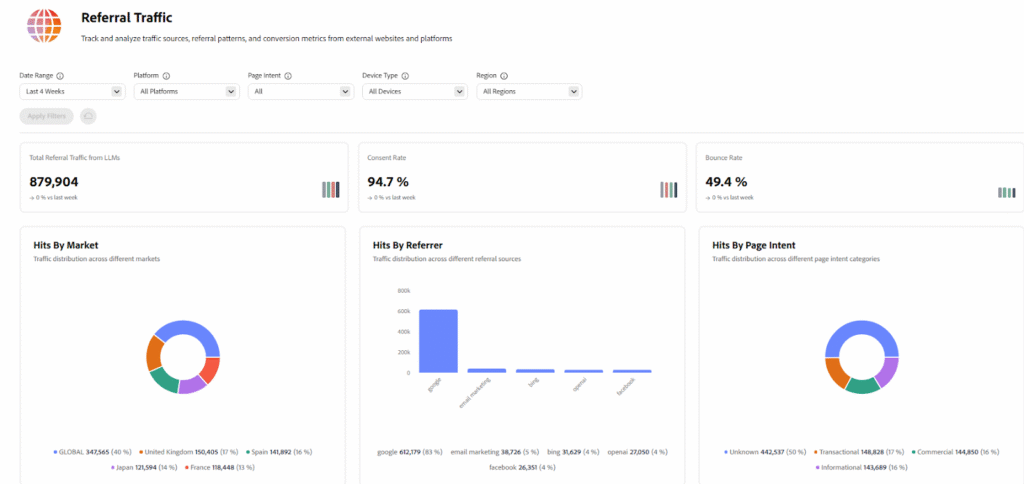
To keep this data accurate, the tool uses CDN-level tracking. This method lets the platform connect AI referrals to specific user sessions, even when browser cookies are blocked or unavailable.
In the future, Adobe LLM Optimizer is set to integrate with Adobe Analytics and Customer Journey Analytics. These connections will give your team the power to see how AI visibility fits into your overall marketing strategy and track the entire customer journey from start to finish.
4. Optimization Engine
This is where data turns into a plan of action.
The Adobe LLM Optimizer tool constantly looks for technical or content issues that might be hiding your brand from AI models. It doesn’t just report a problem; it explains why it’s happening and provides clear, step-by-step instructions on how you can fix it.
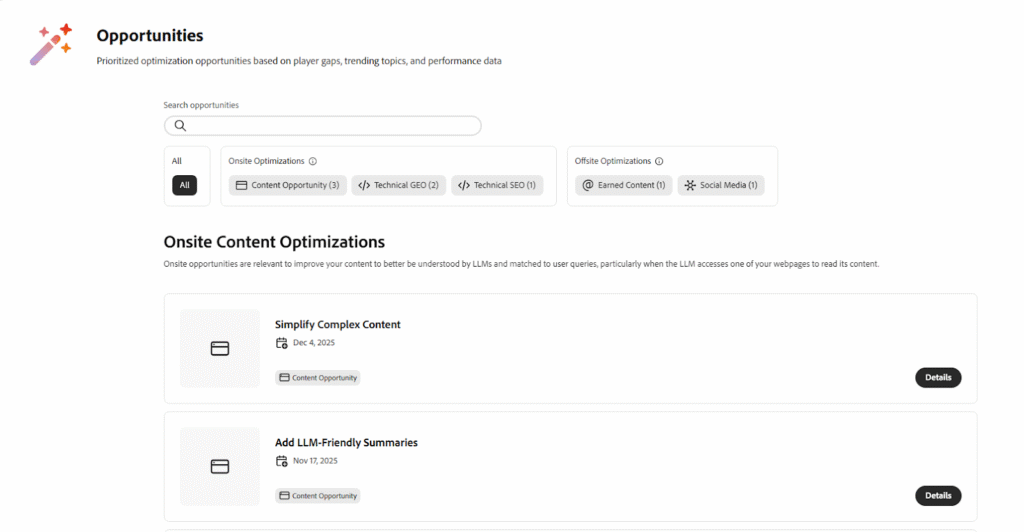
Common optimization includes:
On-site optimizations: It focuses on making your site technically accessible. Multiple websites use heavy JavaScript that works great for people but is invisible to AI bots, which usually prefer simple HTML.
Adobe fixes this by “pre-rendering” your pages into a format that AI agents can easily read and quote. It also handles technical “blockers,” like clearing the way for AI crawlers in your robots.txt files or fixing broken error pages that lead to dead ends.
Offsite optimizations: It focuses on making your content clearer for AI. The platform might suggest adding structured FAQ sections, which are perfect for question-based AI searches. Or it might create summary blocks for your longer articles.
It also helps clean up duplicate headings and missing meta descriptions, making it much easier for AI search tools to understand what your pages are about.
The biggest advantage of this engine is its speed. Many of these fixes can be applied with just one click at the CDN level. This means marketing teams can go live with improvements immediately, rather than waiting weeks for an engineering queue.
Now that we’ve covered how to optimize your site, let’s take a look at how Adobe LLM Optimizer actually works behind the scenes.
How Adobe LLM Optimizer Works: An End-to-End Workflow
To get real use of the platform, it’s important to understand what’s happening beneath the surface. Adobe LLM Optimizer follows a structured workflow that shows how brands are interpreted by AI systems, step by step.
Step 1: Monitoring Through Prompts, Not Keywords
Generative engine optimization (GEO) moves away from traditional keyword research and instead focuses on prompts. Prompts reflect the actual questions people ask AI assistants, which makes them a more accurate signal of real search behavior.
The process begins by defining prompts that align with your business objectives. These might include product-based questions, such as which tool is best for a specific use case, service-oriented queries about solving a particular problem, or brand-related questions that reflect trust and credibility.
Once these prompts are configured, Adobe LLM Optimizer tools run them across multiple AI models and analyze the responses. This reveals whether your brand is included in AI-generated answers and how it is positioned when it does appear.
Step 2: Measuring Brand Presence Across Multiple LLMs
After prompts are evaluated, the platform examines brand visibility across several major language models and regions. For each prompt, it identifies whether your brand is mentioned, how it is cited, and why it appears in the response.
It also shows which competitors are included alongside your brand. This side-by-side view is important for understanding where others are outperforming you in AI visibility and which topics are driving their inclusion in AI answers.
Step 3: Agentic Traffic & Referral Traffic Insights
At this point, you’ll get to know what AI agents are doing on your site.
Agentic traffic shows which pages bots visit, how frequently they come back, and whether they can actually read what’s there.
Here’s the thing: a lot of websites rely heavily on JavaScript. It looks great for humans browsing around, but AI agents? They often see nothing but a blank page. That’s a massive problem.
Referral traffic tracks something different. It shows actual people who clicked through from an AI-generated answer and landed on your site. This is the data that proves ROI, not just visibility.
Step 4: Prescriptive Optimization Recommendations
The platform doesn’t just gather data and show you. It tells you exactly what needs fixing.
You won’t get generic advice like “optimize content quality or write human written content”. Instead, it identifies specific technical problems, such as broken links, blocked pages, and unreadable JavaScript, and walks you through how to fix each one.
Every recommendation explains what the issue is and why it matters for AI models.
Here’s a table showing a few examples of how the tool recommends actionable fixes for your brand:

Step 5: Edge-Based Optimization and Deployment
This is where things get really interesting. Adobe LLM Optimizer makes changes at the CDN level, not in your site’s actual code.
What’s that mean for you? Your marketing team can fix AI visibility problems without waiting weeks for the engineering team to get around to it.
Let’s look at a practical example: let’s say AI agents can’t read your product pages because they’re built with heavy JavaScript. The platform pre-renders those pages at the edge. Bots get clean, readable HTML. Your human visitors? They still see the same dynamic, interactive experience they always have.
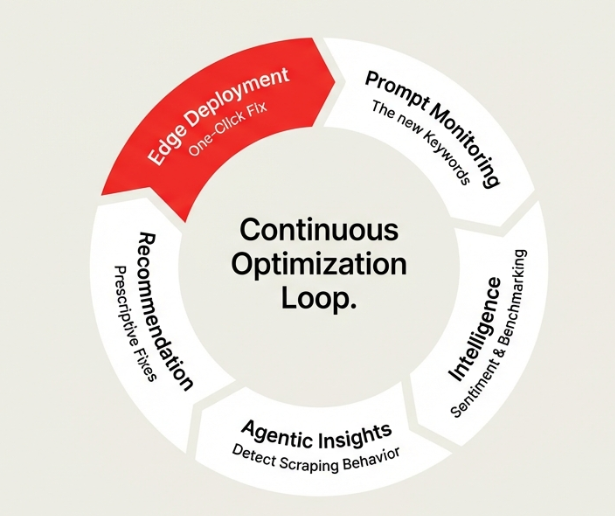
The best part of this approach is that it’s low-risk. It doesn’t slow down your site or mess with the user experience. Once it’s live, the platform keeps monitoring how visibility changes and connects those changes back to actual business impact.
Now that you understand how the whole system works, let’s talk about what you actually get out of using it.
Benefits of Using Adobe LLM Optimizer Tool for Brand Presence
Now that you know how the technology works, the next logical question is: why invest in it?
The real value of the platform lies in how it bridges the massive gaps in visibility, accuracy, and measurement that AI search has created.
Here is a breakdown of the primary advantages.
1. Expanding Your Brand’s Presence and Share of Voice
Traditional search engine optimization tool focuses on rankings, but this platform prioritizes relevance and authority. It is designed to help your brand earn mentions and citations across major AI models like ChatGPT, Gemini, Claude, Copilot, and Perplexity.
By using Generative Engine Optimization (GEO) scores, your team can track how often you appear for high-intent queries compared to your competitors. These improvements can happen quickly.
For example, the coffee brand Frescopa saw its citations increase fivefold in just one week after optimizing.
2. Clear Visibility into “Agentic” Traffic
While humans usually land on your homepage, AI agents tend to skip it and head straight for deep content like FAQs, help articles, and technical documentation.
Adobe LLM tool analyzes your CDN logs to reveal this hidden behavior. It shows you exactly how AI bots are moving through your site and which specific pages are influencing the answers they give to users.
3. Actionable and Automated Improvements
This platform is built to move you past simple analysis and into direct action. It automatically identifies technical issues. Such as AI agents being blocked in your robots.txt file or broken 4xx/5xx error pages, and recommends specific fixes.
One of the most powerful features is “pre-rendering” JavaScript-heavy pages, which makes your dynamic content readable for AI bots without changing the experience for human visitors. Many of these updates can be deployed instantly through one-click actions.
4. Protecting Brand Accuracy and Reputation
When an AI powered SEO tool surfaces incorrect information, it can damage customer trust instantly. Adobe LLM Optimizer helps by linking AI-generated responses back to the source content they used.
If a model like ChatGPT or Gemini is hallucinating or using outdated facts, you can identify the source of the error and correct it at the root. This gives your PR and communications teams much tighter control over how your brand is described across different regions and models.
5. Clear Attribution and Business Impact
According to a study by Gartner, organic search traffic is projected to decline significantly by 50% by 2028. It is more important than ever to prove the value of AI visibility. Adobe LLM Optimizer tool goes beyond basic reporting by connecting AI mentions to actual business outcomes.
Through planned integrations with Adobe Analytics and Customer Journey Analytics, you can track a user’s path from an AI citation all the way to a final conversion. This gives you a clear look at your return on investment.
6. Built for the Enterprise
The tool is a standalone SaaS product, which means you don’t need to use Adobe Experience Manager (AEM) to get started. It is built to support large, complex organizations and can connect to custom CMS setups through APIs.
Pricing is straightforward and based on “prompts,” the AI-era version of keywords. Plans start at $115,000 per year for 1,000 prompts and scale upward as your monitoring needs grow.
By this point, I’m sure the advantages are clear. And like any other enterprise tool, this platform also has specific limitations, which we will look at next.
Limitations of Adobe LLM Optimizer AI Visibility Tool
Every platform has its own disadvantages. And the Adobe LLM tool has a few limitations, which you should be aware of if you’re considering this platform.
So, let’s get a clear look and see where this platform falls short:
1. High Entry Price for Smaller Businesses
Let’s be practical; spending $115,000 per year is a huge barrier. Especially, if you’re running a startup, this price tag makes the LLM Optimizer tool a non-starter. It’s just not accessible at that stage.
Mid-market companies also face a challenge. You might have the budget, but you can’t justify spending six figures when you’re not sure if AI search will even matter for your business? This is enterprise software, built for brands with enterprise-level marketing spend.
If your company brings in less than $10M annually, it’s better to start somewhere else. Use a cheaper AI visibility tool first. See how you show up in AI responses. Build a case with actual data. Then, when you can prove the value, come back and consider the enterprise option.
2. Prompt-based Pricing Needs Deliberate Planning
Unlike traditional SEO platforms, where tracking large keyword sets is relatively inexpensive, each prompt in Adobe LLM Optimizer has a direct cost implication.
Your team needs to make intentional choices about what they want to monitor. See if you want to monitor every product category, each market, or all competitor comparisons. If you don’t have a clear strategy, your expenses might grow quickly. This is not a tool with which you can experiment whenever you want to.
Growth makes it more complex. As new products launch or markets expand, prompt requirements increase, which will make long-term budgeting harder to predict.
3. You Need Strong Content to See Real Value
It is important to remember that Adobe LLM Optimizer doesn’t actually write helpful content for you. It finds technical bugs, visibility gaps, and missed chances for citations, but the quality of your original writing is what ultimately determines your success.
If your articles are outdated or thin, technical fixes won’t suddenly make you an AI favorite. The platform works best when you already have great content that just needs better structure so AI bots can find it.
In short, this tool will help you with distribution, not the substance of your message.
4. A fast-moving Category with Evolving Best Practices
Generative engine optimization (GEO) is still very new. Unlike traditional SEO tools, which have decades of established rules, there aren’t many “universally accepted” best practices yet. AI platforms change how they crawl and cite information almost every week.
If you’re investing in this platform, it means you’re entering a space that naturally carries uncertainty.
The Adobe tool has committed to ongoing updates, but your teams should still recognize that they’re operating early in a fast-moving landscape.
When Adobe LLM Optimizer Tool May Not Be the Right Fit
While Adobe LLM Optimizer is a powerful platform, it isn’t the right fit for every business situation. There are times when starting with a simpler approach is actually the best move.
- If you’re a startup or a small business with a tight budget, the entry cost, which starts at $115,000 per year, might be too high to justify right away. This tool is specifically designed for businesses that are ready to make a significant investment.
- The tool also won’t help much if organic search isn’t driving your growth. When most of your customers come from paid ads, referrals, or direct traffic, boosting AI visibility probably won’t be of much help.
- Content readiness matters too. If you’re still figuring out your content creation process, focus on building solid, consistent content first. Optimize for AI agents later.
- The same goes for niche industries where search volume is low. If people aren’t asking AI assistants about your category yet, you won’t see much return.
- And this isn’t built for quick tests or short experiments. The LLM Optimizer tool typically requires an annual commitment, so it’s not ideal for teams that want to try things out cheaply.
In these cases, starting with a lower-cost monitoring tool makes sense. Gather some data, prove there’s a real opportunity, and then upgrading to an enterprise solution becomes a much easier call.
Challenge: Securing Leadership Approval
Seeing the value of Adobe LLM Optimizer yourself is one thing. Getting your CFO or CMO to sign off on it? That’s the real challenge.
Here’s how you can build a business case:
1. Show competitive analysis: The best way to approach this is with hard evidence, not just theory. Start by showing them where competitors are already showing up in AI-generated answers while your brand is nowhere to be found. Make it crystal clear that this isn’t some future problem. You’re losing visibility right now.
2. Demonstrate early wins: Bring actual results to the table. If there’s a “try before buy” option available, use it. Even a small drop in citations or mentions can help leadership see the connection between the AI visibility tool and real traffic or revenue down the line.
3. Project ROI clearly: Talk about it in terms of ROI and risk management. If organic search drives a significant chunk of your customer acquisition, and analysts are predicting major declines in the next few years, spell out what that means in lost revenue. Position Adobe LLM Optimizer as protection against that decline, not just another tool to experiment with.
Here’s the reality: most executives still don’t fully get AI-driven search. You’ll need to educate them on why this matters before you can ask for a six-figure budget.
So, now that you are fully aware of its challenges. You might be thinking whether you should get this tool or not. So, let’s clear that for you as well.
Who Should Use Adobe LLM Optimizer for AI Visibility?
Adobe LLM Optimizer is primarily designed for large, established organizations, typically those pulling in over $100 million in annual revenue. But honestly, it’s less about company size and more about how much you depend on search visibility to drive business.
- If you’re a CMO or Head of Marketing watching your organic traffic drop month after month, this tool is tough to ignore. It shows you exactly how your brand appears when people ask AI assistants instead of typing into Google.
- For Communications or PR leaders, you’re probably worried about accuracy. AI systems can pull up outdated or flat-out wrong information about your brand. Adobe LLM Optimizer tool helps you track down where those incorrect narratives are coming from so you can fix them before they do real damage.
- SEO and GEO specialists need this too. You’re dealing with the messy reality of adapting everything you know about search to an AI-first world, where visibility isn’t about page rankings anymore. It’s about whether machines can understand and cite your content.
- Digital Marketing Managers who oversee content creation get value here as well. The platform tells you if AI agents can even access the content your team is publishing, let alone use it in their answers.
Industries That See the Most Value
1. B2B companies with research-heavy buying cycles: Think SaaS companies, IT services, financial products, healthcare solutions. Buyers start their research by asking AI tools questions, and if you’re not showing up in those early answers, you’ve already lost their attention.
2. B2C brands that live on search traffic: Retail, eCommerce, travel, hospitality, consumer packaged goods. If customers find you through Google today, AI-powered answers are where the next battle for visibility is happening.
At this point, you’re probably wondering if this actually works. Fair question. Let’s look at what happens when real brands start using this tool.
Real-World Outcomes and Use Cases of Adobe LLM Optimizer
Let’s look at the actual example and see how the Adobe LLM tool made adifference.
Frescopa is a good example.
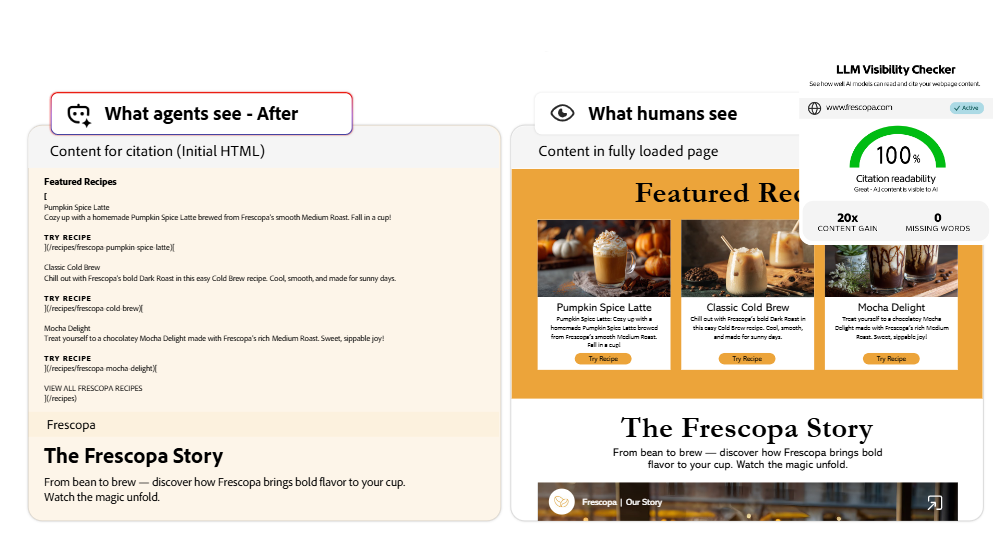
The problem: AI agents were unable to read key dynamic elements on their site, including product descriptions, ratings, and reviews. As a result, this content was effectively invisible to AI search systems, which meant Frescopa rarely appeared in AI-generated answers.
Here’s an example showing LLM visibility with AI optimization:

The solution: Frescopa implemented edge-based optimization that pre-assembled content specifically for AI agents. This approach left the human browsing experience unchanged and required no direct code changes, as everything was deployed through the CDN layer.
The outcome: Within a week, Frescopa saw a 5x increase in citations, translating to a 500% lift.
This aligns with broader trends. Adobe Analytics reports that retail websites experienced a 4,700 percent increase in traffic from generative AI sources between July 2024 and July 2025. This isn’t some future prediction. It’s already happening.
At this point, the next logical question is cost. If the results are this strong, what level of investment is required? Let’s look at the pricing next.
How Much Does Adobe LLM Optimizer Cost?
Adobe LLM Optimizer is not a tool meant for casual testing or small budgets. It’s built for large organizations operating at scale, with investment expectations that reflect that reality.
The pricing model is based on prompts. The entry point starts at 1,000 prompts per year, priced at approx. $115,000 annually.
Calculating Your Prompt Needs
How do you estimate how many prompts you need? Here’s the formula:
Markets × Products × Topics per Product = Total Prompts
Let’s say you’re a B2B SaaS company offering cloud-based HR management software, operating in the US, UK, and Australia. You have 5 core product modules per market and need to track 12 topics per module.
- 3 markets × 5 product modules per market = 15 total product-market combinations
- 15 combinations × 12 topics per module = 180 total prompts
Based on these requirements, a sizing assessment would estimate approximately 8,500 prompts annually to cover your complete AI visibility needs across all markets, features, and use cases.
At the $90 per prompt tier (10,000-19,800 range), the annual cost would be: $90 × 8,500 = $765,000 annually
Is It Worth the Investment?
That depends on your business model and how much organic search traffic matters to you.
If you’re a $100M+ revenue company where search drives a significant portion of customer acquisition, losing brand visibility in AI search could cost you millions in lost revenue. In that case, $570,000 is insurance against decline.
For smaller companies and startups, this probably isn’t the right fit. Your exposure to large-scale search demand is limited, and the cost is tough to justify at that stage. There are lighter AI visibility tools that cost less and provide basic monitoring. Consider those first.
Mid-market companies, especially those earning $10M to $100M annually, often benefit from a phased approach. Start with lower-cost monitoring tools to assess competitive movement and demand. Once you’ve proven the value, you can justify the enterprise investment.

Now that we’ve covered pricing, let’s look at what comes next and how this tool will evolve in the future.
What Feature Enhancement is Expected in Adobe LLM Optimizer
Adobe LLM Optimizer is shifting from a basic AI tracking tool into a deep business system that connects AI visibility to actual results. Adobe’s roadmap highlights four main areas where the technology is heading.
1. Connecting AI Visibility to Your Bottom Line (AA & CJA Integration)
One of the most anticipated updates is the integration with Adobe Analytics (AA) and Customer Journey Analytics (CJA). Right now, it can be hard to prove exactly how much an AI citation is worth. This connection will bridge that gap.
Once this is live, you can stop guessing and start measuring the financial impact of your AI presence. You will be able to see exactly how a mention in ChatGPT leads to a sale on your site. By tracing the journey from an AI answer to a final purchase, marketers can finally show the real ROI of their optimization efforts.
2. Preparing for the “Agentic” Shift
We are moving away from AI that just answers questions and toward AI “agents” that actually do things, like booking a flight or placing an order. Adobe is upgrading its edge-based technology to prepare for this shift.
These enhancements will help brands organize their data so that AI agents don’t just “read” the page. Instead, these agents will be able to check real-time pricing and inventory to complete transactions for a user without them ever having to click a button.
3. Better Fact-Checking and Brand Control
As AI models become more conversational, the risk of “hallucinations” or wrong information increases. Adobe’s roadmap includes advanced validation features that tie AI answers directly to your verified “Source of Truth” files.
This is essentially a safeguard against misinformation. It ensures that when an AI talks about your brand, it uses your latest, approved facts rather than pulling old or incorrect data from random corners of the internet.
4. Working Within the Adobe Experience Cloud
Even though the LLM Optimizer tool works perfectly on its own, Adobe is building deeper connections with the rest of the Experience Cloud. These “Better Together” workflows will eventually allow the system to fix problems automatically.
For instance, if the optimizer notices a gap in your visibility, it could trigger an automatic content update or launch a conversational “Brand Concierge” to help guide users. This moves the platform from just spotting problems to actively solving them.
Final Thoughts
AI search is no longer experimental. It’s here, and it’s changing how customers discover brands.
If you’re an enterprise brand, losing AI visibility means losing market share. Citations, sentiment, and accuracy matter more than Google rankings because they directly shape customer perception before anyone even visits your site.
Adobe LLM Optimizer offers one of the most complete enterprise solutions available today. It combines deep visibility into how AI agents access your content, prescriptive recommendations on how to fix issues, and low-risk deployment through the CDN layer.
If you’re ready to invest, start with visibility measurement. Understand where you stand today. Then fix agent readability issues. Finally, scale with structured content and continuous monitoring.
For ongoing AI visibility tracking and faster iteration, consider pairing enterprise insights with lighter tools that allow you to test and learn quickly.
The shift to AI search is happening whether you’re ready or not. The question is: will your brand be part of the answer? Talk to the AI SEO experts for FREE to get all the answers related to your brand’s AI visibility.
FAQs
What is the LLM Optimizer in Adobe?
Adobe LLM Optimizer is an enterprise platform built to help brands manage and improve how they show up in AI-generated search results. Unlike standard SEO agencies, it uses actual server data to see exactly how AI bots crawl your site and use your content.
This platform spots where you are missing out on visibility and provides specific, one-click fixes to make sure your brand is cited correctly.
Which Large Language Models does Adobe LLM Optimizer Track?
Instead of just focusing on one AI, Adobe LLM Optimizer looks at the whole AI landscape. It tracks how your brand is cited across five major platforms: ChatGPT, Gemini, Copilot, Perplexity, and Google AI Overviews.
By looking at all these models at once, the tool shows you how different AI systems are interpreting and sharing your information.
How can LLM Performance be Improved?
Getting better results from AI starts with making your content easy for bots to read and summarize. You should focus on a clean site structure with clear headings and summary blocks that help bots understand long articles quickly.
Technical fixes like pre-rendering are also vital, as they help AI agents read complex code they might otherwise skip. It is also important to keep a close eye on your key metrics to see what is working.
How do you Optimize for LLM-driven Search?
To win in AI search, you have to start viewing prompts as the new target keywords and make sure your content gives direct answers to common customer questions. You also need to make sure your site’s settings aren’t blocking AI crawlers from reaching deep content.
Such as help guides and blogs, which are the sources AI loves to cite. Watching your competitors helps you see where they are winning so you can fill those content gaps yourself.
How Should a Website Be Optimized for LLM Visibility?
Optimizing for AI is a continuous cycle of monitoring your visibility and making technical tweaks at the “edge” layer of your site. Use your CDN log data to see which pages bots are actually visiting and fix any broken links or errors that get in their way.
Adobe’s one-click deployment lets you make these changes instantly without waiting on a dev team, so you can keep up as AI behavior and citation rules constantly change.






Post a Comment
Got a question? Have a feedback? Please feel free to leave your ideas, opinions, and questions in the comments section of our post! ❤️