

AI Performance in Bing Webmaster Tool: Complete Guide

Website owners spent years moving blindly when it came to AI search. They had no reliable way to know whether AI systems were pulling from their content or skipping it entirely. That changed in February 2026 when Microsoft rolled out the AI Performance tool inside Bing Webmaster Tools as a public preview.
For the first time, there is actual data on how AI uses your content. Before getting into what the tool tracks, it helps to understand how AI search visibility works and why it operates differently from traditional search metrics.
AI Performance in Bing Webmaster Tool shows you directly how Microsoft Copilot and Bing’s AI-generated summaries pull from your pages when building responses.
That matters more than it sounds. For years, if an AI referenced your content, you had no way of knowing. Now, at least within Microsoft’s ecosystem, that information is available.
The tool does have real limitations, though, and misreading the numbers can push your content strategy the wrong way.
Here is what this guide covers:
- What AI Performance in Bing Webmaster actually tracks and what it misses
- How accurate the data is and where it falls short
- How to access and set up Bing AI performance
- How to optimize your content for higher AI citations in Bing Copilot
What Is AI Performance in Bing Webmaster Tool?
AI Performance in Bing Webmaster Tool is the first official reporting feature from a major search engine that shows how your content actually gets used inside AI responses. It is completely free to access. The tool tracks how Microsoft Copilot and Bing AI built answers that reference your pages while responding to user search queries.
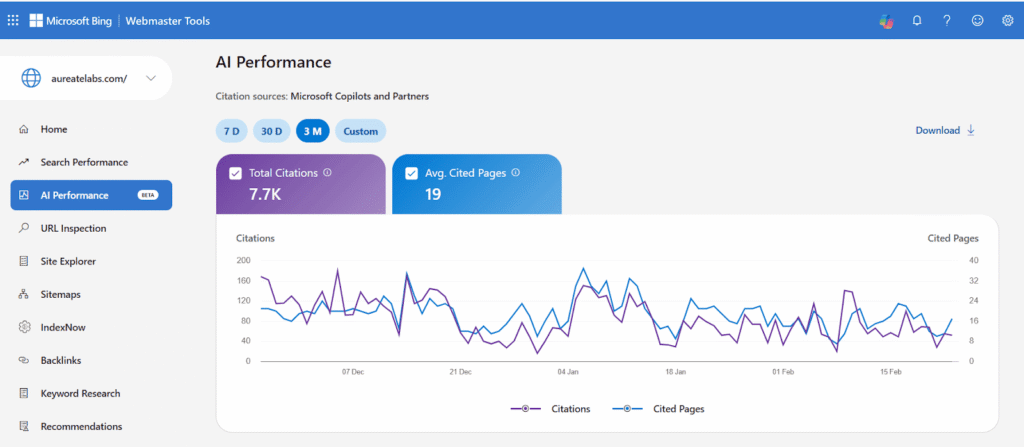
The best way to think about it is a citation log. Each time Copilot draws from your content to put together a response, the tool records that event. Across a rolling 90-day window, you build up a picture of which pages are being referenced, how frequently, and around what general topics.
This points to a genuine shift in how search performance works. Rankings used to be the entire game. Today, a user can ask Copilot something and leave with a complete answer without clicking a single result. If your content shaped that answer, you had a hand in the outcome without earning a visit. That is the exact gap AI Performance in Bing Webmaster is designed to fill.
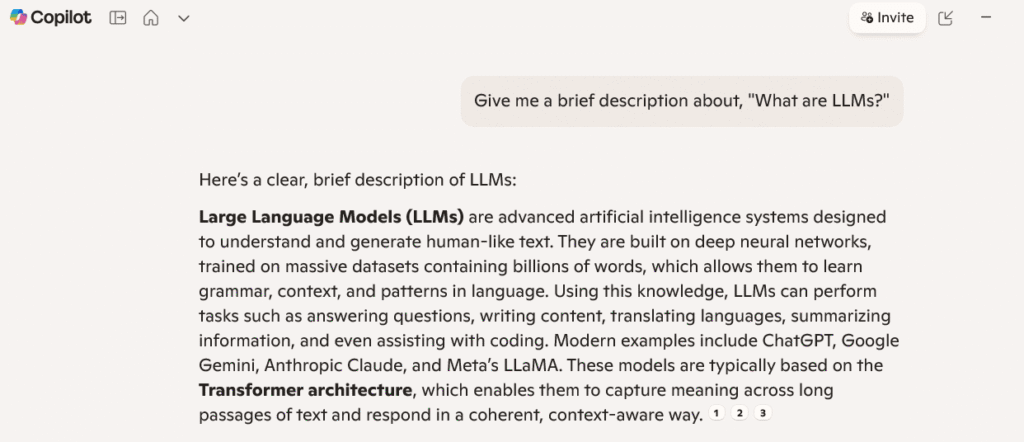
To show this in action, I put the question “What are LLMs?” to Microsoft Copilot to see how it responded.
So who actually needs this tool? Any site owner who thinks about visibility as something bigger than page rankings. That covers marketers, SEO professionals, content teams, and publishers. If you are currently blocking AI crawlers in your robots.txt, you will not see any data here. But even that tells you something worth knowing.
What Platforms and Surfaces Does Microsoft Bing Webmaster Tool Cover?
The AI Performance in Bing Webmaster tool tracks supported AI surfaces within Microsoft’s ecosystem. Which means, Microsoft Copilot comes first, followed by Bing AI-generated summaries, and a few select partner integrations.
| Platform / Surface | AI Visibility Data Available | What You Can See | Key Limitations |
| Microsoft Copilot | Yes | Citations, cited URLs, trends over time | Limited to Microsoft ecosystem |
| Bing AI summaries | Yes | AI citation counts and page-level visibility | No insight outside Bing results |
| Microsoft partner AI surfaces | Partial | Select citation and performance data | Coverage varies, not comprehensive |
| ChatGPT | No | None | No public citation or visibility reporting |
| Perplexity | No | None | Citations visible only inside responses |
| Google AI Overviews | No | None | No reporting or attribution metrics |
| Claude | No | None | No source-level visibility data |
| Gemini | No | None | No external analytics access |
What this webmaster tool leaves out: ChatGPT, Perplexity, Google AI Overviews, Claude, and Gemini. None of those platforms shares this type of data yet.
That is a significant gap. If your content decisions are based entirely on what Bing Webmaster Tools reports, you are only seeing part of the picture. Later in this guide, we will cover how to close that gap.
5 Core Metrics of Bing Webmaster’s AI Performance Dashboard
The AI Performance dashboard in Bing Webmaster Tools gives you five core metrics to work with. Each one tells you something different. None of them gives you the complete picture on its own.
1. Total Citations
Total citations show how many times your site appears as a source within the selected date range. It is a volume number, not a quality indicator. Knowing you were cited is useful, but this metric does not tell you where in the response you appeared, whether you were the primary source or a passing reference tucked into a longer answer.
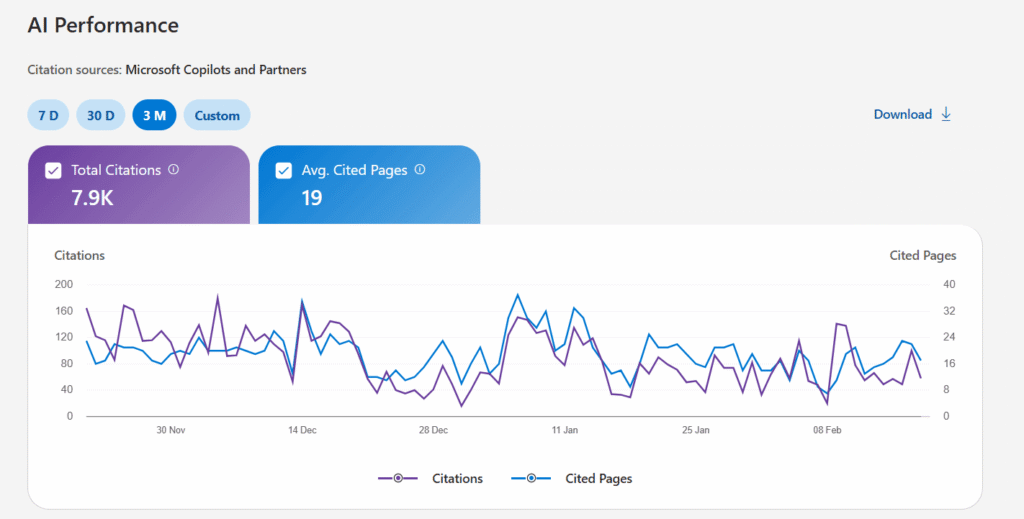
A rising citation count is a good sign. Just do not walk into a stakeholder meeting and position it as a traffic or conversion metric. It is not the same thing.
2. Average Cited Pages
Average cited pages shows the daily average of unique URLs the AI referenced within your chosen date range. The formula behind it is straightforward: total cited pages/number of days in the period.
What this number actually tells you is how broadly the AI is drawing from your site. Even on mid-to-large sites, it is pretty common to see just 3-5 pages driving the majority of citation activity. That kind of concentration is not unusual, but it does point to an opening worth acting on.
If your site has a hundred indexed articles and three of them are doing all the heavy lifting, you are likely looking at either a content quality issue or a structural problem across the rest of the site.
3. Grounding Queries
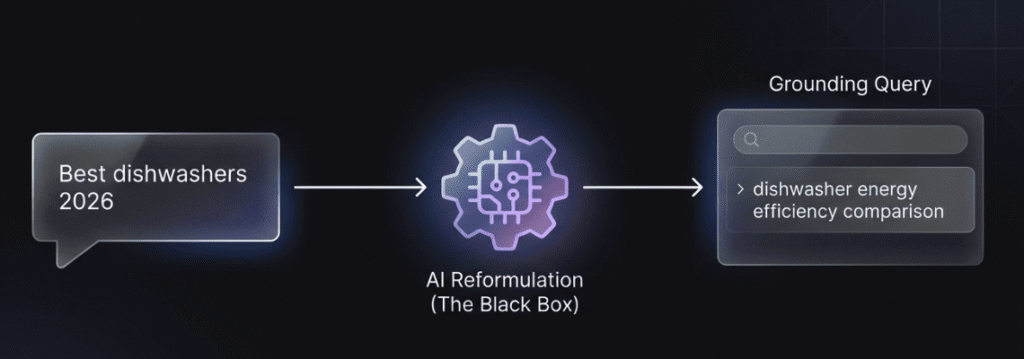
Of all the metrics in the dashboard, this one gets misread the most. Grounding queries are the key phrases that the AI used internally when it went to retrieve your content. They are not what the user typed into the search bar. They represent the AI’s own reformulation of what it was looking for at the moment of retrieval.
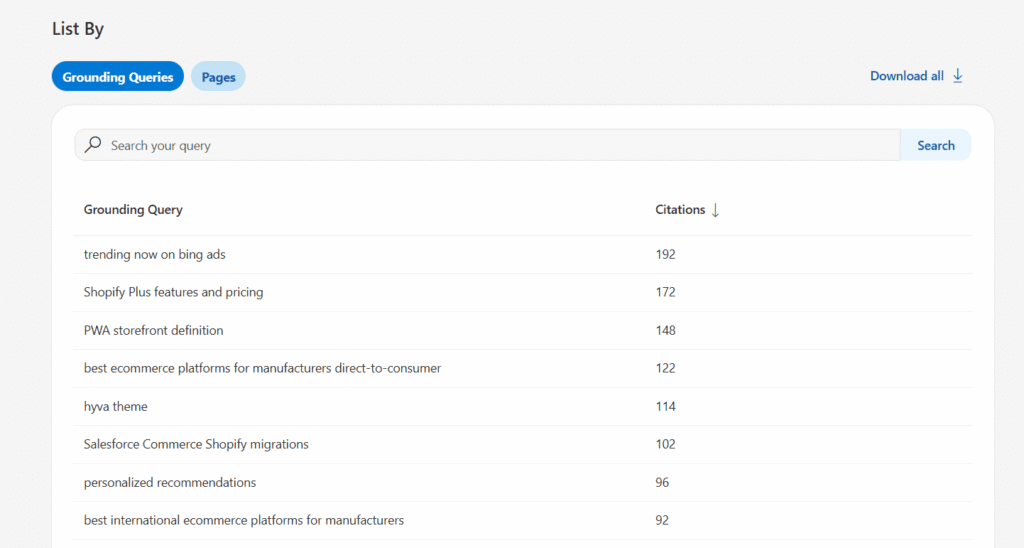
Take a user searching “Best dishwashers 2026.” When the AI goes to pull relevant source material, it might reframe that as something like “dishwasher energy efficiency comparison.” That reframed phrase is what ends up in your grounding queries data.
Two things to keep in mind before you act on this data: it is sampled, meaning it is not a complete record of every retrieval event. And these phrases reflect how AI systems generate answers, not the way actual people phrase their questions. They are worth paying attention to for content strategy, but treat them as directional signals rather than hard audience data.
4. Page-Level Citation Activity
Page-level citation activity breaks down citation counts by individual URL. This is where you actually see which pages are doing the heavy lifting. Pages that consistently get cited tend to have a few things in common: a clear structure, concrete data points, and answers that get straight to the point.
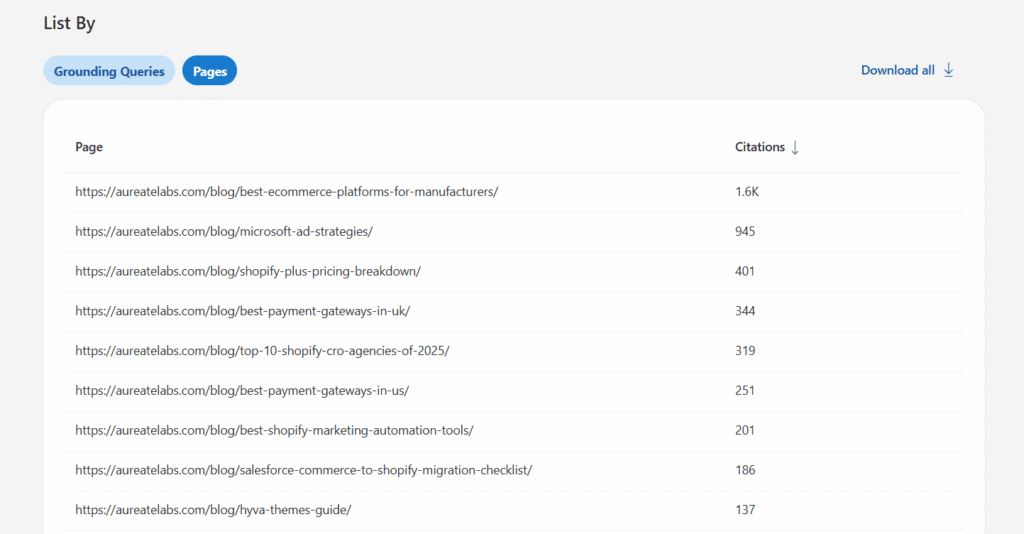
If a page is indexed but never appears in this data, treat it as a warning sign. Either the page is structured in a way that makes it difficult for AI to pull content from, or, stronger, more authoritative sources are covering the same ground and winning.
5. Visibility Trends Over Time
The trend view maps your citation activity across the 90-day window. Consistent upward movement is what you want to see. Sharp drops usually tie back to a content change, a technical issue, or a competitor gaining ground on a topic you were previously owning.
Seasonal patterns are also real, particularly for topics connected to purchase decisions or recurring industry events.
This is where the AI Performance dashboard shifts from a snapshot tool into something genuinely useful for long-term strategy.
How Accurate Is the Bing AI Performance Report?
Before you take these numbers to a client or present them internally, it is worth knowing where the data is solid and where it gets fuzzy.
Microsoft is fairly open about the tool’s limitations, which is worth acknowledging. Grounding queries are sampled, not exhaustive. The AI Performance report aggregates data across supported AI surfaces, so you cannot isolate Copilot activity from Bing summary activity.
The data reflects citation frequency, not ranking or prominence within a response. There is a typical 2 to 3 day reporting lag. And because this is a public preview, the methodology is subject to change.
The data shown represents real citation events, but it’s a filtered, aggregated view of them, not a complete audit trail.
Most AI Content Use Happens Without Visible Credit
There is a difference between an AI model using your content to build a response and actually crediting you for it. The first is called grounding. The second is visible attribution. The distance between those two things is bigger than most people realize.
The majority of grounding events never produce a visible citation. Your content did the work, your structure and expertise shaped the answer the user received, but your brand name was nowhere in sight. The AI Performance in Bing Webmaster data tracks citation events, but even those only represent a slice of how often your content is actually being used.
That is not automatically a bad thing. Grounding authority, meaning your ability to influence AI outputs even when you do not get named, still affects brand perception and the overall quality of AI-generated answers. Just make sure you know what the numbers you are looking at actually measure.

Pro Tip: Bing Webmaster Tools only shows citations within Microsoft’s ecosystem. To understand how your content performs across ChatGPT, Perplexity, and Gemini as well, you need cross-platform tracking. Learn how to track AI search visibility across all major AI platforms.
Limitations and Gaps of Bing Search Performance Tool
Let’s be upfront about what this tool does not show you:
- Knowing your brand was cited tells you nothing about whether that citation actually drove anyone to your site. There is no traffic data attached to it.
- You also have no way to tell whether you were the primary source at the top of a response or a passing reference buried near the bottom. Citation prominence is invisible here.
- The grounding queries you see are the AI’s internal reformulations, not the actual phrases people typed into the search bar. Keep that distinction in mind when drawing content conclusions.
- Your data is siloed to your own site. You cannot see who else is being cited for the same topics in your niche, which means the competitive context is absent.
- And the Bing search performance tool stays within Microsoft’s walls. How does your content perform inside ChatGPT, Perplexity, or Gemini? You will not find that here.
Put it all together: you know a citation happened, but you do not know which response it appeared in, how it was framed, or what impact it had.
Cross-Referencing for Validation
Since the tool has these blind spots, it is best not to rely on it alone. Pair it with your server logs to check for actual AI crawler visits from Bingbot and GPTBot.
It also helps to do manual spot checks. Grab your top grounding queries and plug them directly into Copilot to see if you show up and how. For a broader view, tools like Track My Visibility can give you cross-platform citation context that Bing alone cannot provide.
In Short: Treat Bing search performance data from this tool as a directional signal, not the final word.
How to Access and Set Up Bing AI Performance
The setup process is pretty simple. All you need is a verified site in Bing Webmaster Tools, which is free for any public website.
If you are running multiple subdomains or regional versions, like a .com and a .uk, each one has to be verified on its own. Also, do not panic if the dashboard looks empty when you first log in after verifying. Data takes 48 to 72 hours to start showing up.
Step 1: Verify Your Site
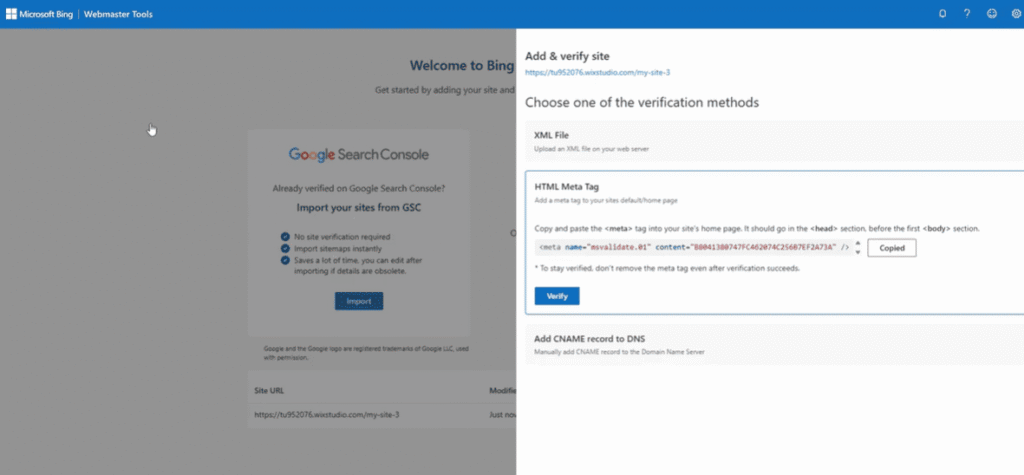
There are three verification methods available: uploading an XML file, inserting a meta tag, or adding a DNS record. Any of them will get the job done. For larger sites, though, DNS tends to be the most reliable option. Meta tags have a way of getting wiped out during deployments or site updates, and then you are back to square one with verification.
Even if Google sends you most of your traffic, this is worth five minutes. Getting verified gives you a real AI performance baseline and tells Microsoft’s index that someone is actively looking after the site.
Step 2: Navigate to the Dashboard
Go to bing.com/webmasters, pick your property, and look for AI Performance in the left navigation panel. If you just verified, give it a day or two before expecting anything to appear. An empty dashboard at the start does not mean the tool is broken. It is just the normal delay before data kicks in.
Step 3: Select Date Range and Export
The Bing Webmaster tool gives you a 90-day rolling window to work with. Charts are handy for catching broad patterns quickly, but if you want to do any real analysis, the CSV export is where that happens. It lays out citation counts alongside grounding queries, which are the phrases AI systems actually use when retrieving your content to build a response.
To keep things manageable over time, a quick weekly check is enough to catch any sudden shifts, while a monthly review gives you the breathing room to assess whether the AI Performance dashboard is flagging anything worth addressing in your content strategy.
A few things to keep in mind before you dive in: you need verified site ownership in Bing Webmaster Tools, and any public website is eligible. If your site is blocking AI crawlers through robots.txt, no data will show up, simply because there is nothing for the tool to report on. Sites with multiple subdomains or regional versions will each need to go through verification separately.
Also, do not read into an empty dashboard right after setup. There is a standard 48 to 72 hour delay after verification before data starts coming through.
Interpreting Your Microsoft Bing AI Performance Data
This dashboard works like a GPS for your content’s influence. It won’t show you foot traffic yet, but it shows exactly which maps the AI is using to guide people.
Establishing Your Baseline
Thin numbers early on are not a red flag. The first 30 days are a reference point, not a report card. A local business will naturally see fewer citations than a national publication, and that is fine. Your site’s size, niche, and where you currently stand in Bing search engine ranking will all determine what a healthy baseline looks like for you.
High-Performing vs. Underperforming Patterns
Keep an eye on these signals when you review weekly trends:
- Green Flags: Citation numbers moving steadily upward, with a good spread of pages getting referenced. When your grounding queries line up with your actual business topics and users intent, that is a strong indicator that things are working.
- Yellow Flags: A consistent dip across three or four weeks with no obvious reason behind it, or the AI leaning heavily on one page for most of your citation volume. Both are signals to widen your content coverage.
- Red Flags: Your strongest pages show zero citations or a sudden drop across the board. Go straight to your robots.txt. There is a real chance that I crawlers, are being blocked without you realizing it.
Content Type Performance
In-depth guides and “best of” roundups consistently hold up well. FAQ and help center content has strong citation potential but tends to be underleveraged. Product pages are hit or miss, depending on how much substantive detail they actually contain.
Thin, templated programmatic pages rarely earn citation activity. Case studies and original research, on the other hand, tend to perform well when the underlying data is solid and the structure is clean.
Understanding Your Grounding Query Data
Start by sorting your grounding queries by volume, then look at how the branded and non-branded breakdown shakes out.
You want a balanced mix. If 70% of your citations are coming from non-branded, topic-driven queries, your authority is in good shape. But if you are showing up mostly for broad informational searches when your real goal is to be cited for specific product comparisons or purchase-stage content, that is a gap worth addressing.
Let that data drive where you build out your how-to and comparison content next.
How to Optimize Your Content for Higher Bing Copilot Citations
AI is no longer just passively reading your site. It is actively scanning it for facts worth using. If you want to get cited, the mindset shift is this: stop writing for rankings and start writing for extraction. If you want a deeper look at how to optimize content for AI answers, the principles apply across all AI platforms, not just Bing Copilot.
1. Content Structure That Gets Cited
Lead with a heading that asks the question, then answer it directly in the paragraph that follows. Each paragraph should make one point and finish it before moving on. Add FAQ sections with schema markup. And get to the point in your introduction. Define your topic or entity right away, not after three sentences of setup.
The AI Performance in Bing Webmaster data consistently favors content that is easy to pull from. Structure is not just a readability thing anymore.
2. Writing for AI Extraction
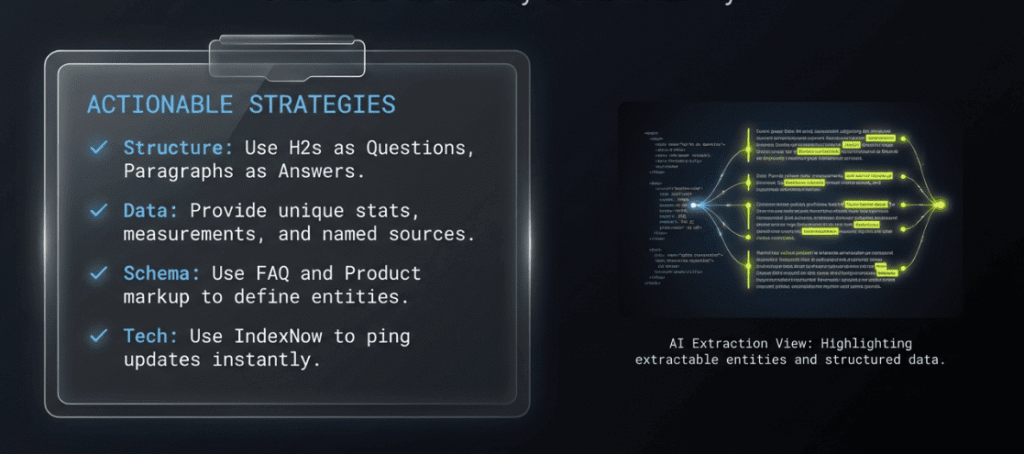
Back your claims with numbers, measurements, and named sources. Reference experts and link out to studies. Write statements that could hold up on their own as a standalone answer. Keep your terminology consistent throughout the page rather than swapping between synonyms.
One practical habit worth building: use IndexNow to notify Bing the moment you update a page. It is now the standard way to make sure Copilot is not pulling your outdated 2024 stats.
3. Technical Optimization
Schema markup is not optional at this point. Product, Review, FAQ, HowTo, and Local Business schemas all give AI surfaces a cleaner read of what your content is actually about. Use server-side rendering where possible, and double-check that your robots.txt file does not block AI crawlers.
Worth repeating because people get this wrong: GPTBot and Bingbot are separate directives. Blocking one does not affect the other. Building internal links that connect related content into topical clusters benefits both your Bing search engine ranking and your AI citation rates.
4. Topical Authority
AI systems do not cite just anyone. They cite sources they have already established trust in for a given subject. Deep topical coverage, strong backlinks, clear expert authorship signals, and consistently accurate content build that trust over time.
No workarounds here. Bing search performance in AI answers runs on the same signals that have always driven traditional ranking. The fundamentals still apply.
Analyzing Page-Level Citation Performance
This is where you get into the specifics: which pages the AI is actually drawing from and how regularly. No more guessing about what is working. The data tells you directly.
1. High Grounding, Low Visible Citation
Your content can shape an AI response without your site ever getting a name-check. It happens when the AI uses your page for background context rather than pulling a specific fact or direct claim. Your content did the work, but the user has no idea your brand was involved.
When you spot this in your page-level citation activity, the issue is almost always a lack of specificity. Broad, general content is easy for AI to absorb quietly and move on from.
What earns visible attribution is content that the AI cannot easily replace: original data, firsthand research, a genuine expert perspective. The harder your insight is to substitute, the more likely the AI is to name you as the source.
2. Indexed But Never Cited
Some pages sit in Bing’s index and never appear in citation activity at all. This pattern is frustrating and usually comes down to one of two causes. Either the page structure makes it difficult for AI to extract the content, or stronger sources on the same topic outrank it.
Three options worth considering. Rework the structure so the content is easier for AI to pull from. Fold it into an existing page that already carries authority. Or cut your losses and accept that the page is not delivering enough to justify further investment. Not everything needs saving.
3. Declining Citation Trends
A downward trend in visibility usually starts with freshness. AI systems consistently favor content that is current and accurate. A guide that was solid in early 2025 can get displaced by something more recently updated. A competitor may have simply published a better-organized piece on the same subject.
Treat these dips as signals worth acting on, not emergencies. They point you toward exactly where a freshness pass or a content expansion would make a real difference.
What Grounding Queries Reveal About AI’s Understanding
Grounding queries tell you how AI reads the purpose of your pages. If AI systems keep retrieving a product page for informational queries when it should signal buying intent, the content architecture is causing the problem. Adjusting a few keywords will not fix it.
Coverage gaps show up here, too. If you receive citations within a topic cluster but specific subtopics never appear, you either have not created that content yet or you structured it in a way that prevents the AI from extracting it easily.
Building a Prompt Research Strategy
Pull your grounding queries on a regular cadence and sort them by funnel stage and topic cluster. Over time, this becomes a practical prompt research library. Cross-reference it against what you are seeing from other AI tools and platforms. Spot the highest-volume themes and create content that addresses them directly. That is generative engine optimization working the way it is supposed to.
Troubleshooting Common AI Performance Issues
A dashboard showing little to no data is not a dead end. It is telling you something. Here is how to diagnose the most common problems.
1. Zero Citations Despite Quality Content
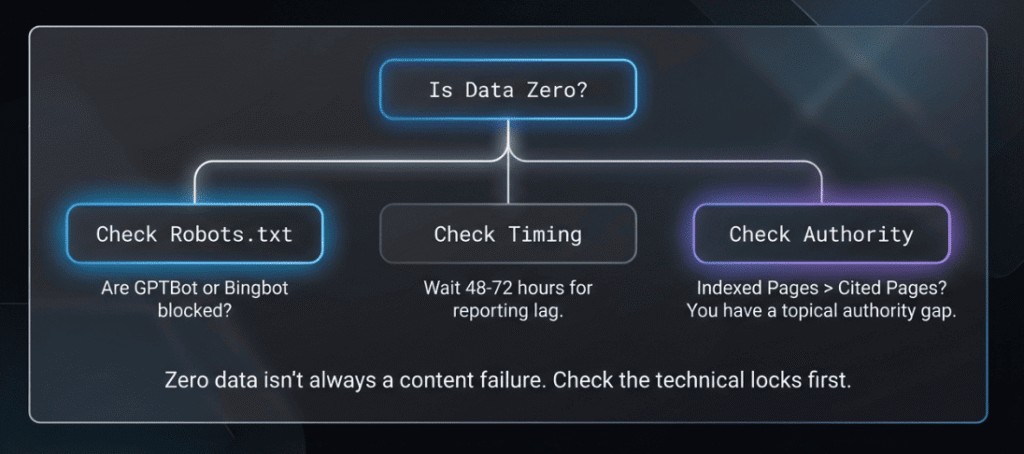
The first place to look is robots.txt. If you block GPTBot or Bingbot, the AI cannot access your content, and the report shows nothing. Worth remembering: these are separate directives, so blocking one has no effect on the other.
Next, factor in timing. The AI Performance report has a built-in 48 to 72 hour data lag. If you published something recently and it has not cleared the processing queue, it will not appear yet. Wait a few days before assuming something is wrong.
Then check whether your site is actually indexed in Bing. AI Performance in Bing Webmaster can only surface data for content that Bing has already crawled and indexed. Gaps in indexing mean gaps in citations.
2. Low Citations Relative to Indexed Pages
When a handful of pages are responsible for nearly all your citation activity, that usually points to a topical authority gap. The AI has built trust in your site around one or two subjects and is not extending that confidence to the rest of your content.
Tightening internal links between related pages gives the AI a clearer path to connect them. Layering in schema markup on underperforming pages helps signal what those pages are actually covering. Neither change is dramatic, but both tend to show up in better citation patterns over time.
3. Declining Performance Over Time
Before you start pulling things apart, consider whether the drop follows a predictable pattern. Some topics are naturally seasonal. Tax content slows in summer. Gift guide traffic spikes in November. Timing a decline against the calendar first saves a lot of unnecessary troubleshooting.
If seasonality does not explain it, focus on two areas: whether any technical changes went live around the time the decline started, and whether a competitor has recently refreshed their content on the same topics with a cleaner structure or more current data.
A drop in Bing search performance that lines up with a site update is almost always a technical problem. A slow, steady slide with no obvious trigger tends to mean competitive displacement.
Track My Visibility: Best Addition to Bing’s AI Performance
Bing Webmaster Tools covers Microsoft’s ecosystem, and that’s where its visibility ends. ChatGPT, Perplexity, Google AI Overviews, Gemini, none of that shows up here. For most sites, that blind spot accounts for 80-90% of total AI search activity.
Track My Visibility is a brand AI search visibility tool that monitors performance across multiple AI search platforms at the same time. It goes beyond Bing by tracking citations across platforms, identifying competitors that receive citations for your target topics, providing prominence indicators, and delivering prompt-level data that reflects how users actually search.
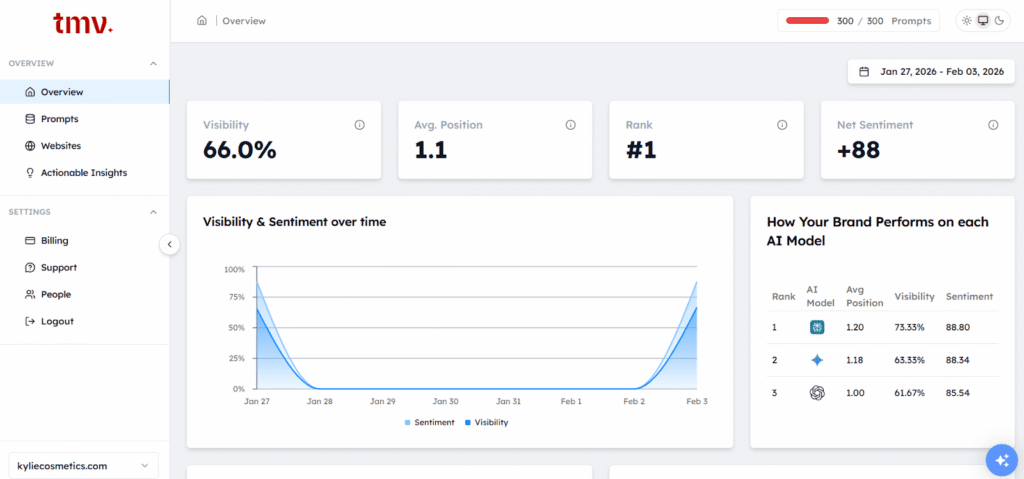
Here is what Track My Visibility actually measures and what each metric is telling you.
- Prompt-based AI Visibility Check: You pick the questions, either ones you write yourself or query sets built around real customer personas. The tool then runs those prompts and shows you whether AI models are pointing people to your brand or handing that visibility straight to a competitor. This is a solid early step toward understanding where you actually stand in AI search.
- Run Across AI Models: Your prompts get tested on ChatGPT, Google AI Overviews, Perplexity, and Gemini, all at once. So instead of manually checking each AI search platform, you get a side-by-side view of where your brand is showing up and where your competitor is taking your spot.
- Competitor AI Visibility: You can see which competitor pages are getting cited for the same topics you care about, and where they are showing up instead of you. Once you know that, building a plan to close those gaps becomes a lot easier.
- Brand Mentions Dashboard: All your citations, mentions, visibility by AI model, and competitor comparisons are available in one dashboard. The way content appears across platforms is clearly laid out, so you do not have to switch tools or manually pull data together.
- AI Readiness Score: Each page gets a score based on how likely AI search engines are to cite it. Things like clear headings and well-organized key information play a direct role in that score, indicating placement potential within AI-generated answers. It is a fast way to see which content AI already trusts and which pages are not quite there yet.
- AI-ready Recommendations: Rather than leaving you to figure out what to fix, the brand visibility tool gives you a prioritized list of specific things to act on. Such as, add this context, restructure this section, strengthen this signal. The goal is to improve clarity and structure so your team knows exactly what to work on next.
If generative engine optimization is part of your strategy, one platform’s data is not enough. Bing Webmaster Tools gives you the Microsoft slice. Track My Visibility fills in the rest.
How to Use Both AI Visibility Tools Together
- Start with Bing Webmaster Tools to get your citation baseline down. Before anything else, know which pages and content types are performing inside Microsoft’s ecosystem.
- Pull your grounding queries and sort them by funnel stage. These phrases become the core of your prompt research library and point directly to your strongest topic clusters.
- Once that foundation is in place, bring in Track My Visibility to see how those same pages and topics hold up on ChatGPT, Perplexity, and Google AI Overviews. This is where you can measure your full AI content visibility and spot platform-specific gaps that Bing data alone would never surface.
- Run a monthly check on your server logs for AI crawler activity. GPTBot, PerplexityBot, and ClaudeBot visits confirm that the citation activity you are seeing is actually driving real crawls, not just showing up as a number.
- Take your top grounding queries from Bing and manually search them in each AI platform. Check whether you appear, how prominently, and who else is showing up in the same responses.
- Pull everything into a single reporting view: Bing citation trends, Track My Visibility cross-platform data, and server log signals together. Weekly reviews catch sudden shifts; monthly reviews are for strategic decisions.
- One last pattern worth watching: a dip in Bing search performance data while Track My Visibility numbers stay flat almost always points to a Bing-specific technical issue. When both drop together, the problem is usually content quality or authority.
Key Takeaways and Action Plan
AI Performance in Bing Webmaster opens the first real door into AI visibility data, but it is one door in a much bigger building.
Get clear on the accuracy limitations before you put these numbers in front of anyone. Citations tell you how often you showed up, not how prominently, not whether anyone clicked, and certainly not whether it drove revenue. Content structure and topical authority are the levers you actually control. GEO extends SEO fundamentals. It does not overwrite them.
Combining Bing Webmaster Tools with Track My Visibility and server logs is the closest you will get to a complete picture of your AI visibility across search engines. No single tool gets you there alone.
That is where to begin.
FAQs
How do I optimize for Bing search?
Start with clean crawlability, schema markup, and quality backlinks. Bing search engine ranking responds to many of the same signals as Google, but with a stronger lean toward exact-match relevance and overall site authority. Comprehensive topical coverage helps too, the more depth you have on a subject, the more relevant information you’re giving both the search engine and its AI surfaces to work with.
What percent of searches are done on Bing?
According to Statcounter, Bing holds around 4.4% of the global search market share, but that headline number undersells the real picture. In desktop and corporate environments, that figure rises to somewhere between 10 and 15%. If your audience skews B2B, Bing’s footprint is probably larger than you are accounting for.
Does Bing have AI results?
Yes. Copilot is built directly into Bing’s search results, sitting alongside traditional blue link listings. Bing search performance now spans both dimensions: where your pages rank and how often your content gets pulled into AI-generated answers. As these AI-driven experiences take up more of the results page, keeping an eye on both signals makes practical sense.
Is Bing Webmaster Tools free?
Completely. No paid plan, no premium tier, no upgrade prompt. Every core feature, including AI Performance in Bing Webmaster, is accessible to any verified site owner at no charge.
Is Bing Webmaster Tools legit?
Yes. It is Microsoft’s own platform for site owners to monitor and manage their presence in Bing. The data comes from real citation events, though it carries the sampling and aggregation caveats covered earlier in this guide.
Bing respects publisher content and content owner preferences. The platform respects supported control mechanisms, such as robots.txt directives, and reflects those settings directly in its reports.
What is Bing Webmaster used for?
It covers crawl health, search performance, index status, and now AI citation tracking through the AI Performance dashboard. The newer AI Performance section shows how your content feeds supported AI experiences across Microsoft’s ecosystem. It highlights which pages receive citations, tracks how citation patterns change over time, and reveals the topics the AI associates with your site.
How much does Bing Webmaster Tools cost?
Nothing. It is free for any verified site owner






Post a Comment
Got a question? Have a feedback? Please feel free to leave your ideas, opinions, and questions in the comments section of our post! ❤️