


In this post, I will be guiding you to enable Two-Factor Authentication (2FA) in the Magento 2.3.x version.
The advantage of 2FA:
- Higher security for your Magento 2 Admin
- Lower the risk of a data breach.
- Give your store more value.
Let’s do it
Introduction
A user-friendly two-factor authentication was invented and patented by Indian origin: BHASKAR RAGHAV [IN] and KUNAL SHARMA [IN] for the Google Authenticator app. It is the most accepted concept today. Many mobile apps and websites are using it.
TOTP or time-based one-time password, is used by Google Authenticator, which keeps changing the password every 30 seconds. Two users can’t have the same password, and it is generated randomly.
2FA extension comes pre-installed by the latest Magento 2.3 is built by the MSP team. It is necessary that everyone must enable this out-of-box feature in the M2 Webstore and other login accounts.
How to
Register device with the Magento 2FA login
- Login to your Magento 2 Store admin
- On left hand side, click on Stores > Configuration link
- On the configuration page, browse to the SECURITY > 2FA.
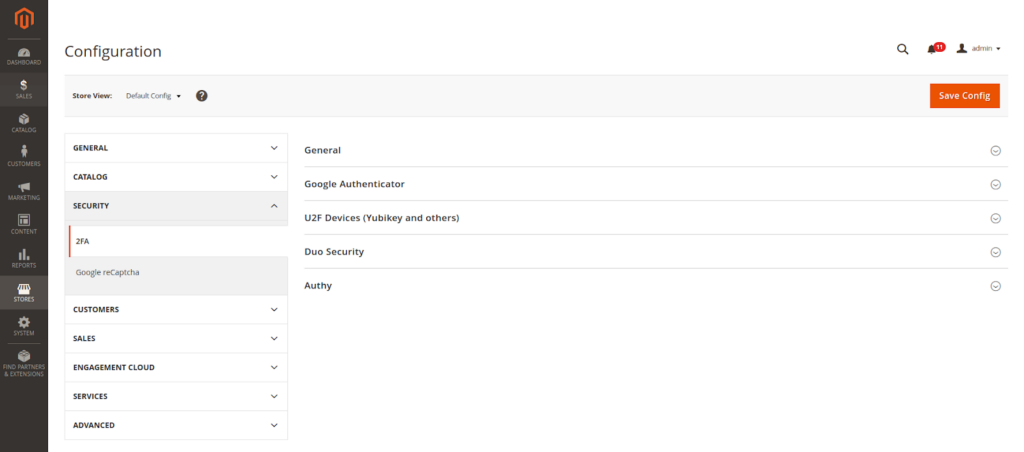
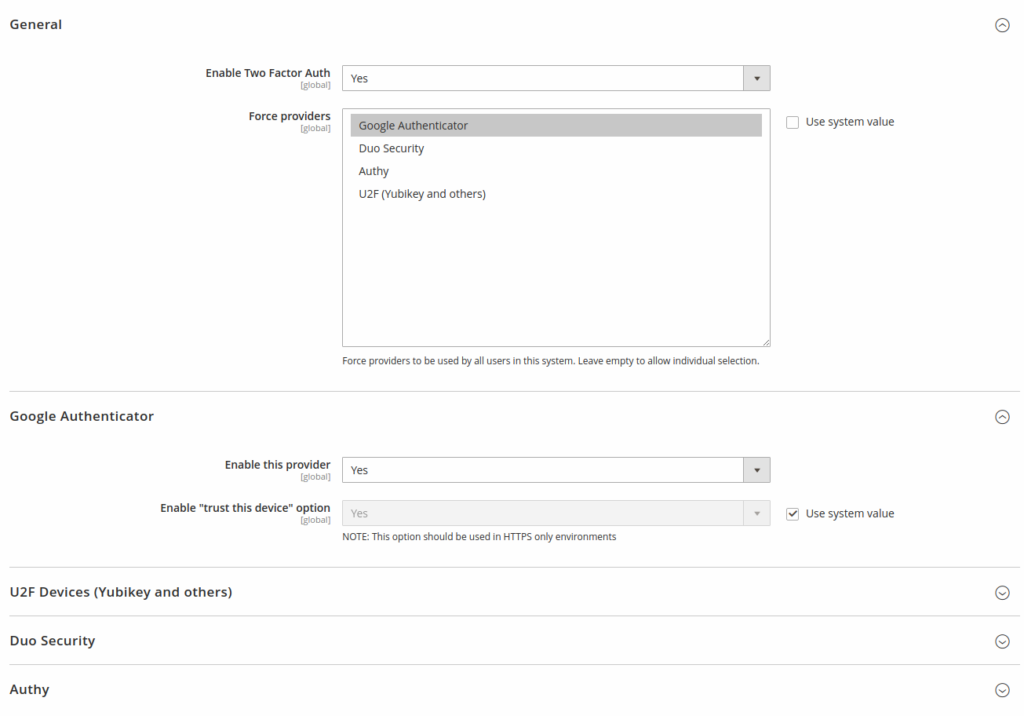
- Enable the 2FA service of the one of the providers you frequently use. Like I have enabled Google Authenticator.
- To force all users to use 2FA you must uncheck the “Use system value” of Force providers field and select the Google Authenticator.
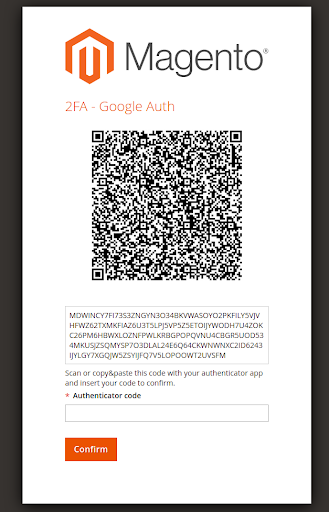
- After I have enabled the 2FA of Google Authenticator then admin will be logout and QR code scan page will be required to register your device.
- On success I will be redirected to the Magento 2 Admin dashboard page.
- Now my device is registered for 2FA and feels safer now.
Login admin after Magento 2FA setup
- When you visit the Admin login, you will be asked for username & password.
- After the login success, you will be asked for the 6 digit number password from the Google Authenticator app.
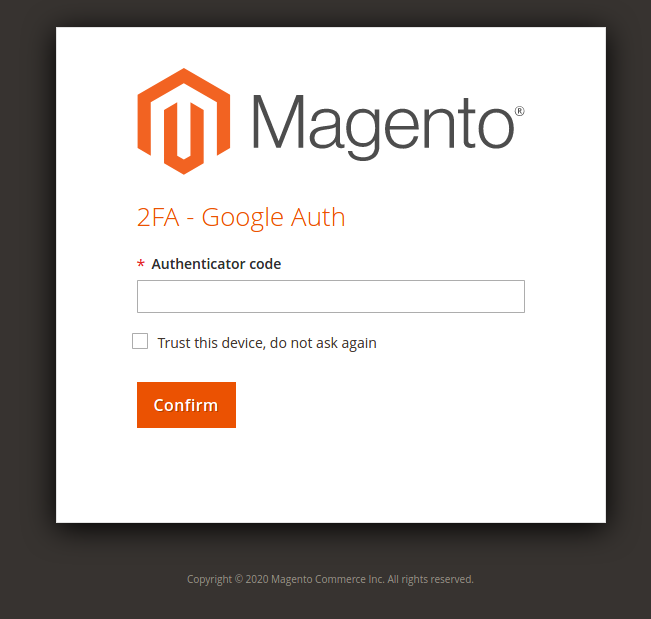
- Submit the correct 2FA code & you are logged in the Magento 2 admin.
- Now you can do your admin things.
Multiple Factor Authentication Setup in 2FA
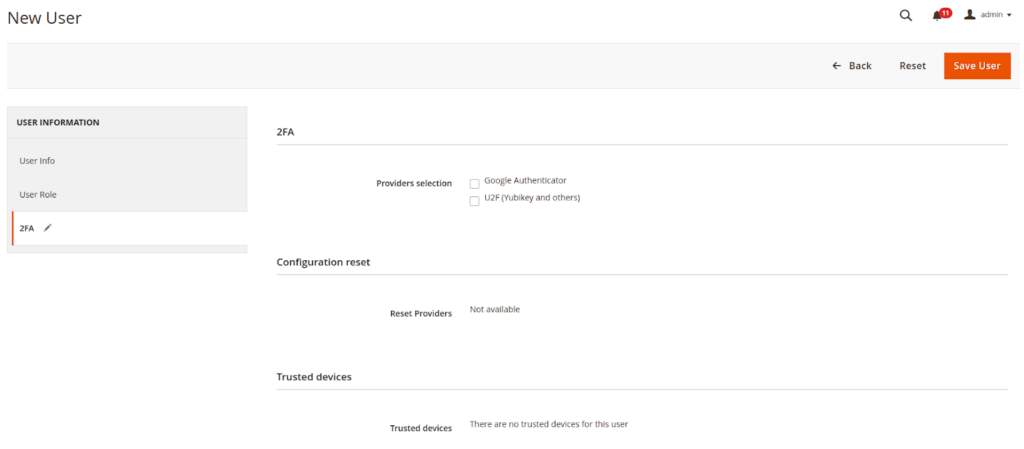
Surprisingly you can assign users their 2FA app preferences like Google Authenticator, Duo Security, Authy and U2F Devices (Yubikey and others).
Note: For this “Force providers” must check(✔) the “use system value” in the 2FA configuration page.

For that here is the real-world use case:
| User | Authenticator provider |
| Main admin | Google Authenticator |
| Shipper | Authy |
| Inventory users | Duo Security |
| Managers and Marketing users | U2F USB Authentication device |
Disabled the 2FA code in the emergency
- You can disable the 2FA by below command:
php bin/magento msp:security:tfa:disable - Once you have deployed, tested or done admin operations then you re-enable the 2FA from the admin.
Advantages
- Your store is more secure from the hackers who are trying to steal sensitive data.
- You can assign multiple authentication providers for each user.
Disadvantages
- 1 extra step is required to pass for Admin access






Post a Comment
Got a question? Have a feedback? Please feel free to leave your ideas, opinions, and questions in the comments section of our post! ❤️