


If you’re looking to setup free shipping in Magento 2, you’ll find the process straightforward and highly effective.
Free Shipping is one of the programs you can set up on Magento 2, so customers don’t need to pay any fee for the delivery. Free shipping makes them feel more comfortable, and this is one marketing strategy that can encourage them to purchase more.
In this process, you set the conditions in the Magento 2 Shopping Cart Rule settings, and the system applies Free Shipping to any order that meets them.
1 Step: Activate Free Shipping
- On the Admin Panel go to Stores > Settings > Configuration > Sales > Shipping Methods.
- Open the Free Shipping section and follow the steps given below:
- Enable the Free Shipping by choosing Yes.
- Add the Title.
- Enter the Method Name to make clear about the shipping method. For free shipping, type Free in the box.
- Offer the Minimum Order Amount for the shipping.
- Enter an error message in the Displayed Error Message box that will appear if Free Shipping is not available.
- The Ship to Applicable Countries can be set to either of the two options:
- All Allowed Countries: Free Shipping is supported for all the countries.
- Specific Countries: Free Shipping is only supported for selected countries.
- Set Show Method if Not Applicable to Yes if you want to show Free Shipping all the time.
- Set the Sort Order on the Shipping Method on the checkout page.
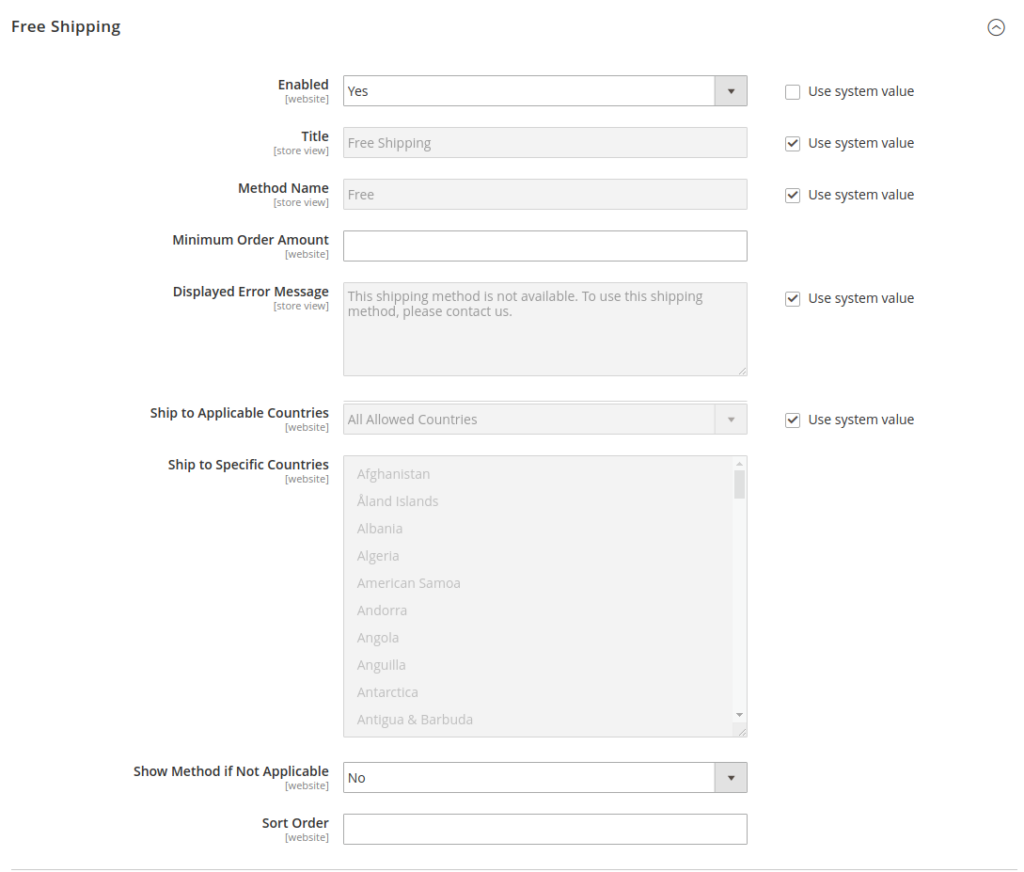
2 Step: Activate Free Shipping in the Carrier Configuration
- On the Admin Panel go to Stores > Settings > Configuration > Sales > Shipping Methods > UPS.
- Set Free Method to “Ground.”
- Enable the Free Shipping with Minimum Order Amount to the minimum amount of purchase for which free shipping is applicable in the Minimum Order Amount for Free Shipping field.
3 Step: Set a Shopping Cart Price Rule
On the Admin Panel Go to Marketing > Promotions > Cart Price Rules.
Apply Free Shipping for Any Order
- In the Rule Information tab:
- Set Name for the new rule and leave some descriptions of that.
- Assign to the Website and Customer Group
- Set Status to Active for which the rule is applied.
- Set Coupon to No Coupon if shipping promotion is offered without any coupons.
- In the Actions tab, open Pricing Structure Rules section:
- Set Apply to Percent of product price discount
- Set Apply to Shipping Amount to Yes
- Set Free Shipping to For shipment with matching items.
- In the Labels tab.
- Under the Default Label section, insert the text in the Default Rule Label for All Store Views.
- Under the Store View Specific Labels set the label for each store view.
4 Step: Check the Rule
Afterward, test the rule right away to make sure it works perfectly.
Setting up free shipping in Magento 2 is pretty straightforward once you dial in the right configs. You activate the method, set carrier options, then lock in a cart price rule to trigger it cleanly.
As a result, this approach reduces checkout friction and boosts conversions, and this workflow lets you setup free shipping in Magento 2 fast.
Thank you for reading this blog. Please share your thoughts below, and if you require assistance with your Magento store development, our team is here to help
Thanks for checking out this blog. Ultimately, share your thoughts below, and reach out anytime if you need help with your Magento store development—our team has your back.






Post a Comment
Got a question? Have a feedback? Please feel free to leave your ideas, opinions, and questions in the comments section of our post! ❤️