

In this hack of Magento web development, we will be guiding you on how to add a custom button in the admin product UI-component form in Magento 2.
Here we will be using Aureatelabs as the Vendor name and CustomButton as the name of the module. You can change this according to your Vendor and Module name.
The product form is generated via UI-Components.
To begin with, you have to create a product_form.xml file in app/code/Aureatelabs/CustomButton/view/adminhtml/ui_component directory
<?xml version="1.0" encoding="UTF-8"?>
<form xmlns:xsi="http://www.w3.org/2001/XMLSchema-instance"   xsi:noNamespaceSchemaLocation="urn:magento:module:Magento_Ui:etc/ui_configuration.xsd">
   <!--For custom button-->
   <argument name="data" xsi:type="array">
       <item name="buttons" xsi:type="array">
           <item name="customButton" xsi:type="string">Aureatelabs\CustomButton\Block\Adminhtml\Product\Edit\Button\CustomButton</item>
       </item>
   </argument>
</form>
Next, you have to create a CustomButton.php file in app/code/Aureatelabs/CustomButton/Block/Adminhtml/Product/Edit/Button directory
<?php
namespace Aureatelabs\CustomButton\Block\Adminhtml\Product\Edit\Button;

class CustomButton extends \Magento\Catalog\Block\Adminhtml\Product\Edit\Button\Generic
{
	public function getButtonData()
	{
    	return [
        	'label' => __('Custom Button'),
        	'class' => 'action-secondary',
        	'on_click' => 'alert("Hello World")',
        	'sort_order' => 10
    	];
	}
}
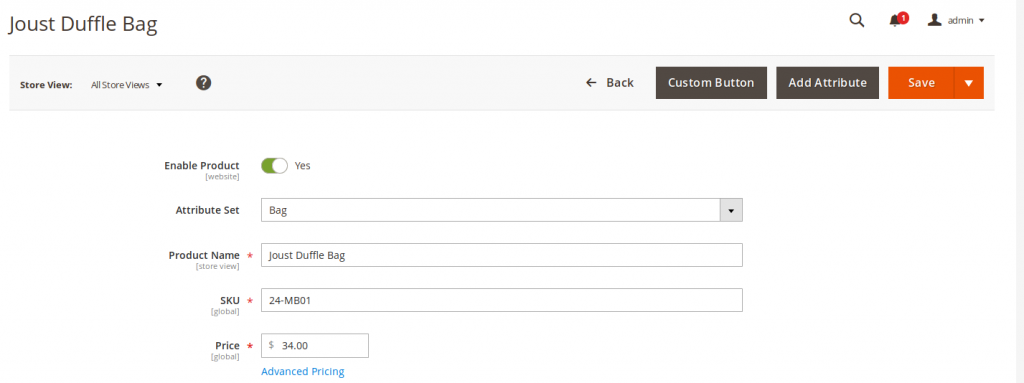
After this, flush the cache and open the product admin UI-component form. Now, you can see the custom button on the product admin form.
Related sources
Conclusion
That’s the straight path to add a custom button in the admin product UI-component form and keep your Magento workflow clean. Once the module files are in place and the cache is flushed, the new button fires instantly. Simple, stable, and easy to extend for future admin actions.






can you please tell how to send data to controller after clicking this custom button?