

How to Tell a Brand Story Using Amazon A+ Content Modules

You’ve probably heard that Amazon A+ Content can lift sales. Amazon’s own data puts that number at 8% on average, and Premium A+ modules increase lift for brands that use them well.
So why are so many brand-registered sellers still leaving that on the table?
Most of them have A+ content live. They’ve uploaded images, filled in the text boxes, and moved on. The result is a detail page that looks slightly better than a plain product description, but does nothing to make a buyer trust the brand behind it. There’s no story. No reason to stay. No reason to choose you over the next listing.
If you’re a brand-registered Amazon seller or a private label brand owner, that’s exactly what this guide is here to fix. Because the problem usually isn’t your product. It’s that your listing reads like a spec sheet when it should read like a brand.
In this guide, we’ll walk you through how to use Amazon A+ Content modules strategically to build trust and drive conversions on your detail page.
In this guide, you’ll also learn:
- What Amazon A+ Content actually is, and how it differs from Brand Story
- Why your brand story section is doing more work than you think
- The 14 key Amazon A+ Content modules and what each one is built for
- A 7-step narrative arc to structure your Brand Story like a real story
- How to measure whether your content is actually working
Key Takeaways (TL;DR)
- Amazon A+ Content lives in the product description area and is product-focused. Brand Story lives above it in a dedicated “From the brand” section; they serve different purposes.
- Brand Story isn’t just cosmetic; it pushes competitor recommendations down the page and is required to access Premium A+ Content.
- There are 14 different Amazon A+ modules you can work with to drive sales.
- Structure your Brand Story like a narrative: hook, purpose, proof, and invitation, not just a list of features.
- Alt text on every image matters for search results visibility, so don’t skip it.
What is Amazon A+ Content?
Amazon A+ Content, previously called Enhanced Brand Content for third-party sellers, is the section that replaces the plain product description on your detail page. It is where you use images, videos, text, comparison charts, and lifestyle visuals to show what your product does and why it’s worth buying.
If these are used well, they can genuinely elevate how buyers perceive your brand before they even read a single review.
Brand story is different. It appears in a separate dedicated section labeled “From the brand,” sitting above your A+ modules on desktop. It’s not about the product; it’s about the brand behind it. Who you are, what you stand for, and what else you sell.
The most common mistake sellers make is treating these two as the same thing. They copy product features into Brand Story or use it as overflow space for more specs. That wastes the real estate entirely. Before building anything new, audit your existing content, as most sellers are surprised by how much is already there and how little of it is actually working.
Both are free with Brand Registry enrollment. A+ Content can be created by navigating to the A+ Content Manager in Seller Central.
If you want a fuller breakdown of eligibility and content types, our Amazon A+ Content guide for sellers covers all of it in detail.
💡 Pro Tip: Applying A+ Content to just your hero ASIN won’t cut it. Premium A+ with videos, hotspots, and carousels requires a Brand Story live across your entire catalog. New to Amazon? Our beginner’s guide to selling on Amazon shows you how it all connects.
Why Your Brand Storytelling Matters on Amazon
Using Amazon A+ Content can help drive brand awareness and encourage repeat purchases.
Here’s something worth knowing:
It takes 5 to 7 brand impressions before a buyer actually remembers who you are. On Amazon, you get very few chances at those impressions. Brand Story is one of them.
“Most brands are missing the aspect of building trust. If you want to sell somebody in person, you have to establish a connection and build trust before asking for the sale. Same with selling online. You want to show happy customers, reviews, press releases, and authority people vouching for your product.”
— Karl Weische, conversion rate optimization expert, via Startup Hustle podcast
When a buyer is scrolling through your Brand Story carousel, they’re not seeing the “Customers also viewed” section that shows your competitors’ products. That section gets pushed further down the page. That alone is a reason to take Brand Story seriously.
There’s also the Premium A+ unlock. If Brand Story is live across all your ASINs and you have 5 approved A+ projects in the last 12 months, you become eligible for Premium A+ Content, which includes videos, interactive hotspot modules, and clickable carousels, at no added cost. Most sellers don’t realize this is gated behind Brand Story completion.
And then there’s upselling. The ASIN showcase module inside Brand Story lets buyers browse your other products without leaving the current detail page. That’s a real opportunity to increase order value from a buyer who’s already convinced enough to be on your page. Upselling existing customers costs 68% less than acquiring new ones and can increase revenue by 10 to 30% (CX Today).
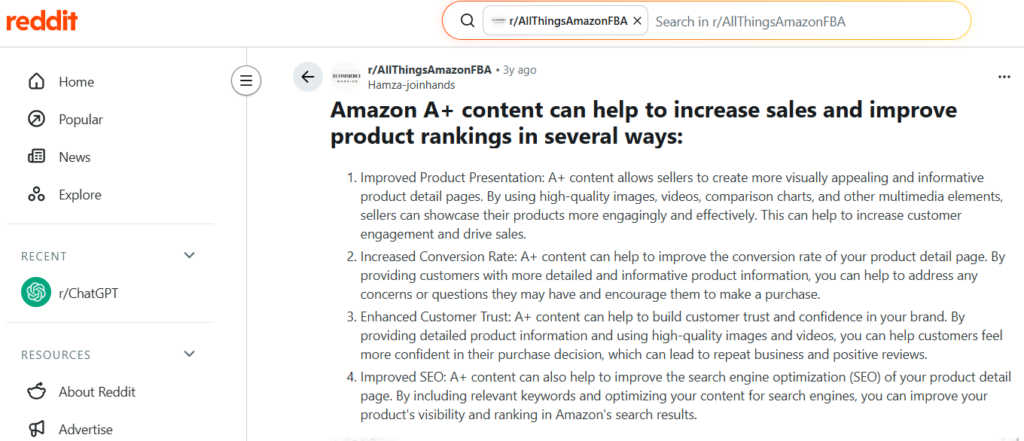
A user mentioned on Reddit that Amazon A+ Content can help increase sales and improve product rankings in several ways, from improved product presentation and higher conversion rates to better customer trust and stronger SEO on the detail page. And from what we see working with brands every day, that tracks.
What are the Different Amazon A+ Content Modules
When you open the A+ Content builder in Seller Central, you’ll find 14 standard modules to work with. For Brand Story specifically, you can add up to five modules alongside the mandatory Carousel Background to build out your narrative.
Each one is built for a different job on your detail page. The variety of layouts means you’re not locked into one visual style. You can mix and match based on what your brand story actually needs.
Here’s what each module is and how you can use it to tell your brand story, not just list product information.
1. Single Image & Sidebar
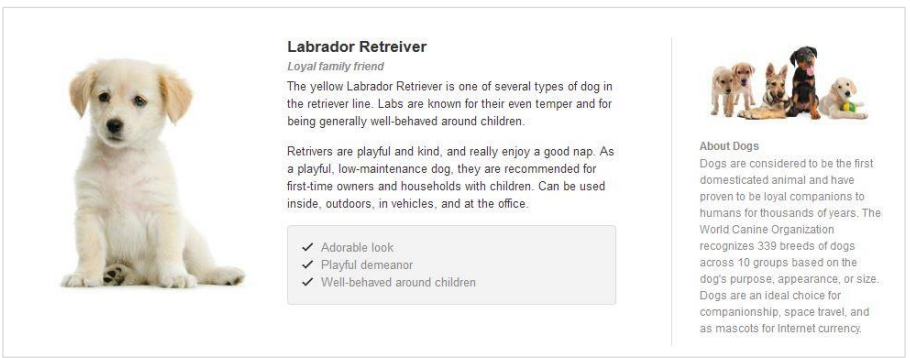
This module gives you a 300x400px image on one side and a sidebar with its own headline, body text, and bullet points on the other. Two content areas, one module.
Use this when you have a strong product visual that needs context. The sidebar is a good place to list what makes your brand different: short, punchy lines that a buyer can scan in seconds.
You can also pair this module with your brand logo to reinforce recognition right alongside the copy.
2. Single Left Image

A 300x300px image on the left with an optional headline and body text on the right. Simple and clean.
Use this for a focused brand moment. You can add a founder photo with a short origin story, or a manufacturing image with one line explaining your process. The simplicity is the point. Sometimes one image and two sentences say more than a module packed with content.
3. Single Right Image

Same as Single Left Image, but the image sits on the right with text on the left.
The layout change is worth using intentionally. Alternating between Single Left and Single Right as you build out your A+ content creates visual rhythm down the page. It keeps buyers scrolling instead of feeling like they’re reading the same block on repeat.
Single Left Image and Single Right Image are essentially image-only modules with optional text. They are the cleanest option when the visual alone is strong enough to carry the message.
4. Four Images & Text
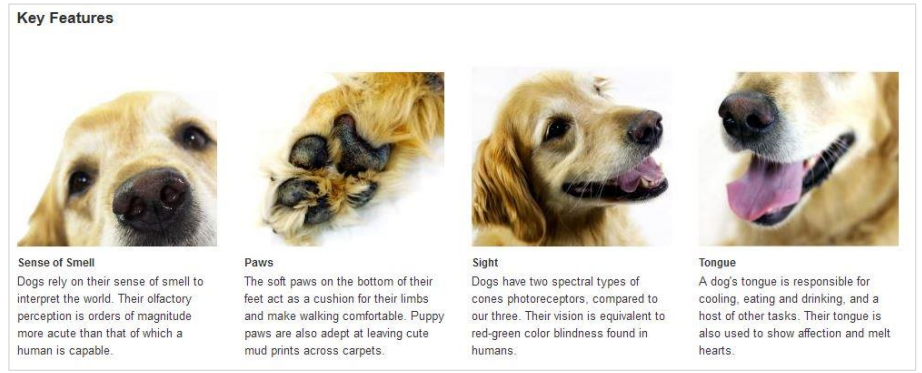
Four 200x200px images, each with a headline and body text underneath. Clean, scannable, and built for showing range quickly.
Use this to highlight your key brand values or differentiators, not product features, but the reasons someone should choose your brand. Each image slot is one reason. A manufacturing standard, a material choice, a community commitment.
Buyers scan this module fast, so each headline should carry the point on its own, even if they skip the body text.
5. Comparison Chart
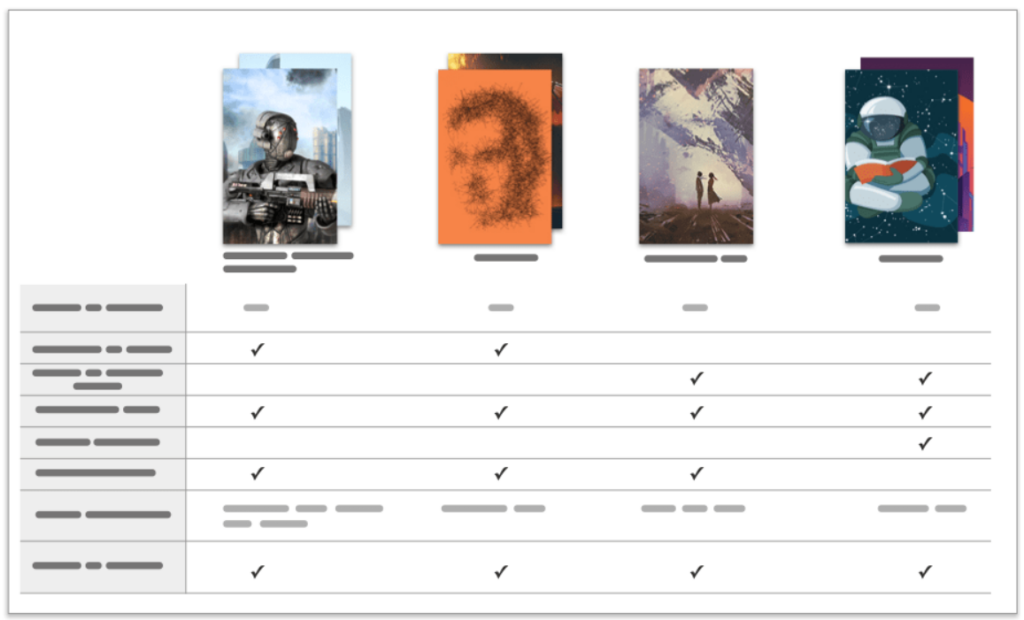
Up to 6 columns, each with a product title, optional image, and customizable comparison metrics across rows.
Most sellers use this to compare product variants. For brand story purposes, consider using it differently: compare your product against the generic category alternative, and show clearly where you win.
Help the buyer decide without leaving the detail page. The faster they can see why your product is the right choice, the less likely they are to go back to search results, find a competitor, or browse a different Amazon store altogether.
At that point, the only thing left for them to do is click Add to Cart. Not using the Comparison Chart this way is one of the common Amazon seller mistakes that quietly costs brands conversions every day.
6. Four Image Highlights

A primary 400x400px image paired with smaller supporting images, each with an optional caption. The primary slot supports larger images, which makes it a good place to lead with your strongest visual.
This works well for showing your product in multiple real-life contexts. A skincare brand could show morning routine, travel kit, gifting, and sensitive skin use, for four different buyers, in one module. It answers the question “Is this for someone like me?” without the buyer having to ask it.
7. Single Image & Specs Detail
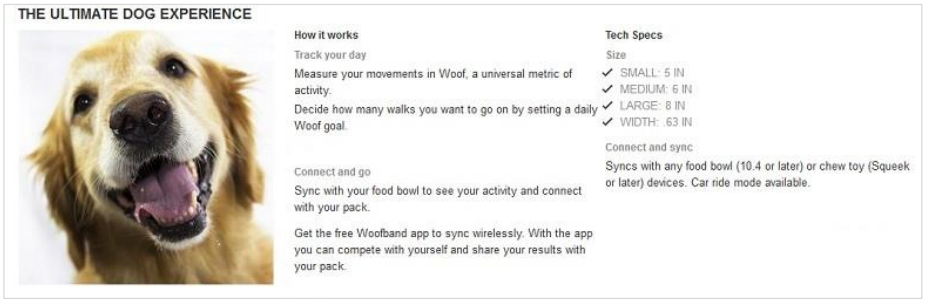
A 300x300px image alongside a structured layout with multiple subheadlines and body text sections.
This is where you build your brand trust with proof. Use it for certifications, quality claims, or any result your product consistently delivers. The format looks credible, which is exactly why it works for trust signals. “Third-party lab tested.” “ISO 9001 certified facility.” “Dermatologist reviewed.” One image that supports the claim visually, and the text that backs it up.
8. Single Image & Highlights

A 300x300px image with a headline, subheadlines, body text, and bullet points. More structured than the Single Left or Right Image modules.
Use this to introduce your brand purpose in more detail. What problem does your brand exist to solve? The image should show the brand in context, a founder, a process, a lifestyle moment, while the structured text tells the short version of your origin story. Specific details work here.
For example, “Started by a physiotherapist who couldn’t find a product that actually worked” is more memorable than “passionate about quality.”
9. Three Images & Text
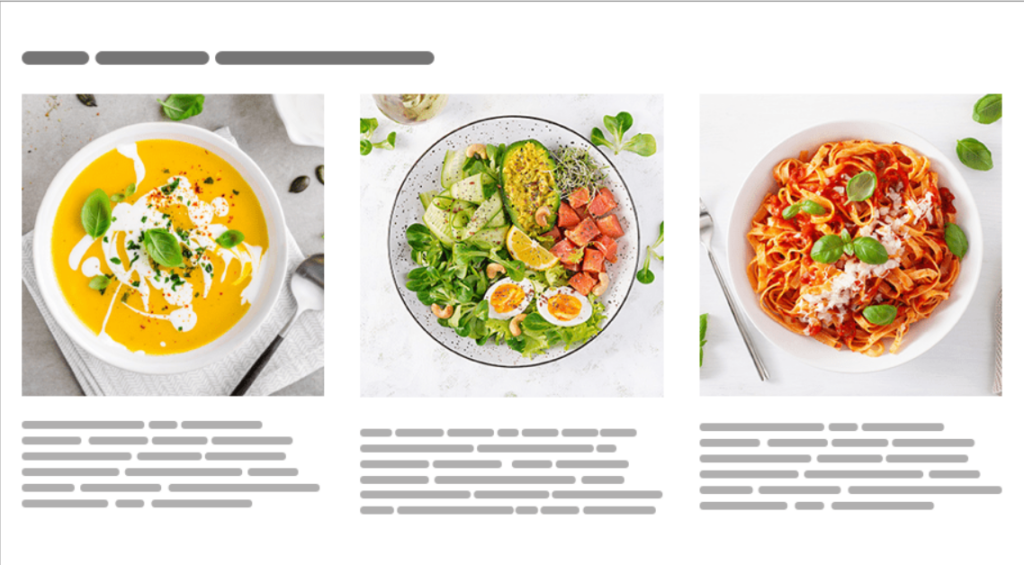
Three 300x300px images, each with its own headline and body text. A module-level headline ties them together.
Use this to walk buyers through your brand’s core pillars, three things that define who you are. Sourcing, craftsmanship, and community. Design, durability, and sustainability.
Whatever your brand’s three pillars are, this module frames them visually and gives each one room to breathe. It reads like a brand manifesto without feeling like one.
10. Four Images / Text Quadrant
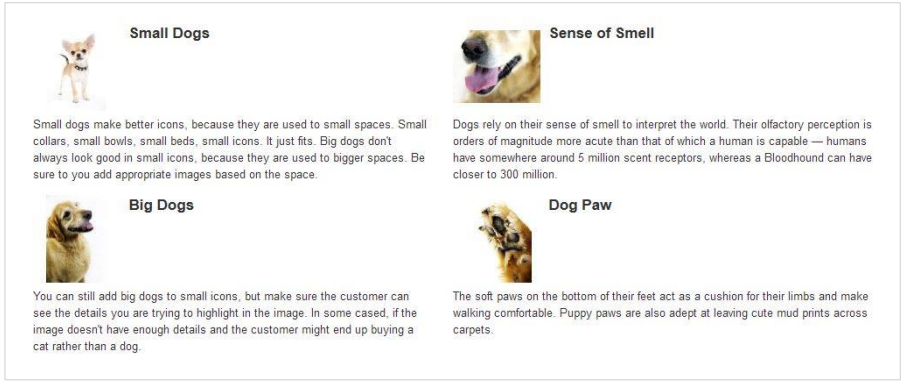
Four 135x135px images arranged in a grid, each with a required headline and body text. Compact and structured.
This is a good module for giving customers a quick overview of your product range or use cases. Four small images with sharp headlines can cover a lot of ground fast. It works well for brands with a clear family of products that solve related problems.
11. Image & Dark Text Overlay

A full-width 970x300px image with dark text sitting directly on top of it.
You can use this as your opening hook. On desktop, this module is displayed at full width, making it the most visually dominant element in your entire A+ section.
A+ Content is automatically optimized for mobile viewing, so mobile shoppers get a clean version too. It’s still worth previewing your overlay modules on mobile before submitting, since tight text can get cut off on smaller screens.
You can add a strong lifestyle image with your brand tagline or a single outcome-focused line.
Choose this version when your background image is light enough for dark text to read clearly against it.
12. Image & Light Text Overlay
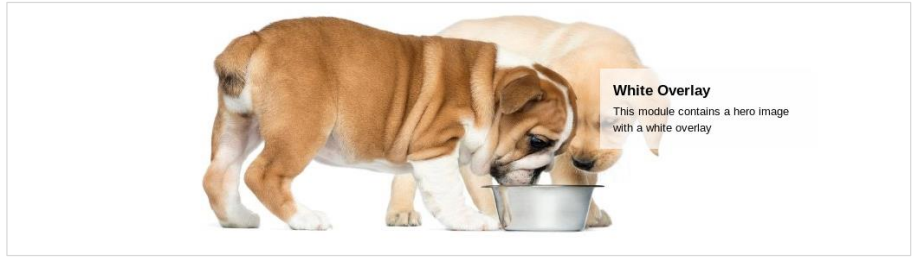
Same format as Image & Dark Text Overlay, but with light text on top.
Use this when your background image is darker in tone. The same storytelling logic applies: one image, one line, one impression. These two overlay modules are your banner options, and they’re the strongest visual statement Amazon A+ Content gives you within the standard module set.
13. All Text
No images. Just a headline and body text.
It supports rich text formatting, so you can bold key lines or break up the copy to make it easier to read.
This one gets overlooked because it feels plain. It’s actually useful for the moments in your brand story where the writing should speak for itself. Here you can create content related to the mission statement, a founder’s note, and a short explanation of why you do things differently.
Used sparingly, a text-only block creates contrast against all the imagery around it and makes buyers actually read it.
14. Technical Specifications
A structured table with a headline and up to 16 specification name-definition pairs.
This module sits at the end of the storytelling arc for a reason. Once a buyer is sold on your brand, they want the facts. Dimensions, materials, compatibility, certifications, all in one clean table.
It answers the last set of questions before someone adds to the cart, and it removes any lingering doubt about whether the product is the right fit.
How to Structure a Brand Story in A+ Content
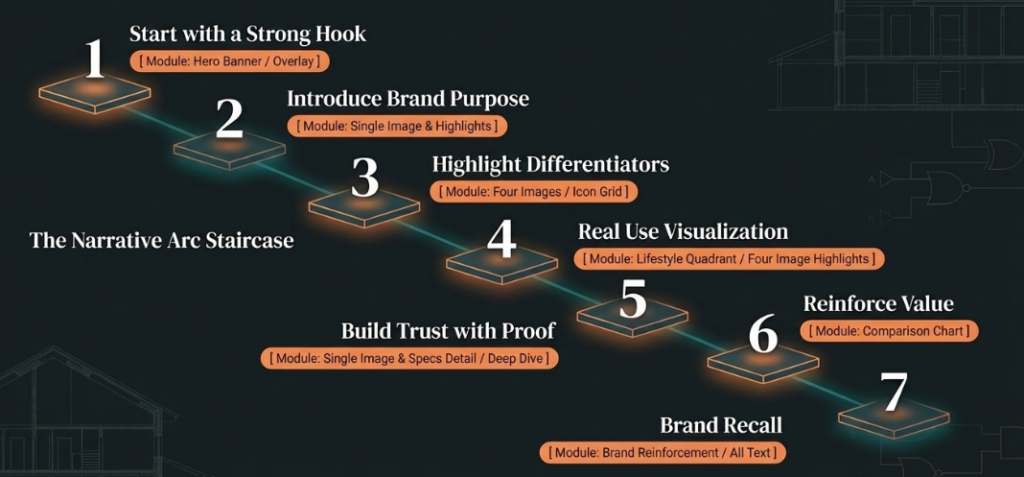
Now that you know different A+ content modules, it’s time to understand how to sequence them into something that actually reads like a story. Here’s a 7-step narrative arc that works. Use it as a template for sequencing your modules so your listing has a beginning, a middle, and an end.
1. Start with a Strong Hook
Your first visual needs to answer one question: why this brand? Lead with a bold headline and a lifestyle image focused on outcome, not product specs. You have about two seconds to earn the scroll.
2. Introduce the Brand Purpose
What problem does your brand exist to solve? Why was it created? Keep this short and specific. A founder’s name, a year, a clear problem. These details make a brand feel real instead of manufactured.
A good real-world example of origin-led brand storytelling is how Stanley does it on Amazon. Their A+ Content consistently leads with brand identity before product details.
3. Highlight What Makes You Different
Don’t list your brand’s features here. Translate them into benefits and show what separates you from every other option in your category. Visual cues like icons help buyers scan this quickly.
4. Show the Product in Real Use
Lifestyle images outperform plain product shots every time. Show the product being used by a real person in a real context. Help the buyer visualize themselves using it. The more engaging and relatable the scenario, the longer a buyer stays on the page.
5. Build Trust with Proof
Certifications, quality claims, review highlights, or any data-backed result your product has produced. This is where the Brand Focus Image module earns its place. One strong claim, shown visually, builds more trust than five weak ones.
6. Use Comparison to Reinforce Value
Help buyers make a decision faster by showing how your product compares, either to your own product range or to generic alternatives. Position clearly. Don’t make them work for the answer.
7. End with a Clear Brand Recall Section
The last thing a buyer sees in your Brand Story should reinforce who you are. Consistent colors, fonts, and tone. Leave them with a strong final impression of the brand, not just the product. Amazon A+ Content helps create a consistent user experience, which can increase customer loyalty. This last module is where that consistency either lands or falls apart.
It can be difficult to map out this narrative and get the module sequence right on the first try, and that’s completely normal.
At Aureate Labs, we build and optimize A+ content for eCommerce brands specifically to improve visibility and drive more revenue from their detail pages, not just make them look better.
How to Measure the Impact of Your A+ Content
Once your Amazon A+ content is live, track these four things:
- Conversion rate: You can track this on the ASIN before and after publishing, as this is the clearest signal.
- Time spent on the product page: longer dwell time usually means the content is doing its job.
- Return rates: better expectation-setting through accurate images and text leads to fewer returns.
- A/B testing: if you have access to Manage Your Experiments in Seller Central, test two versions of your A+ layout against each other and let the data decide.
Give it at least 4 to 6 weeks before concluding. Traffic volume affects how quickly the data becomes reliable. Also, keep in mind that Amazon typically takes up to seven business days to approve and publish A+ Content after submission.
Final Thought
Most sellers treat Amazon A+ Content as a box to check. Upload some images, fill the text fields, and move on. But as this guide shows, that approach leaves real money on the table, both the 8% average sales lift Amazon cites and the trust that turns a first-time buyer into a repeat customer.
Your detail page isn’t just a product listing. It’s the one place on Amazon where you fully control the narrative. When you use that space like a story, with a hook, a clear purpose, proof that backs it up, and a reason to remember you, your A+ Content stops being decoration and starts doing real conversion work.
If you’re not sure whether your current content is pulling its weight, our team at Aureate Labs audits and rebuilds A+ Content specifically to drive revenue, not just improve appearances. Get in touch with us today!
The brands winning on Amazon aren’t just selling better products. They’re telling better stories.
FAQs
What is an example of content in Amazon A+?
A good Amazon A+ content example includes a lifestyle hero image showing the product in use, a feature breakdown using images and text modules, a product comparison chart against your own range, and a Brand Story carousel that introduces who you are. Brands in the beauty, health, and home categories tend to have strong content examples worth studying.
How much does A+ content cost on Amazon?
Standard Amazon A+ Content is free for brand-registered sellers. Premium A+ Content, which includes videos, interactive hotspots, and clickable carousels, is also free once you meet eligibility requirements: Brand Story live across your catalog and 5 approved A+ projects in the past 12 months.
Is Amazon A+ content worth it?
Yes, if you do it intentionally. Amazon’s own data shows that A+ content increases sales by an average of 8%, and that figure improves when the content is structured around a clear brand narrative rather than just product specs. For private label brands competing against generic listings, it’s one of the most effective tools on the detail page.
Resources:






Post a Comment
Got a question? Have a feedback? Please feel free to leave your ideas, opinions, and questions in the comments section of our post! ❤️