

Amazon PPC audit: 20 reasons your ad spend isn’t converting

Your ad spend keeps climbing. Sales are flat. ACOS is creeping up every month, and you can’t point to a single thing that broke.
That’s how Amazon PPC usually goes. Accounts rarely fail in obvious ways. They leak slowly through a dozen small problems that each look fine on their own but add up to thousands in wasted spending.
This 20-point Amazon PPC audit checklist helps you find those leaks before they drain more profit. Run through it point by point, and you’ll surface the issues holding your performance back every month.
Let’s find where your money isn’t converting.
TL;DR
- Amazon PPC waste often comes from small issues across campaign structure, targeting, bidding, budgets, and listings.
- Separate branded, generic, and competitor traffic so performance is easier to measure and optimize.
- Regularly review keywords, search terms, bids, placements, and budgets to reduce wasted ad spend.
- Strong PPC performance also depends on conversion-ready listings, adequate inventory, and realistic ACoS targets.
- Evaluate ACoS, TACoS, total sales, seasonality, and testing together to make better PPC decisions.
Who this Amazon ads audit is for (and how to use it)
This audit is built for sellers who are spending so much that waste actually shows up on the bottom line. As a rough line, if you’re putting more than $2,000 a month into Amazon ads, the problems below are costing you real money.
It fits three situations especially well:
- Ad spend keeps rising, but sales are not following.
- ROAS is getting weaker, and the cause is unclear.
- Reports show numbers, but not where the budget is leaking.
It works whether you manage ads yourself, have an in-house person, or use an agency.
New to Amazon advertising?
Start with our beginner’s guide to Amazon PPC before running this audit.
How to use this 20-point checklist for campaign structure
Set aside 60 to 90 minutes with your campaign manager and a search term report from the last 60 days. Run the full audit once a quarter and the quick check monthly.
Score each of the 20 points using a simple three-tier rating:
- Green: Handled well, no action needed.
- Yellow: Working but leaking some efficiency. Worth fixing soon.
- Red: Actively costing you money. Fix this week.
At the end, count your points to get an overall account health score. The PDF version has a printable scoring sheet so you can track it over time.
A quick 10-minute Amazon account audit
Before the deep audit, run this quick check. If everything here is clean, your account is likely in good shape, and this full 20-point audit can help you surface the issue even further before they grow more.
Step 1: Quick health check inside Campaign Manager
Open Campaign Manager, set the date range to the last 30 days, and look at four things:
- Target ACOS or ROAS gap: Compare your main campaigns with their targets. Flag anything that is more than 25% off.
- Profitable campaigns with limited budget: Look for campaigns that hit their daily cap but still beat the target ACOS.
- High-spend, low-return campaigns: Sort by spend, then check ACOS. The biggest budget drains should be reviewed first.
- Campaign purpose: Each major campaign should have a clear job. If the goal is not obvious, the structure needs work.
Step 2: When you need a complete audit
Move into the detailed audit below if any of these are true:
- More than 30% of your spend sits above your target ACOS.
- You have two or more underperforming campaigns in your top five by spend.
- You can’t clearly state the goal of your biggest campaigns.
If you saw any of these, keep reading. The 20-point audit checklist shows you exactly where the leaks are.
20 problems to check in your Amazon PPC account
If the quick audit showed any gaps, the actual problem is inside your campaigns. Here are the 20 issues to check in your Amazon PPC account.
1. Separate branded, generic, and competitor traffic into dedicated campaigns
This is the single most common issue we see, and the most expensive because it hides everything else.
When your branded keywords (e.g., people searching your exact brand name), generic terms, and competitor terms are mixed, reporting becomes distorted.
Branded search tends to convert exceptionally well and delivers strong PPC efficiency, which can make blended campaign performance look better than non-branded traffic actually performs
These traffic types behave differently. When combined, weak performance in generic Amazon PPC campaigns looks acceptable because branded results inflate the average.
Make sure branded, generic, and competitor terms are in separate campaigns.
For our client, after splitting branded traffic for a PPE or face mask campaign, non-branded ACOS was 60%, compared to 39% in the blended report.
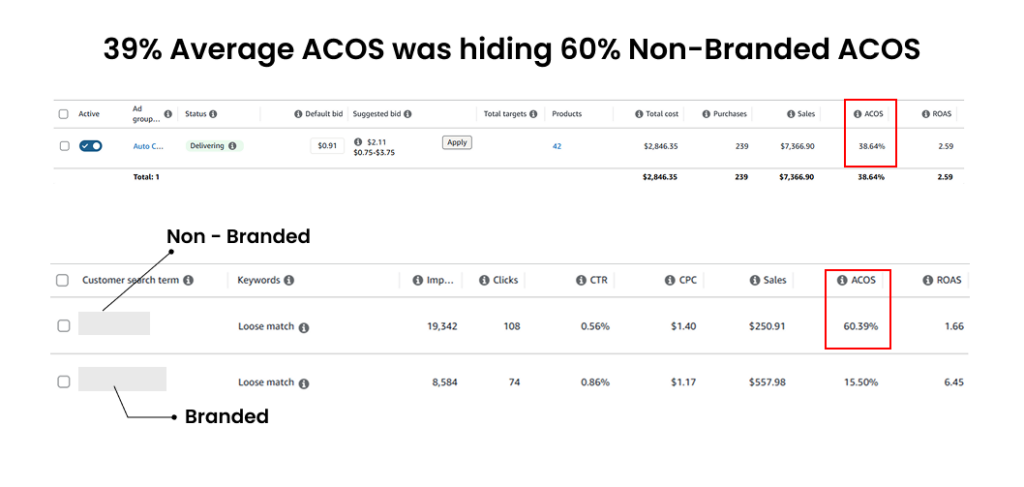
Make sure branded, generic, and competitor terms are in separate campaigns. Each segment needs to stand on its own numbers.
2. Build focused ad groups for clearer optimization control
When one ad group holds 40 keywords and 15 SKUs, Amazon’s algorithm cannot allocate budget effectively. This leads to unclear performance signals.
Overloaded structures make it harder to manage ad groups, understand ad spend, and identify what is actually driving results inside Amazon PPC campaigns.
Keep ad groups tightly structured around a single intent or theme. This creates cleaner data and improves control over bidding decisions.
3. Create a clear naming system for better campaign management
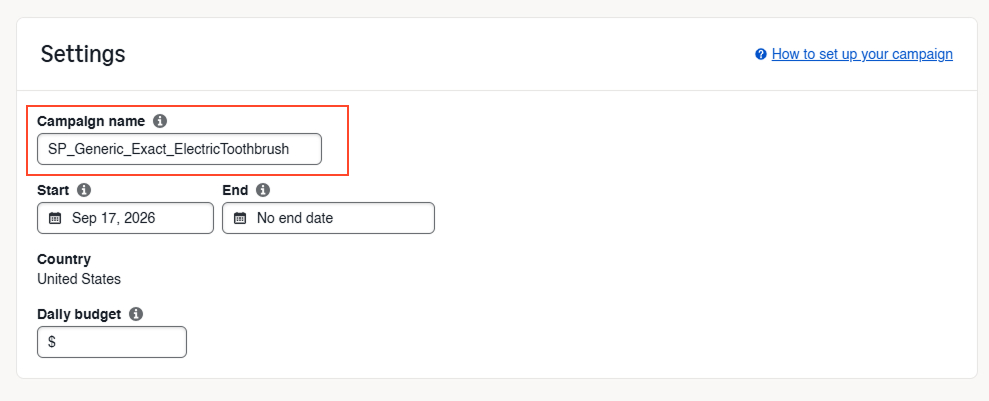
When campaigns are named “Campaign 1,” “Test,” or “New ASIN copy,” optimization becomes difficult because there is no clarity on intent.
A lack of structure leads to inefficient account auditing and weakens long-term campaign structure understanding.
Use structured naming conventions such as “SP_Generic_Exact_HeroProduct” or “SB_Competitor_Broad”, which clearly define purpose, match type, and strategy. You should be able to look at any campaign name and understand what it targets and why.
4. Balance budget across defend, grow, and test campaigns.
Most accounts over-invest in “defend” campaigns, focusing heavily on branded traffic and proven winners while limiting discovery.
This creates strong short-term ACOS but restricts long-term growth and new customer acquisition.
A balanced structure typically looks like:
| Bucket | Purpose | Typical Share |
| Defend | Protect branded terms and scale proven winners | 50 to 60% |
| Grow | Generic discovery, new keyword expansion | 25 to 35% |
| Test | New products, match types, competitor targeting | 10 to 15% |
If most ad spend sits in defense, the account stops acquiring new demand.
5. Ignoring sponsored brands and sponsored display ads
Many advertisers rely only on sponsored product ads, ignoring sponsored brand ads and sponsored display, which creates gaps across the customer journey.

Here’s what each one does:
- Sponsored products capture high-intent search.
- Sponsored brands defend your brand term and introduce your range with a custom headline.
- Sponsored display handles retargeting and pulls back shoppers who viewed but didn’t buy.
Running one and skipping the rest means you’re paying to win the click, then letting interested buyers leak away.
Look at what share of your spend and sales comes from each ad type. If sponsored display is sitting at or near zero, you’re likely leaving repeat and retargeted sales on the table.
The move here is to add Sponsored Brands to protect your branded search and show off your catalog, then use Sponsored Display for retargeting before you push Sponsored Products bids any higher.
Match the format to the funnel stage instead of forcing one type to do all the work.
6. Identify and remove zombie keywords from your campaigns
Zombie keywords are search terms that generate clicks and ad spend but consistently fail to produce conversions. They indicate wasted traffic inside Amazon PPC campaigns and quietly drain the budget every single day, and never convert.
Pull your search term and targeting reports. An actual threshold is any keyword with clicks worth more than two times your target cost-per-acquisition and zero sales.
Pause those or reduce their bids significantly. Avoid deleting them outright, though. Some seasonal terms regain value later in the year, so record them before removing them.
7. Strengthen your negative keyword strategy for cleaner traffic
This tends to go wrong in one of two ways. Either you have no negatives at all or you have been so aggressive with them that you are now blocking terms that actually convert.
Review your negative keyword list against your converting search terms.
Add the irrelevant high-spend terms as negatives, then audit the negatives you already have, just in case you blocked a useful keyword months ago and forgot about it.
8. Optimize broad and auto campaigns instead of leaving them running
Auto and broad campaigns often become inefficient when left unmanaged, even though they are designed for discovery.
Without optimization, they might cost ad dollars on irrelevant keywords, weakening overall Amazon advertising performance.
Treat these campaigns as controlled discovery tools that need weekly attention through search term analysis, not as set-and-forget spend.
9. Use competitor targeting only when you have a clear advantage
Competitor targeting in Amazon PPC campaigns can be effective, but it often becomes inefficient when used without a clear strategy.
Low conversion rates and high bids on competitor keywords can quickly increase ad spend without meaningful return.
Competitor targeting makes sense when you have a clear price advantage, more reviews, or a meaningfully better product for that shopper. If you don’t have a clear reason a shopper would switch to you, skip the competitor targeting and invest elsewhere.
10. Adjust bids based on search intent
Treating a branded search, a generic search, and a competitor search with the same bid ignores that they convert at very different rates.
This weakens the optimized bids strategy and leads to inefficient allocation of budget across campaigns.
Bid levels should reflect intent strength, with higher bids for branded traffic and controlled bids for discovery terms.
If you’re using the same bid across the board, your budget is moving to the wrong places.
11. Optimize placement strategy across search and product pages
Placement performance varies significantly across top-of-search, rest-of-search, and product pages, but is often ignored.
Without analyzing placement performance, advertisers miss key insights from click-through rate, conversion differences, and efficiency variations.
Open your placement report to compare conversion rate and ACOS for top-of-search versus everything else. Apply a placement multiplier to top-of-search on the campaigns where it clearly wins, and pull back where it doesn’t.
Adjusting placement bid modifiers based on placement-level metrics (CVR, ACoS, ROAS) leads to more efficient spend and clearer performance insights.
12. Scaling profitable campaigns for growth
This one can cost you sales often. When product pages do not match ad intent, conversion drops even if traffic quality is high.
This creates inefficiency in Amazon ads, where ads bring traffic but landing pages fail to convert.
Sort by budget utilization and cross-reference with ACOS. Raise budgets on profitable, capped campaigns. If scaling becomes difficult, split the campaign so you can easily control which keywords get the extra room.
13. Align ads with landing pages for higher conversion rates
If your keywords promise one thing and the product page delivers another, you pay for the click and lose those sales.
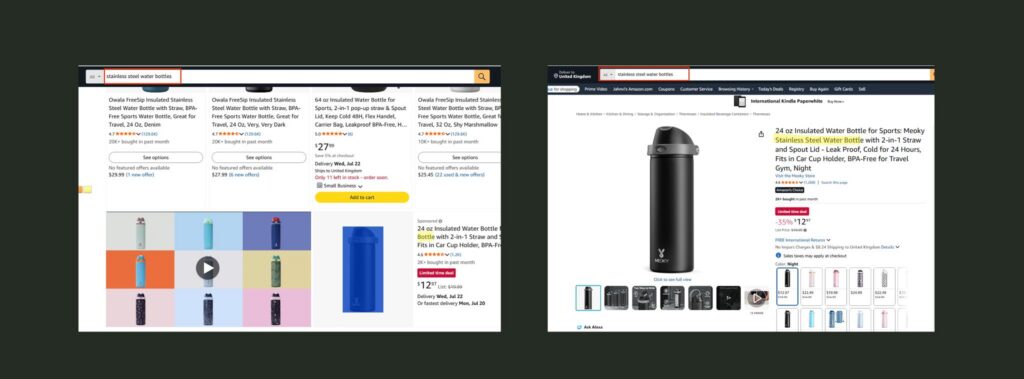
For your top-spend keywords, ask whether the product page clearly matches what the searcher actually wanted. Line up your titles, images, and bullets with the high-intent terms you are bidding on.
A “stainless steel water bottle” search should land on a page that leads with stainless steel, not bury it within bullet points.
Aligning messaging between ads and product pages improves conversion rates and reduces wasted clicks.
14. Prioritize high-performing products over weak listings
Weak products with low ratings or poor conversion history often consume disproportionate ad spend, reducing overall efficiency.
Cross-reference your highest ad-spend ASINs against their rating, review count, and conversion rate.
Reduce spend on the weaker products until the listing quality and review volume can support conversions on their own, then redirect that budget to products that already convert.
15. Prevent ad spend leakage on out-of-stock products
Running ads on out-of-stock products creates direct wasted spend and also impacts long-term organic sales performance.
You waste ad spend on products people can’t reliably buy, and stockouts damage your organic rank.
Check whether any of your actively advertised ASINs are low or out of stock.
Set a simple rule.
Reduce spend as stock drops and pause ads before you run out. Some advertising tools automate this. If yours doesn’t, a weekly manual check does the job just fine.
Campaigns must always align with inventory availability to avoid losing both revenue and ranking.
16. Set product-level ACoS targets for better control
A single ACoS target across all products is a strategic mistake. A product you are launching, a profit-driver, and an add-on item should not share the same efficiency goal.
Ask whether you have differentiated targets by product role. Set them by role:
| Product Role | Strategy | ACOS Approach |
| Hero / profit-driver | Maximize profit | Tight, efficiency-focused target |
| Launch product | Build rank and reviews | Looser, invest for position |
| Add-on/accessory | Support, don’t over-invest | Conservative |
Each should have its own performance metrics and efficiency expectations. Setting targets by product role also helps you identify where you can safely scale and where you need to reduce ACoS on Amazon without limiting profitable growth.
17. Align organic and paid data for accurate performance tracking
Misreading organic sales and paid performance leads to incorrect conclusions about true growth.
It’s easy to over-credit PPC (i.e., counting sales that would have happened organically anyway) or under-credit it (i.e., ignoring the rank boost your ads create). Both lead you straight to bad decisions.
Make sure you are looking at Total ACOS (TACOS), not just ad ACOS, and tracking organic sales alongside paid. If ad spend climbs but total sales don’t, your “paid growth” is just cannibalizing organic.
Using unified measurement helps identify the actual contribution to market share and business growth.
18. Build a consistent search term optimization routine
Without structured search term review, accounts accumulate inefficiencies and miss expansion opportunities in Amazon PPC campaigns.
Regular optimization of search terms improves control over keyword targeting and reduces wasted spend. For more ways to improve Amazon PPC campaign optimization, review these PPC best practices.
Build a simple weekly process. Pull the search term report, move converting terms into exact match, and add wasteful terms as negatives. Fifteen minutes a week compounds fast.
This habit alone separates well-managed accounts from ones that slowly lose spend to inefficiency.
19. Factor in seasonality when evaluating PPC performance
Seasonal shifts in demand are often misinterpreted as performance issues, leading to incorrect optimization decisions.
Make sure you are comparing this period to the same period last year, not just last month.
Factor in the known events like Prime Day, holidays, and your category’s own seasonality. Then compare similar periods instead of measuring seasonal peaks against normal or slower weeks.
Understanding demand cycles ensures more accurate performance evaluation and stable growth.
20. Build a structured testing system for continuous improvement
An account running the same structure and creative for the past months is falling behind. Your competitors aren’t standing still, and a static account slowly falls behind.
Ask what you have actually tested in the last 90 days.
Keep a light testing process. Test new keywords and negatives weekly. New ad creative or product targets monthly, and bigger structural ideas quarterly.
A consistent testing roadmap supports sustainable real growth in PPC performance.
Want a printable version of this audit?
Download the 20-point Amazon PPC audit checklist to review your setup, tick what’s working, calculate your score, and identify what to improve next.
Your Next Move
None of these 20 problems look serious on their own. A few zombie keywords here, a blended ACOS there, a profitable campaign capped just below its potential. That is exactly why they go unnoticed. Each one sits inside the average and drains a little spend at a time.
The fix is working through your account point by point and being honest about what each number is actually telling you. Run the full audit once a quarter, keep your search term review weekly, and you will catch most leaks before they cost you.
Start with structure. That is where the biggest wins tend to sit.
Want a second set of eyes on your account? Talk to our experts, and they will show you where your spending is leaking and what to fix first.
FAQs
1. How often should I run an Amazon PPC audit?
Run the full 20-point audit once a quarter, and the 10-minute triage check monthly. The weekly search term review (point 18) should be a standing habit regardless. Mature accounts with a stable structure can stretch the full audit slightly, but a quarterly audit is safe for most sellers.
2. Is this Amazon audit overkill for small budgets?
If you’re spending under $1,000 a month, focus on the foundation points first: structure (1 to 4), zombie keywords (6), search term review (18), and not advertising out-of-stock products (15). The full 20 points become more valuable as spending grows and small inefficiencies turn into real money.
3. Can I use this audit even if an agency manages my ads?
Yes. Use the audit to get an independent view of your account, then discuss any flagged areas with your agency. If you’re evaluating outside support, learn what to look for when choosing an Amazon PPC management service.
4. Should I pause campaigns while auditing?
No. Pausing campaigns resets momentum and can affect your organic rank. Audit while everything runs, make changes deliberately, and adjust bids or budgets rather than turning things off.






Post a Comment
Got a question? Have a feedback? Please feel free to leave your ideas, opinions, and questions in the comments section of our post! ❤️