

Advanced Strategies for Amazon Multiple Account Management

Amazon multiple account management strategies are essential for sellers looking to scale operations, drive growth, and reduce risk on the platform.
Whether you are launching new brands, entering different markets, or separating business units, managing multiple accounts can offer real advantages, but only if done correctly.
Without a structured approach, you risk account suspensions, policy violations, and operational difficulties.
Amazon has strict requirements for operating multiple accounts, and noncompliance can have serious consequences.
Successfully managing multiple Amazon seller accounts requires understanding both Amazon’s policies and implementing proven operational strategies that keep your business safe and compliant.
This guide breaks down:
- Why multiple accounts can be a smart strategy for growth and risk management
- What Amazon’s 2026 policies actually say and what gets sellers banned
- And most importantly, how to manage multiple accounts safely and efficiently without putting your Amazon store at risk.
Stick around till the end, because the strategies we will share can make the difference between smoothly scaling your business and facing costly account issues.
Why Do Sellers Operate Multiple Amazon Accounts?
The primary reason? Risk diversification and business protection.
Because when you have all your products and revenue streams linked to a single Amazon account, you are basically putting all your eggs in one basket.
This is risky, especially with Amazon’s strict policies and occasional unexpected account suspensions.
Put it like this: you’ve built a successful business selling electronics, but one day Amazon suspends your account due to a policy violation, a customer complaint that escalates, or even an automated system error.
Suddenly, your entire income stream disappears overnight.
This isn’t just a hypothetical situation, as it happens to sellers every day, regardless of their track record or compliance history.
Thus, running multiple accounts helps you avoid this single point of failure.
Here’s how it helps:
- You can separate product categories (e.g., private label vs. retail arbitrage)
- Isolate high-risk products or niches from your core business
- Maintain revenue even if one account is temporarily down
Additionally, multiple accounts enable sellers to:
- Test different business models
- Target specific customer segments more effectively
- Scale operations without the limitations of managing diverse product portfolios under a single account
This organized way of managing multiple accounts helps experienced sellers stay safe and keep their business running smoothly even when problems come up. Smart Amazon seller operations always include contingency planning for account-level risks.
Amazon’s Policy on Multiple Accounts: What You Need to Know
Here’s where things get serious. Amazon does allow sellers to have more than one account, but only if you follow their rules closely.
Understanding Amazon’s multi-account policies is crucial because violating them can simultaneously result in the suspension of all your accounts.
If not, they can suspend all your accounts in one go.
Here’s a quick breakdown of what you need to know:
Amazon allows multiple accounts if:
- You have a legitimate business need (e.g., different brands or product categories)
- Each account has a separate Tax ID and bank account
- You use unique email addresses for each account
- Your businesses are operated independently (no shared team members, tools, or inventory)
It’s recommended to contact Amazon and request permission before opening a second account.
While they may not always approve, it shows that you’re trying to stay compliant with their policies.
What Triggers Amazon Suspensions?
- Logging in to multiple accounts from the same device or IP address
- Sharing staff, VAs, or tools across accounts without proper isolation
- Using the same product images or descriptions across accounts
- Reusing email addresses, phone numbers, or payment methods
- Failing to clearly separate business entities or account purposes
Important to Remember: Amazon’s system focuses on detecting overlaps and suspicious signals, not your internal business logic. Even small overlaps can raise red flags. So, think like Amazon and play it safe by keeping each account fully independent.
Additional Policy Highlights:
- Generally, Amazon allows only one Seller Central account per seller per region unless you can justify a legitimate business need.
- All account information must be unique and not reused across accounts.
- Creating multiple accounts to circumvent restrictions, manipulate feedback, or evade penalties is strictly forbidden.
- All your accounts must be in good standing—if one account is suspended, related accounts may also be at risk.
- While explicit approval isn’t always required, be prepared to provide documentation proving your legitimate need if Amazon asks.
- Regional rules may apply (e.g., GST numbers in India must be unique per account).
Understanding and following these Amazon multi-account policies sets a solid foundation for managing multiple Amazon accounts safely. Next, let’s explore proven strategies to keep your accounts compliant and running smoothly without risking suspension.
Top Strategies for Amazon Multiple Account Management
Now that you’ve got a solid understanding of Amazon’s strict rules around multiple seller accounts, it’s time to focus on what really matters: how to manage those accounts effectively and safely.
Managing multiple accounts doesn’t have to be risky if you follow proven strategies that help you stay compliant and organized.
Professional Amazon seller operations require systematic approaches that minimize risk while maximizing efficiency across all your accounts.
Let’s explore how top sellers keep their accounts safe and running smoothly.
1. Establish Isolated Digital Environments
If there’s one thing Amazon takes seriously, it’s linked accounts.
Amazon’s systems track everything from IP addresses and devices to browser cookies and login patterns. So if you manage multiple accounts from the same computer or internet connection, you’re putting all your accounts at risk of suspension, even if you’re playing by the rules.
That’s why your first step should be creating separate digital environments for each Amazon account.
Effectively managing multiple Amazon seller accounts starts with proper technical isolation to prevent cross-contamination between your different businesses.
How to Do It Right?
Use dedicated devices or virtual desktops: Assign a unique device to each account (like one laptop per account). If that’s not practical, use virtual desktops (like Amazon WorkSpaces) to simulate separate computers in the cloud.
Invest in static IPs or residential proxies: Each account should have a consistent IP address that doesn’t change. Using residential proxies helps mimic real household internet usage, making it much safer than shared or public networks.
Avoid public Wi-Fi, incognito mode, or switching browsers: Don’t log into multiple accounts in the same browser, even in private mode. Stick to one browser per account and never switch between them in the same session.
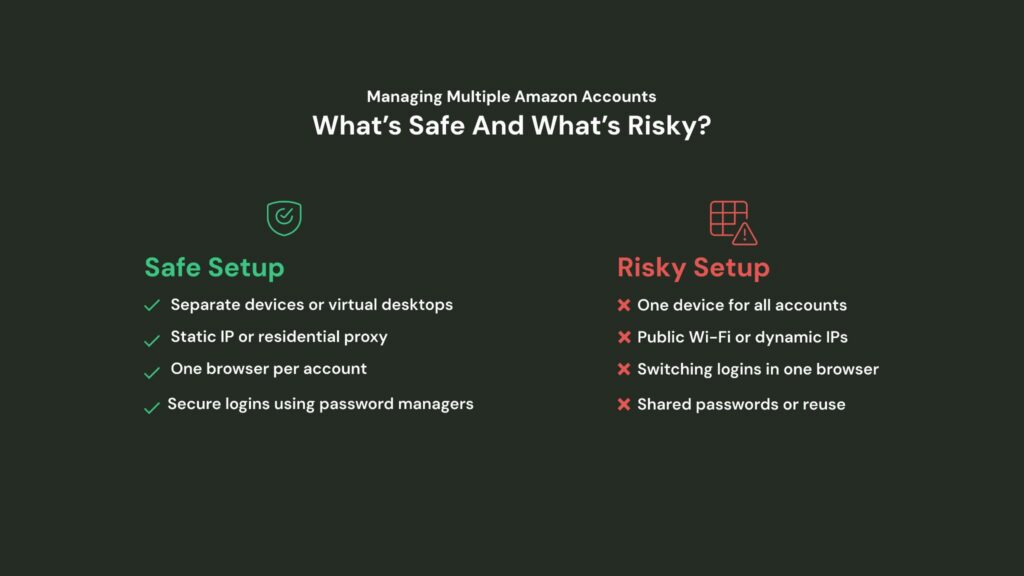
Remember: Amazon doesn’t just look at what you do; additionally, they also look at how, where, and from what device you do it. Isolation is key to staying compliant.
Once your digital environments are clean and separated, the next step is to make sure your backend operations don’t accidentally link your accounts.
2. Create Operational Firewalls
Once your digital environments are fully isolated, the next step is to make sure your day-to-day operations don’t accidentally connect your accounts.
This is where creating operational firewalls becomes essential for successful Amazon seller operations.
Think of each Amazon account as a completely separate business.
That means every part of the operation, such as inventory, teams, suppliers, and workflows, needs to stay independent.
Mixing any of these elements between accounts could leave a trail Amazon can follow, putting all of them at risk.
How to Do It Right?
1. Use separate inventory sources, warehouses, and packaging: Each account should have its own supply chain setup. Don’t fulfill orders from the same warehouse or ship products using the same packaging across accounts.
2. Don’t share teams, suppliers, or creative assets: Avoid using the same advertising creatives, as Amazon can connect accounts through these shared resources.
3. Create dedicated SOPs (Standard Operating Procedures) for each account: Build specific workflows for order processing, returns, and customer service per account. This makes it easier to maintain operational separation and improves internal accountability.
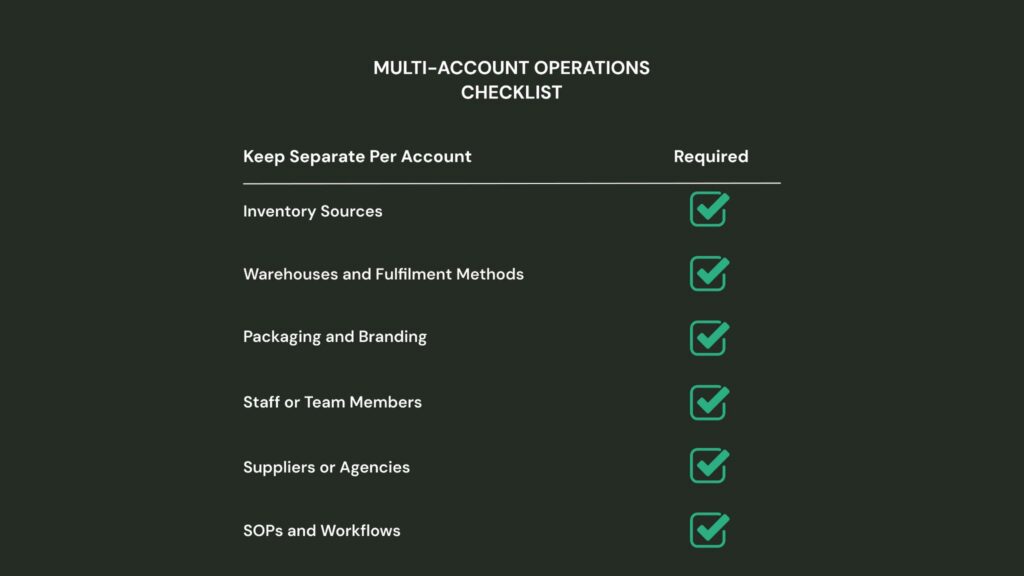
Tip: Even small overlaps, like reusing an ad copy or design file, can increase the risk of account linkage. Keep everything organized!
3. Standardize Access Management
When you’re managing multiple Amazon accounts, sloppy access control can quickly become a security and compliance nightmare. Avoid shared logins and opt for structured, auditable access management instead.
Proper Amazon multiple account management requires clear protocols for who can access what, when, and how.
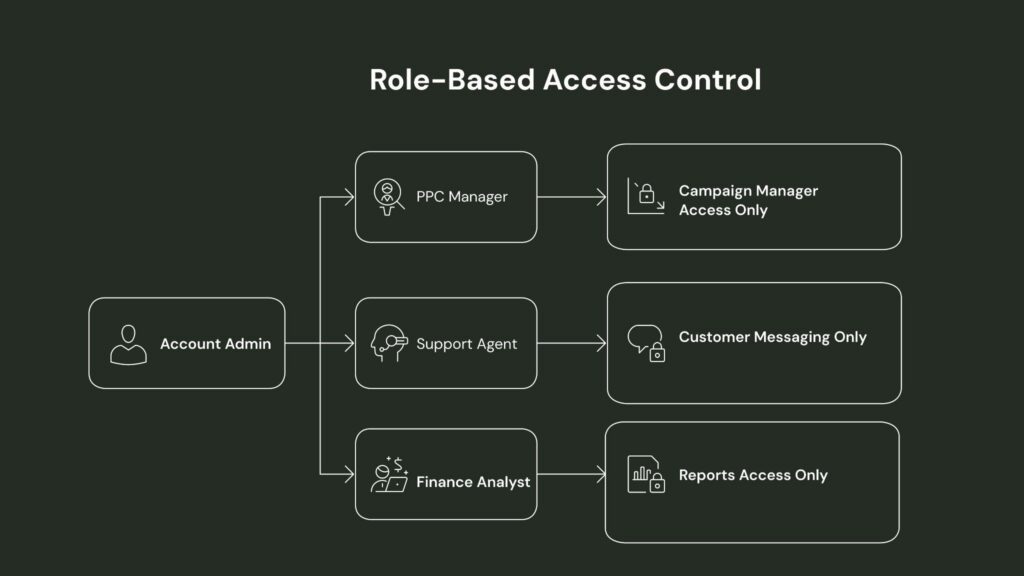
Use Role-Based User Permissions.
Instead of having team members log in with the same email and password (which is a TOS violation on Amazon), assign unique user accounts to each team member through Amazon Seller Central.
Why does it matter?
- Helps with tracking audits and activity logs per user.
- Prevents accidental changes by assigning role-based access.
- Supports secure offboarding when someone leaves.
Use a Password Manager for Shared Credentials
For tools or platforms that don’t support user-level access, use a secure password manager like 1Password or Bitwarden. These tools allow you to:
- Share credentials without revealing the password
- Revoke access at any time
- Monitor who accessed what, and when
Maintain a Team Access Log (Update Monthly)
Set up a shared spreadsheet to document:
- Who has access to what
- What role they are assigned
- Last access date
- Notes on permission changes
This makes it easy to review monthly and ensure no one has access they shouldn’t.
By standardizing access management with role-based permissions and secure credential sharing, you safeguard your Amazon accounts while maintaining clear oversight and control.
4. Use Multi-Account Management Tools
Managing multiple Amazon accounts means juggling different logins, inventories, and workflows, and doing it all manually can quickly become overwhelming.
The right tools can help you streamline operations, reduce errors, and keep everything organized.
Efficient Amazon seller operations rely on specialized software solutions that can handle the complexity of multi-account management without compromising security or compliance.
Multi-login or GoLogin for Account Containerization
Tools like Multilogin or GoLogin create isolated browser environments, or “containers,” for each Amazon account. This lets you log into multiple accounts simultaneously on the same device without risking cross-account contamination or detection by Amazon’s systems.
Advantages
- Prevents cookies and cache from mixing between accounts
- Improves workflow efficiency by switching between accounts instantly
- Reduces the risk of account suspensions due to suspicious login activity
Tools for Inventory Management Per Account
Tracking inventory separately for each account is crucial. Tools like SoStocked or InventoryLab offer robust inventory management tailored to Amazon sellers managing multiple stores.
Features
- Real-time inventory tracking by account
- Automated reorder alerts to avoid stockouts
- Integrated sales analytics for smarter purchasing decisions
Platforms for Task and SOP Centralization
Centralizing your team’s tasks, Standard Operating Procedures (SOPs), and workflows in platforms like ClickUp or Notion keeps everyone aligned and accountable across accounts.
Advantages
- Create shared project boards and timelines
- Store detailed SOPs for consistency and training
- Assign and track tasks by team member and account
By adopting these specialized tools, you can effectively manage multiple Amazon accounts without getting overwhelmed, which keeps your operations secure, organized, and scalable as your business grows.
5. Keep Accounts Separate and Compliant
When managing multiple Amazon accounts, one of the biggest risks is having them unintentionally linked.
Amazon has strict policies around this, and if it suspects your accounts are connected in ways that violate its rules, it could suspend or shut them down even if you didn’t mean to link them.
Following Amazon multi-account policies requires constant vigilance and regular auditing to ensure no accidental connections develop over time.
To avoid this, follow these steps to keep your accounts separate and fully compliant.
Step 1: Run quarterly risk audits to catch any signs of overlap between accounts. Focus on three key areas:
- IP Addresses: Make sure each account is accessed through a unique IP or containerized browser.
- Shared Tools: Don’t use the same logins or software accounts across multiple Amazon stores.
- User Access: Check that team members aren’t logging into more than one Amazon account from the same device.
Step 2: Watch for Policy Updates because even minor updates can affect how you manage multiple accounts. Staying informed helps you avoid accidental violations.
- Subscribe to Amazon Seller Central updates
- Monitor changes in Amazon’s Terms of Service
- Revisit your SOPs regularly to ensure they still comply
Step 3: Track Login Activity to catch potential red flags early.
- Logins from unexpected countries or locations
- One device accessing multiple accounts
- Access attempts outside regular working hours.
Even a basic login in Google Sheets can help you stay ahead of issues. For larger teams, consider monitoring tools that flag flaws automatically.
By separating your accounts operationally and monitoring for risks regularly, you stay on Amazon’s good side and avoid surprises that can hurt your business.
6. Have a Backup Plan if an Account Gets Suspended
Even with the right systems in place, Amazon account suspensions can still happen, often without much warning.
When they do, it’s critical to have a backup plan so your business isn’t left scrambling.
A clear response strategy saves time, protects revenue, and keeps your team focused on solutions instead of stress.
An experienced manager managing multiple Amazon seller accounts includes preparing for worst-case scenarios with documented recovery procedures.
1. Decide in advance:
- Who gets notified immediately? (e.g., account manager, legal, leadership)
- What’s the first step? (Pause ad spend? Notify the fulfillment team? Start collecting documentation?)
Having a checklist ready reduces panic and ensures nothing is missed.
2. Assign an Appeal Owner: Make it clear who is responsible for filing the appeal. This should be someone familiar with Amazon’s policies and your store’s history. Their job:
- Draft the Plan of Action (POA) professionally, clearly addressing the root cause and corrective actions.
- Communicate directly with Amazon support through Seller Central’s Performance Notifications tab.
- Track all communication and deadlines to ensure timely responses.
This avoids confusion and ensures a consistent voice when speaking to Amazon.
3. Set an Internal and External Communication Plan: Decide how your team will stay in the loop and what you’ll share with external partners (like suppliers or agencies). This includes:
- Regular internal updates through Slack, email, or your project management tool.
- A backup point of contact for urgent operational decisions.
- Clear status reports if the suspension affects shared resources like warehouses or tools.
Having this protocol in place guarantees that if the worst happens, your team knows exactly what to do and can focus on getting the account reinstated as fast as possible, with minimal workflow disturbance.
7. Design Each Brand Differently
Amazon multiple account management means juggling multiple brands, and each brand needs its own unique look and feel.
Designing each brand differently helps avoid account linking risks and builds stronger connections with your customers.
Strategic Amazon seller operations include developing distinct brand identities that prevent Amazon’s algorithms from detecting similarities between your accounts.
Make sure each brand in the Brand Registry is linked to a separate legal entity with its own trademark.
Avoid using the same owner accounts or contact emails across different brands.
To put this into practice, here are some actionable ways to differentiate each brand’s design and identity:
1. Create Unique Brand Styles: Give every brand its own:
- Voice and tone in product descriptions and messaging
- Packaging design that reflects the brand’s personality
- A+ content layouts tailored specifically to the products
Distinct styles make your brands stand out individually and help keep Amazon’s algorithms from seeing them as related.
2. Use Separate Creative Teams: Whenever possible, assign different creative teams or freelancers to each brand. Different perspectives and styles will reduce overlap and keep your brand identities fresh and separate.
3. Avoid Similar Listings and Storefronts: Make sure your product listings and storefront designs are noticeably different:
- Use unique product titles and descriptions
- Choose distinct images and graphics
- Design storefronts with different logos, colors, and layouts
This helps prevent your accounts from looking too alike, which can raise red flags with Amazon.
By diversifying your brand identity and design systems, you create a strong foundation for each Amazon business. By minimizing the risk of account linkage, you seize the opportunity to reach new audiences with customized messaging and visuals.
8. Create a Test & Rollout Account Strategy
Managing multiple Amazon accounts means you have a great opportunity to test new ideas safely before scaling them across all your stores. Establishing a clear test and rollout strategy helps minimize risk and ensures changes actually improve performance.
Smart Amazon multiple account management includes using one account as a testing ground for new strategies before implementing them across your entire portfolio.
1. Designate a Pilot Account: Choose one account to act as your testing ground. This is where you’ll try out:
- New product listings or descriptions
- Pricing adjustments
- Advertising campaigns and strategies
By focusing your experiments on a single account, you reduce the chance of mistakes affecting your entire business.
2. Measure Results Carefully: Track key metrics like sales, conversion rates, and ad spend performance on your test account. Only when you see positive results should you consider rolling changes out to your other accounts.
3. Use A/B Testing Frameworks: Where possible, use A/B testing methods to compare performance between different versions of listings, ads, or pricing. This data-driven approach allows you to:
- Manage risk by only adopting winning strategies.
- Optimize campaigns before full rollout.
- Make informed decisions backed by evidence.
A solid test and rollout strategy lets you innovate confidently, protecting your business while making continuous improvements across all your Amazon accounts.
Wrapping Up: Managing Multiple Amazon Accounts the Smart Way
Running more than one Amazon account isn’t just about staying organized; it’s about thinking ahead.
Whether it’s keeping your finances separate, giving your team the right access, or making sure each brand looks and feels unique, every small step helps protect your accounts and grow your business.
But let’s be honest,
It can get overwhelming fast.
That’s where Aureate Labs can help.
Need a trusted partner to help you handle multiple Amazon accounts without the stress?
At Aureate Labs, we work with sellers, brands, and aggregators to make managing multiple accounts simple.
From setting up clean systems to keeping everything compliant with Amazon’s rules, we’ve got your back.
Let’s simplify your Amazon growth — get in touch with us today!






Post a Comment
Got a question? Have a feedback? Please feel free to leave your ideas, opinions, and questions in the comments section of our post! ❤️