

Hyvä Checkout A/B testing: How to ensure conversion lift before full rollout

Replacing the checkout on a Magento Open Source or Adobe Commerce store is the kind of decision most merchants put off longer than they should. The checkout is where purchase intent either converts or collapses, and even a small drop in completion rate is expensive at scale.
But if you have doubts about whether your Magento store actually needs Hyvä Checkout, then A/B testing can remove that hesitation from the equation.
Instead of committing to a full rollout before you have evidence, you run Hyvä Checkout alongside your existing checkout for a defined slice of your traffic, measure what actually happens to your sales and conversion rates, and make the decision based on what your own store data shows.
This article covers how to set that up, what to measure, and how to read the results.
Key takeaways
- Cart abandonment averages 70.22% across ecommerce. For Magento merchants, a significant portion of that is recoverable through a better checkout experience.
- Hyvä Checkout loads up to 13x faster on mobile than standard Magento checkout. But speed alone does not justify a full rollout without testing first.
- A purpose-built Magento module enables percentage-based traffic splitting between Hyvä Checkout and Luma fallback, with no custom development required.
- Start with 10-20% of traffic, verify analytics and extension compatibility before expanding, and define a kill switch threshold before the test goes live.
- Run the test for at least two full weeks to capture weekday and weekend traffic patterns before drawing conclusions.
- The goal of the test is not to prove Hyvä Checkout works in theory. It is to confirm it works for your specific store, your specific customers, and your specific checkout complexity.
How Hyva Checkout A/B testing works
There is a purpose-built Magento module for this: elgentos/magento2-hyva-checkout-ab-test, maintained by Elgentos and available via Composer. It enables a configured percentage split between Hyvä Checkout and the Luma fallback checkout, or between the Hyvä Checkout one-page version and the multi-step version.
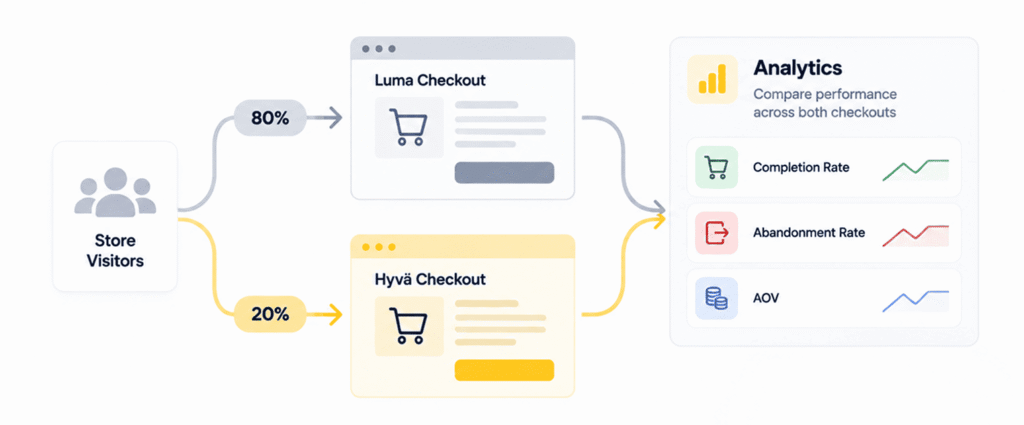
The module assigns customers to checkout versions randomly based on your configured split. At 20/80, 20% of customers reaching checkout see Hyvä Checkout and 80% stay on Luma. Assignment is session-based, so a customer does not switch versions mid-session. Configuration lives under Stores > Configuration > Hyvä Themes > Checkout > A/B Test. A URL parameter override is also available for development testing without affecting live traffic.
The module supports three testing scenarios:
- Hyvä Checkout vs. Luma fallback. This is the primary use case for merchants currently on the standard Magento checkout who want to test the conversion impact of switching to Hyvä Checkout before committing to the implementation.
- Hyvä Checkout’s single-page vs. multi-step layout. Once you are already running Hyvä Checkout, this allows you to compare layout approaches and find out whether your specific customer base converts better on a single page or a stepped flow.
- Staged percentage rollout. Rather than executing a high-stakes 50/50 switch, you can manage operational risk via a small exposure baseline (e.g., exposing only 10% of live traffic). This validates that all complex payment providers, tax rules, and local shipping integrations function correctly before increasing traffic scaling.
How to set up the A/B test of Hyvä Checkout
A/B testing a checkout requires more upfront preparation than testing a product page. The stakes are higher because any issue in the checkout flow has a direct and immediate impact on revenue.
Before splitting any traffic, work through this setup checklist:
Step 1: Define your baseline metrics
Pull your checkout completion rate, cart abandonment rate (broken down by step, if applicable), average order value (AOV), and payment method distribution from your current analytics suite covering the past 30 to 60 days. These figures establish the historical control group. Without a clean, unskewed baseline, your eventual test results will be nearly impossible to interpret accurately.
The Risk: An incompatible layout or missing JavaScript component will quickly look like a “poor conversion rate” in your data when it is actually an implementation failure.
The Fix: Review the official Hyvä Compatibility Tracker and thoroughly test all payment gateways in a staging environment using the URL override parameter before proceeding.
Step 2: Verify extension compatibility.
Every payment gateway, shipping matrix provider, address validation service, and checkout extension in your tech stack must be verified as compatible with the Hyvä Checkout framework.
Step 3: Configure variant-level analytics tracking
Your analytics framework must be able to segment sessions by the specific checkout version utilized, perfectly attributing the final order or abandonment to the correct variant. If your analytics cannot separate the two, you will not be able to draw any conclusions from the test. You must set up the tracking before the test starts.
Step 4: Establish an operational “Kill Switch”
Decide before launching exactly what data anomalies would force you to abort the test and revert completely. For example, a sustained drop of 5% or more in your hourly checkout completion rate over a 24-hour period is a textbook trigger to halt the experiment. Defining these parameters in advance prevents emotional, reactive decisions when unexpected data anomalies occur under mid-test pressure.
How to deal with Checkout A/B test & its outcomes
Checkout tests need more time than product page tests because the audience is smaller. Only a fraction of your total traffic reaches checkout, and the population that does is already self-selected with higher purchase intent. Variation at this stage requires a larger window to separate real differences from normal fluctuation.
Run the test for at least two full weeks, capturing both weekday and weekend traffic. For a checkout completion rate around 30%, you need roughly 500-600 completions per variant to detect a 5 percentage point difference with 95% confidence. Lower-traffic stores may need 4-6 weeks to reach that threshold.
Do not call the test early even if one variant looks clearly ahead after the first week. Checkout behavior differs significantly between weekday and weekend traffic, and early results often do not hold when the full two-week period is accounted for.
Here are the metrics to track during the test. Track these at the variant level throughout the test period:
| Metric | What it tells you |
|---|---|
| Checkout initiation to completion rate | Primary conversion metric; the most direct measure of checkout quality |
| Abandonment rate by checkout step | Shows where in the flow customers are dropping off; step-level data tells you more than overall abandonment |
| Average order value | Conversion rate improvements should not come at the cost of smaller orders |
| Payment method distribution | A shift in which payment methods customers select can indicate the layout is changing behavior |
| Mobile vs desktop completion rate | Hyvä Checkout’s performance advantage is most pronounced on mobile; check whether the lift is device-specific |
| Time to complete checkout | Faster completion generally correlates with lower abandonment; useful as a secondary signal |
Three outcomes are possible from an A/B test.
Outcome 1: Hyvä Checkout wins clearly
Checkout completion rate is higher, abandonment rate at key steps is lower, and AOV is at least stable. You have the evidence you need to proceed with full rollout. Move the traffic split to 100% for Hyvä Checkout and decommission the Luma checkout.
Document the specific metrics that changed and by how much, because this becomes useful context for future checkout optimization decisions.
Outcome 2: No meaningful difference
Completion rates are within the margin of error across both variants. This is not a failed test. It tells you that the conversion opportunity from switching checkout layouts is smaller than anticipated, and that the optimization effort may be better directed at specific friction points (form fields, payment method presentation, guest checkout prominence) rather than the full checkout replacement.
Test those individual elements within Hyvä Checkout rather than treating the overall result as a reason not to migrate.
Outcome 3: Hyvä Checkout underperforms
Completion rate drops, or abandonment increases at a specific step. Before concluding, investigate whether this is a checkout design issue or an implementation issue. An extension compatibility problem, a broken payment method, or a form validation error in the Hyvä Checkout implementation can look like a conversion problem in the data.
Review session recordings for the underperforming variant before attributing the result to checkout design. Fix any technical issues and rerun the test before concluding that Hyvä Checkout does not work for your store.
The case for phased rollout rather than a hard cutover
Even when the test results clearly favour Hyvä Checkout, a phased rollout makes sense for most stores.
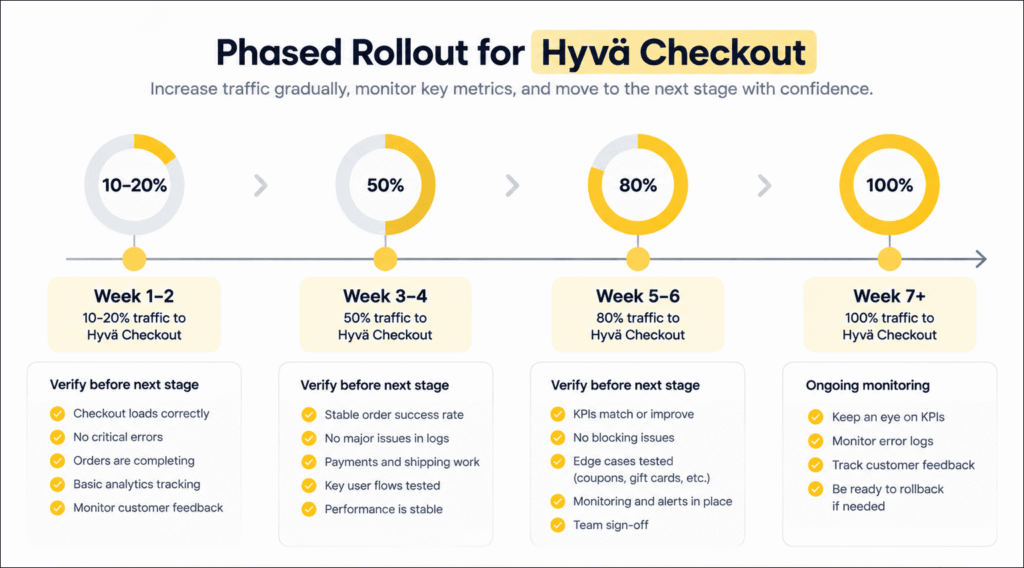
At each stage of the rollout, compare the current phase conversion data against both the test results and the original baseline. If the numbers hold or improve, proceed. If they deteriorate, hold the rollout at the current split until you have identified the cause.
Work with a Hyvä Gold Partner
A Hyvä Checkout implementation requires verifying compatibility across all your payment gateways, shipping providers, and custom checkout logic before any traffic is exposed. Getting this wrong means test results that reflect implementation issues rather than actual checkout quality.
Aureate Labs is a Hyvä Gold Partner with experience implementing Hyvä Checkout for Magento Open Source and Adobe Commerce stores. Our Hyvä theme development process covers the full scope: extension compatibility, custom checkout logic, analytics setup, and the A/B test configuration so the rollout is based on evidence rather than assumptions.
If you are considering Hyvä Checkout and want to understand what an A/B test approach looks like for your specific Magento setup, talk to our team.
Here are the frequently asked questions by store owners that you also might need to know:
Do I need Hyvä Theme installed before I can use Hyvä Checkout?
Yes. Hyvä Checkout requires Hyvä Theme as a prerequisite. You cannot run Hyvä Checkout on a Luma-based storefront. If you are considering Hyvä Checkout but have not yet migrated your storefront to Hyvä Theme, the typical approach is to scope both together and run the checkout A/B test as part of the broader Hyvä migration project rather than as a standalone initiative.
Will the A/B test break my existing payment methods?
It should not, provided the test is set up correctly. The Luma fallback variant continues using your existing payment configuration without any changes. The Hyvä Checkout variant is where compatibility needs to be verified in advance. Every payment gateway in your stack needs a confirmed Hyvä Checkout compatible module before real traffic is exposed to that variant.
Will the A/B test break my existing payment methods?
It should not, provided the test is set up correctly. The Luma fallback variant continues using your existing payment configuration without any changes. The Hyvä Checkout variant is where compatibility needs to be verified in advance. Every payment gateway in your stack needs a confirmed Hyvä Checkout compatible module before real traffic is exposed to that variant.
Should I run the test at 50/50 from the start?
Not necessarily, and for most stores we recommend against it. Starting at 10 to 20% exposure to Hyvä Checkout for the first week lets you verify that extensions are working correctly, analytics tracking is capturing data from both variants accurately, and no edge cases in payment processing are causing silent failures.
What happens to customers who are mid-session when the test goes live?
The module assigns customers to a checkout variant at the point they reach the checkout page. Customers who are mid-cart but have not yet initiated checkout will be assigned when they do. Customers who are already in a checkout session when the test is activated are not reassigned. Their existing session continues whatever checkout was active when they started.






Post a Comment
Got a question? Have a feedback? Please feel free to leave your ideas, opinions, and questions in the comments section of our post! ❤️