

Hyvä theme migration SEO checklist to protect rankings

Most Magento merchants focus heavily on what Hyvä gives them after migration: faster load times, better Core Web Vitals, lower maintenance costs, and a lighter frontend built for modern devices. What gets less attention is what you can quietly lose during the migration process if it is not planned properly.
Luma ships roughly 1MB of JavaScript and CSS on every page load. Migrate to Hyvä, and that drops to around 0.2MB. A 0.1-second improvement in site speed converts to 8.4% more conversions, per Deloitte research.
But a Hyvä theme migration is not a visual skin swap. It rebuilds the entire frontend layer of your Magento storefront. And that frontend layer is exactly where search engines and LLMs read the signals your Magento store has built up over time: structured data, metadata, internal links, image delivery behavior, and the HTML output from every extension in your stack.
We’ve already covered Hyvä theme SEO benefits. Now, this Hyva theme migration SEO checklist will help you protect the SEO rankings you already have while completing a seamless migration to Hyvä.
Why Hyvä migrations create SEO risk?
Your products, categories, CMS pages, and URLs do not move during a Hyvä migration. The Magento backend stays intact. What changes is everything the search engine actually reads.
A Hyvä implementation changes:
- PHP templates that render your page HTML
- CSS architecture, moving from LESS-based traditional Magento themes to Tailwind CSS
- JavaScript, replacing Knockout.js and RequireJS with Alpine.js as part of the modern frontend approach
- How third-party extensions render content in the Magento storefront
- Image delivery and loading behavior
- Navigation and internal link output from templates
Here is the specific risk most teams underestimate: a Magento extension can continue working in Admin while completely breaking its frontend output after the theme migration.
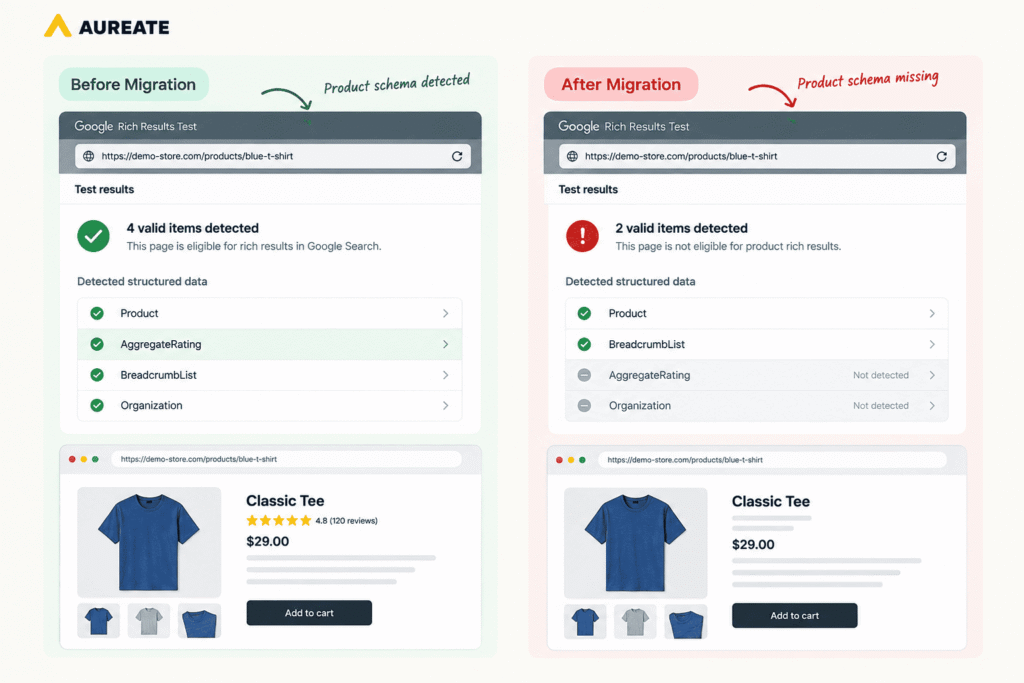
A review extension is a great example here. It may keep collecting reviews and showing them in the dashboard. But if its frontend display relies on Luma-specific JavaScript, the ratings stop rendering on the product page post-migration. If that extension also generated AggregateRating structured data, both the visible star ratings and the schema disappear without a single error being thrown.
There is also a newer dimension worth understanding. AI crawlers like GPTBot, ClaudeBot, and PerplexityBot work differently from Googlebot. Most of them do not render JavaScript. They read raw HTML responses and extract what they can from the initial server output.
If a migration is done poorly and critical content gets trapped inside JavaScript-dependent components rather than being server-rendered, you can end up less visible to AI search systems on Hyvä than you were on Luma. Getting this right is no longer just about traditional Google rankings. It’s about protecting your brand’s visibility in the age of generative AI.
Hyvä migration SEO checklist at a glance
Before migration:
- Crawl the existing Magento storefront and export key SEO elements
- Save Search Console data for priority pages and queries
- Document structured data by page type
- Record LCP, CLS, and INP benchmarks
- Inventory every extension with frontend output
- Confirm URL structure and canonical setup
During planning:
- Protect staging with server-level authentication
- Confirm URLs stay unchanged
- Map Luma-dependent custom components to Hyvä equivalents
- Check Hyvä compatible status for SEO-relevant extensions
- Define Hyvä Checkout scope separately if included in the project
During development:
- Verify titles, meta descriptions, canonicals, and hreflang on representative pages
- Confirm structured data still renders correctly
- Verify extension-generated frontend content
- Check CMS pages and Page Builder output
- Preserve important internal links
- Confirm critical content is in server-rendered HTML (not JavaScript-loaded)
- Make sure LCP images are not lazy-loaded
- Verify product and category page image alt text
Before launch:
- Crawl staging and compare against the original storefront
- Test product, category, CMS, and homepage templates
- Compare Core Web Vitals against baseline
- Check mobile responsiveness and content parity
- Confirm production canonicals
- Test redirects only if URLs changed independently
Post-launch:
- Confirm staging restrictions did not carry over to production
- Crawl production after deployment
- Inspect priority URLs in Search Console
- Monitor the Page Indexing report
- Compare organic performance by page type
- Recheck structured data on live pages
Phase 1: Build your pre-migration SEO baseline
Before changing the frontend, document what the current Magento storefront outputs. You need a concrete record to compare against once the Hyvä implementation is ready.
1. Crawl the existing Magento storefront
Run a full crawl with Screaming Frog or equivalent and export URL, HTTP status, title tag, meta description, H1, canonical URL, meta robots, internal links, and structured data where supported. When the Hyvä implementation is ready, repeat the crawl and compare both datasets. This diff is where template-level regressions show up clearly, without having to manually review pages one by one.
2. Save Search Console data for priority pages
Export clicks, impressions, average position, and priority landing pages before launch to create a reference point. If a specific page type starts declining after the Hyvä migration, this data is how you isolate whether it was a template change, an extension compatibility issue, or something unrelated.
3. Document structured data by page type
Structured data in a Magento store can originate from theme templates, core Magento functionality, SEO extensions, review extensions, custom modules, or CMS markup. This is worth checking carefully because the source determines what survives the migration.
For eCommerce stores, this typically includes:
| Schema type | Where it usually comes from |
|---|---|
| Product and Offer | Theme templates or SEO extension |
| AggregateRating and Review | Review extension (highest risk in migration) |
| BreadcrumbList | Breadcrumb component |
| Organization | Global layout or CMS |
The question is not whether Hyvä work supports these schema types. It does. The question is whether the specific implementation generating them will survive rebuilding the Hyvä frontend.
4. Record Core Web Vitals benchmarks
Record LCP, CLS, and INP for your homepage, a major category page, a product page, and an important CMS page. These are comparison points. The Hyvä theme for Magento creates the right conditions for passing Core Web Vitals and achieving optimal performance, but actual numbers also depend on images, scripts, third-party tags, fonts, and extension frontend code.
5. Inventory extensions with frontend output
This is the most Hyvä-specific check on this list and the most frequently underestimated.
List every extension that outputs anything into the Magento storefront: product reviews, loyalty widgets, promotional banners, shipping estimators, layered navigation, search interfaces, product labels, and analytics scripts.
For each extension, determine whether it works with Hyvä natively, has an official Hyvä compatible module (as Hyvä UI), needs custom code development, or needs replacing entirely. Extension compatibility issues are one of the leading causes of SEO regressions in a Hyvä theme migration because Magento extensions rely on Luma-specific JavaScript in many cases, and those dependencies break silently when the frontend is rebuilt.
If your store does not have deeply customised Luma templates, InstaBuild for Hyvä is worth evaluating before planning the full rebuild.

For stores with complex custom modules, a full Hyvä theme customization remains the right path. But for those where the migration plan involves significant frontend rebuilding that could use a pre-built foundation, InstaBuild reduces that scope considerably.
We’ve also maintained compatibility references for Hyvä compatible SEO extensions, shipping extensions, and marketing extensions if you need a starting point.
6. Scope Hyvä Checkout separately
Hyvä Checkout is a separate product from Hyvä ecosystem. A Magento merchant can migrate the storefront without replacing checkout at the same time. If Hyvä Checkout is part of the project, its analytics, tracking, and custom functionality requirements need to be defined separately and kept out of the storefront SEO QA. Mixing these two scopes is a reliable way to introduce confusion about what caused a regression.
Phase 2: Verify SEO output during development
Waiting until launch to check whether important frontend signals survived is one of the most avoidable mistakes in a Hyvä migration. By the time you find out something is missing, it has already been missing for weeks.
The better approach is checking while templates and custom components are being rebuilt, when the fix is a development task rather than a post-launch emergency.
7. Verify meta tags and canonicals on representative pages
For product pages, category pages, CMS pages, and the homepage, confirm the Hyvä implementation preserves title tags, meta descriptions, canonical URLs, meta robots directives, and hreflang where applicable. If an SEO extension generates these, test its actual frontend output in the Hyvä storefront. Backend functionality does not guarantee frontend compatibility.
8. Verify structured data: do not assume it needs rebuilding
The right starting point is understanding where each schema type currently comes from, then confirming whether it survives the migration. If it depended on a Luma-specific template or an incompatible extension, rebuild it. If it survived intact, leave it alone. The objective is structured-data parity, not changing schema because the Magento theme changed.
9. Check extension-generated content against the baseline
A review extension controls both ratings content and AggregateRating schema. A layered navigation extension affects internal links and filter URLs. A product label module injects HTML that may or may not appear in the Hyvä version.
Comparing actual frontend output against the pre-migration baseline, rather than checking whether the extension works from a shopper’s perspective, is what catches these regressions. A feature can appear functional to a user while producing entirely different SEO output.
10. Check CMS pages and Page Builder content
CMS pages often contain custom HTML, theme-specific CSS classes, embedded widgets, and Page Builder components. Content stored in Magento does not guarantee identical frontend rendering after a theme migration. Important CMS and landing pages should be checked for missing content, broken layouts, hidden text, incorrect heading structure, and missing links. Prioritise the ones already receiving organic traffic.
11. Verify image delivery
Avoid lazy-loading the image that becomes the page’s Largest Contentful Paint element. This is one of the most common causes of LCP regression when image templates are rebuilt during a Hyvä migration. So, make sure main product images load appropriately, hero images are not deferred unnecessarily, and alt text is preserved across product and category pages.
12. Check internal link structure
Template changes can unintentionally remove or alter internal links even when destination pages still exist in Magento. Main navigation, category navigation, breadcrumbs, product links from category pages, related product links, footer links, and CMS links all need to be checked. The link disappearing from the template does not remove the page from the sitemap, which is exactly why this type of regression can go undetected for weeks.
13. Verify AI crawler accessibility
This is a check that did not exist in traditional Magento SEO workflows but belongs in any Hyvä migration done in 2025 or later. AI crawlers like GPTBot, ClaudeBot, and PerplexityBot read raw HTML responses. They do not execute JavaScript. On your current Magento theme, significant amounts of product content and structured data are only accessible after client-side JavaScript runs, meaning they are invisible to these crawlers.
Hyvä’s server-rendered architecture is a genuine advantage here. Content that Hyvä outputs in the initial HTML response is readable to AI systems without any additional configuration. But this advantage depends on the implementation. Confirm that important product information, review content, and pricing data are present in the server-rendered HTML output, not loaded by JavaScript after the fact. You can check this by viewing the page source (not “inspect element,” which shows the rendered DOM) and verifying the content is present in the raw response.
Tools like Track My Visibility can be used to monitor how AI systems are reading and citing your store content over time once the migration is live.
Phase 3: Pre-launch QA
Once development is substantially complete, the staging environment should be treated like a dress rehearsal. The goal is to find anything the development phase missed before it goes live.
14. Crawl staging and compare it with the baseline
Run a crawl and compare it against the original Magento storefront output. Look for missing titles, changed canonicals, unexpected noindex directives, missing H1s, broken internal links, and significant changes in rendered content. Every difference should be investigated rather than assumed to be intentional.
15. Test representative page templates
Thorough testing means covering configurable product pages, simple product pages, major category pages, filtered navigation states, CMS pages, landing pages, search pages, and blog pages if they share the Magento frontend. Template-specific regressions are the most common post-launch issue in a Hyvä migration and the most easily missed when QA focuses only on the homepage.
16. Compare Core Web Vitals against baseline
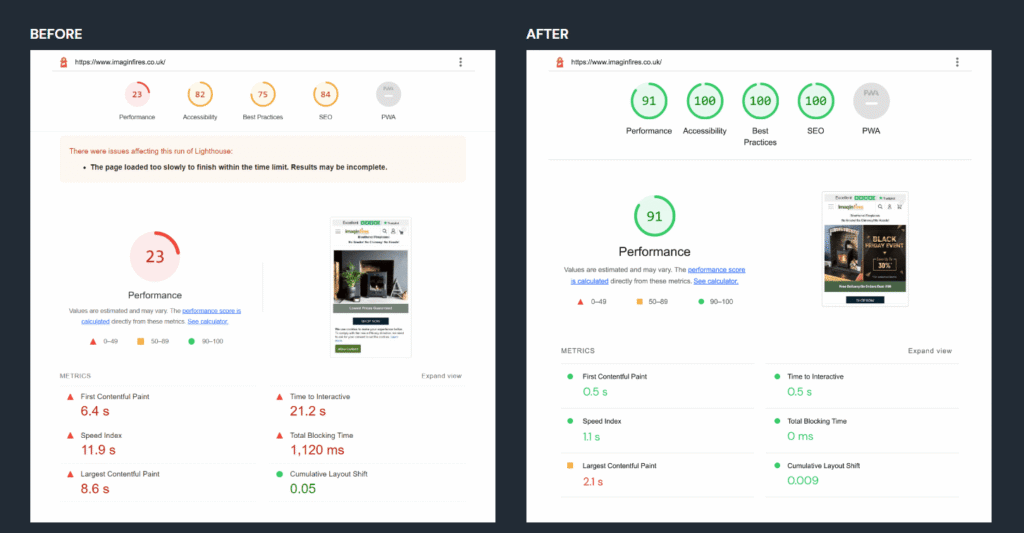
Retest the same pages from Phase 1. A Hyvä theme migration creates real conditions for performance improvement, but the comparison is what tells you whether it actually happened, and where it did not. If one page type performs unexpectedly poorly, the investigation should focus on specifics: third-party JavaScript, large images, fonts, custom Alpine.js components, or extension frontend code.
We migrated ImagineFire to Hyvä ahead of their peak winter season, replacing incompatible extensions with Hyvä compatible alternatives and ensuring proper compatibility across remaining components. It resulted in 296% site speed improvements that directly supported their conversion goals.
17. Test mobile responsiveness and content parity
Hyvä theme is built with mobile devices in mind from the start, but custom development still needs QA on mobile viewports. For SEO-sensitive templates, confirm mobile users receive the same important content as desktop users: navigation, filters, product information, headings, internal links, images, and accordions.
Phase 4: Launch day checks
Most of the SEO work should be complete before deployment. Launch day is about confirming production behaves exactly as expected, with minimal downtime impact.
- Immediately verify production does not contain restrictions copied from staging. Check robots directives, authentication, canonicals, and HTTP status codes.
- Run a focused production crawl on the templates rebuilt during the Hyvä migration and compare against the approved staging crawl.
- Use Search Console’s URL Inspection tool on a small group of priority URLs: homepage, a major category page, a high-traffic product page, and an important CMS page. Confirm Google can access them with no unexpected indexing restrictions.
- Verify the sitemap contains canonical production URLs, indexable pages, no staging URLs, and no accidentally removed priority pages. Submit or reconfirm it in Search Console where appropriate.
If URL changes were introduced during the project, test those redirects independently. A Hyvä theme migration itself does not require redirecting every page, and mixing theme migration QA with URL migration QA is an easy way for things to get missed.
Phase 5: Post-launch monitoring
Post-launch monitoring is where teams often stop paying close attention too early. Most SEO regressions from a Hyvä migration do not appear on launch day. They show up one to three weeks later as Google recrawls and reindexes the new templates.
Monitor performance by page type separately in Search Console rather than looking at overall organic traffic. If product pages decline while category pages hold, the investigation points toward the product page template specifically. These problems more often indicate navigation, canonical handling, content rendering, or filter URL behavior.
Watch the Page Indexing report for newly excluded URLs, crawled-but-not-indexed pages, unexpected canonical selections, and server errors. Retest structured data on representative production pages once the site has been live and crawled.
For larger Magento Open Source and Adobe Commerce catalogs, server logs show how Googlebot and AI crawlers interact with the new storefront, which templates are being crawled, how frequently, and where errors occur.
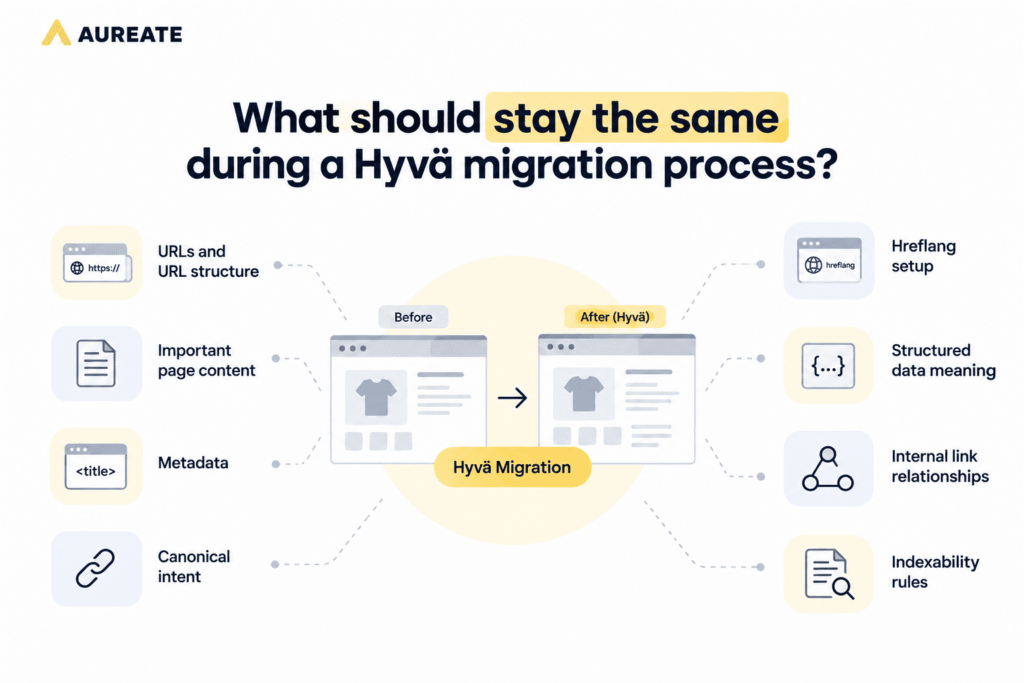
The Hyvä frontend technology changes. The SEO signals search engines already understand should not.
That is the principle behind every item on this checklist. Hyvä’s modern architecture gives you a better foundation for organic performance and eCommerce success. The migration process itself should not cost you the SEO rankings you already earned.
Work with a Hyvä Gold Partner
A Hyvä migration involves more than replacing a Magento theme. Extensions, custom modules, templates, CMS content, tracking, and frontend behavior all need to work correctly in the new architecture. Getting this wrong means compatibility issues, unexpected regressions, and rework that adds cost and delays.
Aureate Labs is a Hyvä Gold Partner with experience delivering Hyvä implementations for Magento Open Source and Adobe Commerce stores. Our Hyvä theme development strategy covers frontend implementation, extension compatibility, custom component rebuilding, QA, and launch planning so that existing SEO signals are protected throughout the migration process.
If you are planning a Hyvä migration, talk to our team about your current Magento setup and what the migration covers end to end.






Post a Comment
Got a question? Have a feedback? Please feel free to leave your ideas, opinions, and questions in the comments section of our post! ❤️