

Google Ads Not Converting? A D2C Troubleshooting Guide

Your Google Ads spend hasn’t changed. Clicks are still coming in. But orders have slowed or disappeared.
This is one of the most common situations in D2C eCommerce, and it almost always triggers the wrong response. Teams start rewriting ads, adjusting bids, or blaming seasonality before verifying whether the account is even measuring purchases correctly. That’s how a bad week becomes a wasted month and why having the right Google Ads agency oversight matters from the start.
When the account stops converting, the failure usually starts higher up the diagnostic chain than most advertisers want to admit. Tracking breaks quietly. Conversion actions drift toward soft signals. Smart Bidding keeps spending because it still sees activity, but the signals are no longer tied to real revenue.
This guide follows the same diagnostic order a senior paid media team uses: confirm the data first, then the goals, then the traffic, then the landing page, and only then the bidding.
KEY TAKEAWAY (TL;DR)
- Google Ads conversion drops are almost always a data problem before they’re a campaign problem. Verify your tracking before changing anything.
- Smart Bidding optimizes toward whatever you tell it is success. If soft actions like “add to cart” or “begin checkout” are set as primary conversions, the system will find more of those, not more buyers.
- Traffic quality matters more than traffic volume. Weak negatives, loose match types, and default location settings are often what’s pulling in clicks that were never going to convert.
- Your landing page is part of the conversion path. If the ad promise doesn’t show up immediately on the page, you’re losing sales that the ad already earned.
- Fix in this order: tracking, then goals, then targeting, then landing page, then bidding. Reversing that sequence wastes time and budget.
Why Your Google Ads Suddenly Stopped Converting
The pattern usually looks like this. A D2C brand keeps spending at roughly the same level, clicks still come in, and then purchase volume drops hard over a few days. The team calls it a campaign problem and starts changing ads, bids, or audiences before confirming whether the Google Ads campaign is still measuring purchases correctly.
That sequence matters because the failure usually starts higher up the diagnostic chain than advertisers want to admit.
In a typical eCommerce account, the slide begins after a period of acceptable performance. Performance Max expands reach. Broad match keywords open up the query set. Extra conversion actions get imported from GA4. Smart Bidding keeps spending because it still sees signals, but those signals are no longer tightly tied to revenue.
The account can look stable while traffic quality, attribution, and optimization goals quietly drift apart.
This shows up in three forms repeatedly:
- Clicks hold steady while orders weaken
- Brand campaigns keep producing sales while prospecting campaigns fade
- Google Ads reports conversions that don’t line up with Shopify, the CRM, or the backend order feed
That last one is the expensive version. If the platform is learning from incomplete or noisy conversion data, every optimization decision after that gets worse. Teams lower target CPA, push budget into the wrong campaign, or pause good traffic because the account is reporting the wrong winners.
What this Looks like in a Real Account
A supplement brand can run into this fast. Search still drives high-intent traffic for branded terms, but non-brand queries get broader, product pages load slowly on mobile, and imported GA4 actions start giving the bidding system too many soft signals. Revenue drops first in prospecting, then account-wide efficiency follows.
Small technical breaks are enough to cause this. A duplicated purchase event, a missing transaction value, a changed attribution setting, or a feed issue can distort what the system optimizes toward.
If the account owner only watches the Google Ads dashboard, the decline often looks sudden because the reporting view hides the sequence that caused it.
A Google funnel exploration report often exposes where users are dropping off before the order is recorded.
A user on Reddit described exactly this: steady 3% conversion rate for over a year, then conversions dropped below 1% month after month with zero results on some days, despite traffic and spend staying the same. The dashboard showed nothing wrong. That’s the pattern this guide is designed to catch.
Struggling with sudden drop in conversions (niche B2B industry) – need advice
by u/Particular_Risk_8197 in googleads
The Right Diagnostic Order
When a client says Google Ads stopped converting, start with the parts of the account that can invalidate every other conclusion:
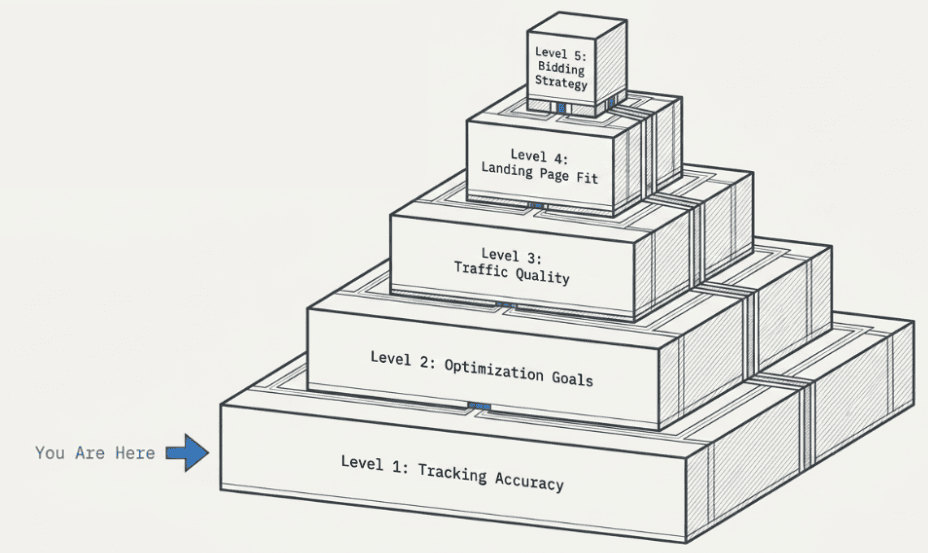
- Tracking Accuracy: Confirm that purchase events fire once, values pass correctly, and the transaction source matches the store or backend.
- Optimization Goals: Check whether primary conversions are real purchases or inflated actions that should never guide bidding.
- Traffic Quality: Review search terms, match types, location settings, audience expansion, and network settings.
- Landing Page Fit: Verify that the product page, offer, price, shipping message, and page speed support the click you paid for.
- Bidding Strategy: Only adjust once the above four are confirmed clean.
In practice, the first fix is almost always basic and technical. Clean measurement comes first. Bidding changes belong near the end, not the beginning. If you’re unsure where your account stands, an eCommerce growth strategy that connects paid acquisition to your full funnel is worth reviewing before making changes.
Is Your Data Lying? A Deep Dive into Conversion Tracking Audits
A D2C brand sees purchases in Shopify, but Google Ads shows a collapse. The first instinct is usually to change bidding, pause keywords, or rewrite ads. That is how bad data turns into bad optimization.
In struggling accounts, start by trying to prove the tracking wrong. If the purchase path is broken, duplicated, delayed, or mapped to the wrong conversion action, every decision after that sits on a weak foundation.
1. Start with the Event, not the Dashboard

The audit begins where revenue should be recorded. Run a real test order and inspect the full purchase journey in Google Tag Assistant and Google Tag Manager preview mode.
On Shopify, Magento, or another eCommerce stack, check five things first:
- The base Google tag loads on the right pages
- The purchase event fires once
- Revenue passes with the right value and currency
- The transaction ID is present where the setup supports it
- Item and order data stay consistent through checkout and the thank-you page
A purchase event with a missing value field can do more damage than no event at all. Bidding systems can still optimize from it, but they optimize from a distorted version of the sale.
2. Check What Google Ads is Counting as Success
Open the conversion actions table and review every action included in the “Conversions” column. Many eCommerce accounts drift off course here.
Common failures include:
- Micro-conversions marked as Primary: Add to cart, begin checkout, newsletter signup, and engaged session can help with reporting. They usually should not steer bidding for a store trying to maximize purchases.
- Imported GA4 Events with Old or Inconsistent Logic: Event names change, parameters break, and no one updates the import settings.
- Thank-you Page Tracking Dependencies: If the final page fails to load, refreshes oddly, or gets skipped by accelerated checkout flows, recorded conversions fall even when orders continue.
- Consent Mode and Browser Restrictions: Client-side tracking misses some users, especially on mobile Safari and privacy-heavy environments.
It’s also worth noting that not all conversion types carry the same weight. For service-based brands running PPC campaigns alongside product campaigns, form submissions should be treated the same way as purchases, mapped carefully, and set as primary only when they represent genuine revenue intent.
3. Audit the Full Stack
A proper tracking audit covers more than whether a tag fired once in preview mode.
| Layer | What to verify | Common failure |
| GTM | Triggers, variables, firing order | Purchase tag fires on the wrong event or more than once |
| GA4 | Event names, parameters, revenue mapping | Purchase event appears, but value is missing or inconsistent |
| Google Ads | Conversion action settings, primary status, enhanced conversions | The wrong action is included for bidding |
| Site platform | Orders are complete, but the conversion never fires | The purchase event appears, but the value is missing or inconsistent |
| Backend source | Shopify, Magento, CRM, OMS | Store revenue trend and ad-platform conversion trend stop lining up |
For stores that need path-level troubleshooting, a Google Analytics funnel exploration report for eCommerce drop-off analysis helps isolate where progression breaks between product view, add to cart, checkout, and purchase.
4. Enhanced Conversions and Server-side Setups
Enhanced Conversions are worth checking line by line. When configured well, Google can match more conversions using hashed first-party customer data. When configured poorly, the account reports cleaner numbers than the setup deserves.
Server-side GTM deserves the same scrutiny. It doesn’t fix bad event design, and it doesn’t replace a sound measurement plan. It does reduce dependence on the browser, which matters when cookies are limited, scripts are blocked, or mobile sessions drop parts of the client-side journey.
For higher-spend D2C accounts, that trade-off matters. Client-side only setups are simpler to launch and cheaper to maintain. Server-side and enhanced conversion work usually improve match quality, but they add implementation overhead and require tighter QA across checkout, consent, and order confirmation flows.
Practical rule: If you cannot explain how a purchase turns into a Google Ads conversion, it is too early to optimize campaigns.
Aligning Goals and Reality: Fixing Your Attribution Model
Clean tracking doesn’t solve much if the account is still measuring the wrong success event. Many D2C brands think Google Ads isn’t converting when the deeper problem is that the account is rewarding activity instead of revenue.
A purchase is not the same thing as an add to cart. A product view is not a buying signal strong enough to steer budget. Yet plenty of accounts still treat those actions as primary conversions because they make the dashboard look active.
Primary Versus Secondary is Not an Admin Detail
In eCommerce, primary conversions should usually be the actions you want bidding to maximize. For most brands, that’s purchases. Everything else belongs in secondary unless you have a very specific reason to do otherwise.
When Google optimizes toward softer events, it tends to find more people who perform softer events. That sounds obvious, but it’s exactly how accounts drift off course.
- Keep as Primary: Purchase, and in some cases, a tightly defined qualified lead if the business model supports it.
- Keep as Secondary: Add to cart, begin checkout, newsletter signup, page engagement, time on site.
- Treat with Caution: Imported events that don’t map one-to-one with actual business outcomes.
If a D2C brand tells Google that “begin checkout” is success, the system will go find more checkout starters, even if they don’t buy. The result is more unqualified traffic hitting the checkout page and fewer conversions that actually matter to the business.
The Conversion Window Can Distort Reality
Attribution window settings reshape performance reporting. If your typical sales cycle is short but your lookback window is much longer, Google Ads can over-credit conversions that were influenced by other channels later.
That creates two expensive mistakes. First, you keep funding campaigns that appear stronger than they are. Second, you misread “non-converting” traffic because reporting isn’t aligned with how customers actually buy.
To reset attribution, pull time-to-purchase data from your source-of-truth system, whether Shopify, a CRM, your order management system, or a warehouse-linked reporting layer. You’re looking for the gap between click and order completion, not just what Google Ads reports.
| Setting | Bad setup | Better setup |
| Primary action | Add to cart | Purchase |
| Secondary signals | Mixed into bidding | Visible, but excluded from bidding |
| Conversion window | Generic default | Based on the verified buying cycle |
| Attribution reality check | Platform-only view | Cross-checked against backend orders |
If the Ad platform and the store disagree, the store wins.
Data-driven Versus Last Click
Attribution model selection is a reporting lens, not a religion. Data-driven attribution can be useful when the account has enough clean signal and the path is multi-touch. Last click is simpler and often easier to sanity-check.
The problem isn’t choosing the “wrong” model in isolation. It’s choosing any model while the underlying conversion action and time window are still misaligned.
For most struggling D2C accounts, the fastest improvement comes from simplifying: make purchases primary, demote softer actions, align the window with actual time to buy, then compare Google Ads against backend revenue again.
Stop Attracting the Wrong Clicks: Refining Campaign Targeting
A D2C account can look healthy on the surface. Clicks are coming in, impressions are steady, and click-through rate looks acceptable. Then you open search terms, location reports, and traffic quality signals, and the real problem appears. Google is finding people willing to click, not people ready to buy.
This is common in accounts selling skincare, supplements, apparel, and pet goods. The brand blames broad match or rising CPCs. The actual issue is poor keyword targeting. Targeting that’s looser than the business can afford.
Weak negatives, Search Partners, and default geo settings pull in irrelevant traffic that was never going to convert.
1. Keyword Strategy Starts with Search Terms, Not Keyword Themes
Keyword themes don’t tell the full story. Search terms do.
Part of a sound keyword strategy is reviewing queries by spend and conversion value regularly, then classifying them by intent. Educational searches, DIY queries, free-seeking terms, competitor research, and product variants you don’t carry should stand out quickly.
Four failure patterns to look for first:
- Research Intent Instead of Purchase Intent: users in research mode searching “how to,” “benefits of,” “recipe,” “ideas,” or comparison-heavy queries rarely buy on the first click.
- Price Mismatch: terms with “cheap,” “free,” “discount code,” or expectations that conflict with your margin structure.
- Catalog Mismatch: searches for sizes, scents, flavors, bundles, or use cases you don’t sell.
- Geographic Mismatch: traffic from countries or regions you don’t ship to profitably.
Low intent keywords and wrong keywords both waste budget in the same way; they attract clicks from people who were never going to purchase.
2. Build and Maintain a Negative Keyword List
Adding negatives is one of the highest-leverage actions in a struggling account. When you identify irrelevant searches in the Search Terms report, add negative keywords to your list immediately.
Over time, this list becomes one of the most valuable assets in the account, as it directly controls what kind of traffic your budget reaches.
Tightly themed ad groups also help here. When ad groups are narrow and well-organized, it’s easier to spot which keywords are pulling in the wrong audience and act on it quickly.
3. Fix Location Targeting before Touching Bids
Default location settings cause more waste than many teams realize. “Presence or interest” is often too loose for brands with country-specific shipping, customs constraints, local promotions, or different margin profiles by region. This is especially true for local businesses running national campaigns without geographic restrictions.
Use presence-based targeting when fulfillment boundaries matter. Then review geographic performance at the country, state, and metro level. If a region drives traffic but never produces profitable orders, exclude it or separate it into its own campaign with tighter controls.
4. Match Type Discipline Still Matters
Broad match keywords can work well in an account with clean purchase data, active negative keyword management, and controlled geography. In a messy account, they scale waste faster than sales.
If you’re rebuilding a struggling account, phrase match and exact match keywords usually make diagnosis easier because they reduce query sprawl. Once search terms are cleaner and conversion feedback is reliable, broad match becomes easier to test responsibly.
One important note: keyword intent can be right, and the targeting still fails if the destination page doesn’t match the query or the ad promise. Getting the click is only half the job.
Fixing the Ad-to-Landing-Page Mismatch
A click can be relevant and still fail. That’s what happens when the ad promises one thing, and the landing page delivers another.
This is one of the most common reasons brands conclude their Google Ads traffic is low quality when the actual issue is on the destination page. The searcher had intent. The ad earned the click. Then the page introduced friction, ambiguity, or doubt.
Message Match Breaks Faster than Most Teams Realize
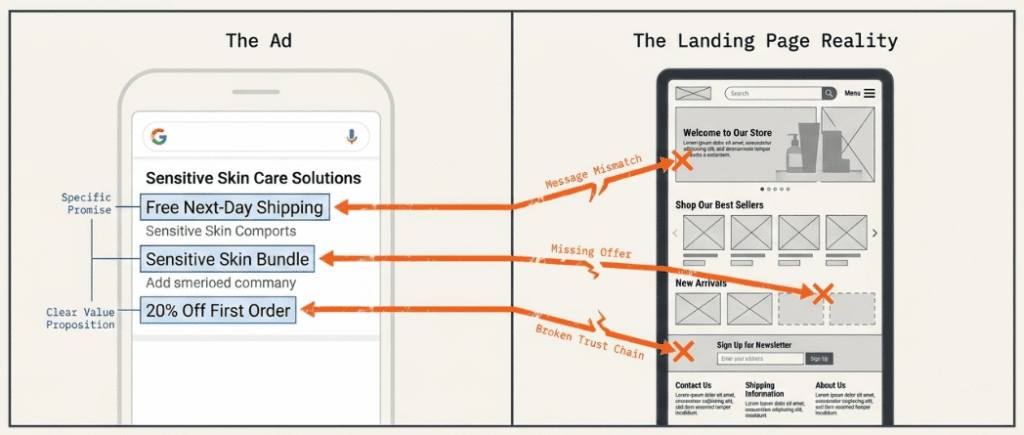
Compelling ad copy only does half the job. If your ad says “bundles,” “free shipping,” “sensitive skin,” “starter kit,” or “same-day dispatch,” that promise needs to be visible immediately on the landing page. Not halfway down. Not hidden in an accordion. Not implied.
For D2C brands, a weak message match usually shows up in one of these forms:
- Category Ad to Generic Homepage: The user searched for a specific product type but landed on a broad storefront.
- Offer Mismatch: The ad mentions a promotion that isn’t obvious on-page.
- Audience Mismatch: The ad speaks to one use case, but the page opens with another.
- Creative Mismatch: The ad frame is premium, but the page design feels cluttered or discount-led.
Compelling headlines in the ad need a corresponding headline on the page. When those two things align, bounce rate drops and conversion rate goes up.
A Five-minute Landing Page Audit
Run this audit before asking for a redesign. Open the page on mobile and answer these questions:
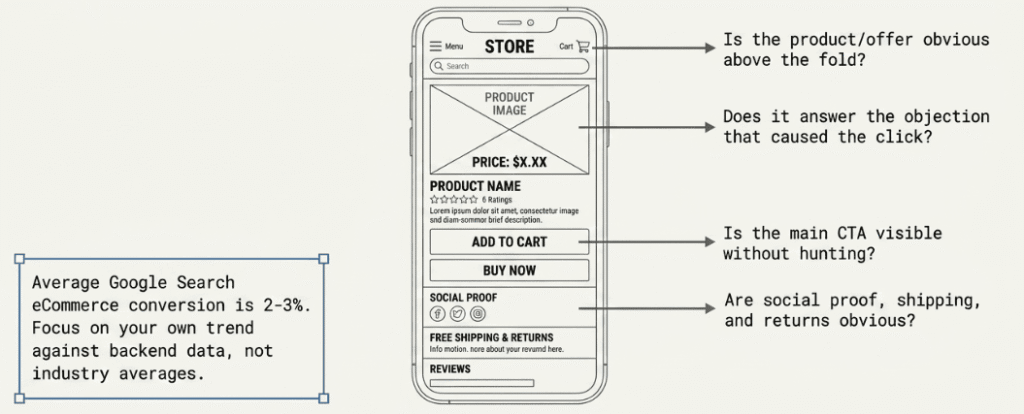
If any of those answers is “not really,” the page is probably undercutting paid traffic.
What to Fix First on D2C Product and Collection Pages
| Area | What good looks like | What usually hurts conversion |
| Headline | Clear value proposition tied to ad intent | Generic brand slogan |
| CTA | Easy to find and action-focused | Buried below distractions |
| Trust | The user has to scroll to understand the deal | Little proof or policy visibility |
| Mobile UX | Fast, readable, tap-friendly | Dense layout, shifting elements |
| Offer clarity | Price, bundle, discount, or benefit explained fast | User has to scroll to understand the deal |
For Shopify brands especially, paid traffic often gets sent to pages designed for browsing, not decision-making. Conversion rate optimization on your top landing pages is often a faster win than any campaign change.
Unique selling points should be visible early on the page. If a visitor can’t tell within five seconds why they should buy from you rather than a competitor, the page is losing sales that the ad already earned.
Don’t Treat CRO and Paid Traffic as Separate Problems
Poor post-click experience doesn’t just hurt conversion rate. It also sends bad performance signals back into the ad account.
Google watches what happens after the click through the signals it can observe. If users bounce, hesitate, or fail to complete the journey, the campaign gets less useful feedback. Over time, that can affect quality score, which auction positions you win, and what traffic the system favors.
A lot of Ad accounts don’t need more traffic. They need a landing page that deserves the traffic they already paid for. If your landing pages need a structural rethink, Aureate Labs’ conversion rate optimization services are built specifically for this problem.
Advanced Levers: Bidding Strategies and Experimentation
When tracking is clean, attribution is sane, targeting is tighter, and the landing page is credible, bidding strategy becomes the lever it should be. Before that, it’s usually just a multiplier of existing problems.
That matters more now because Google’s automation has become significantly more aggressive. Smart Bidding Exploration, rolled out in 2025, uses flexible ROAS targets to bid on broader query categories the system identifies as potentially valuable.
Campaigns using Smart Bidding Exploration see an average 18% increase in unique search query categories with conversions and a 19% increase in overall conversions (Search Engine Land).
That’s a meaningful lift, but it requires the account to have clean purchase data and a stable conversion signal first. Without that foundation, exploration mode scales noise, not revenue.
Pick the Strategy that Matches Account Maturity
| Strategy | When it works | When it backfires |
| Maximize Conversions | Gathering signal, early stage | Conversion quality is mixed or noisy |
| Target CPA | Stable conversion type, consistent value per order | Conversion action is wrong or window is misaligned |
| tROAS | eCommerce with variable purchase values | Account is feeding weak or incomplete purchase data |
Manual CPC still has a place in specific scenarios, particularly in early-stage campaigns where there isn’t enough conversion data to feed Smart Bidding reliably, or when you’re testing a new campaign structure and want tighter control before handing the reins to automation.
The mistake is using advanced automation on top of messy inputs. tROAS won’t rescue an account that’s feeding Google weak purchase data or the wrong conversion actions.
Mobile Needs Its Own Scrutiny
Mobile drives the majority of eCommerce traffic, but it consistently converts at lower rates than desktop. That gap isn’t always a bid allocation problem, but it’s always worth investigating.
Review performance by device, hour, and campaign type. If mobile traffic is eating budget but producing weak purchase quality, don’t let automation keep pushing there unchecked. Segment the data, compare landing page behavior by device, and decide whether the problem is bid pressure, page friction, or both. Optimize bids by device once you have enough segmented data to make a confident decision.
Use Every Ad Format Available to You
Running ads without taking advantage of available formats is a missed opportunity. Ad extensions, including sitelinks, callouts, and structured snippets, improve ad visibility and give potential buyers more context before they click. They also contribute to quality score and can improve click-through rate without increasing spend.
Multiple headlines in responsive search ads let Google test combinations and find what resonates with your target audience. The more relevant assets you give the system to work with, the better it can match your ad to the right search.
Remarketing Campaigns Deserve Separate Attention
Remarketing campaigns target users who have already visited your site or interacted with your brand. These audience segments typically convert at significantly higher rates than cold traffic because the buyer already has some familiarity with your product.
If your account is struggling with driving conversions from prospecting campaigns, keeping remarketing campaigns healthy and well-funded protects revenue while you fix the broader issues.

Pro Tip: Remarketing works best when it’s timed around moments your audience already cares about. If you want to layer seasonal intent on top of your remarketing audiences, the eCommerce marketing calendar for 2026 maps out the key windows where D2C brands consistently see higher return from warm audiences.
Experiment in Controlled Loops
The best-performing accounts don’t make sweeping changes everywhere at once. They run contained tests.
| Test area | What to change | What to keep stable |
| Bidding | One strategy shift at a time | Audience, landing page, core offer |
| Audience signals | Add remarketing or customer lists | Bidding target and ad set |
| Landing page | One destination variant | Keywords and budget |
| Device approach | Adjust mobile treatment | Creative and offer |
Run one meaningful test, let the account collect enough signal, then decide. If you change bids, ad copy, audiences, and landing page all in the same window, you’ll learn almost nothing.
For D2C brands, the strongest bidding setups usually share three traits: they optimize to purchase (not softer events), they use audience context, especially remarketing and first-party signals, and they treat automation as a tool to supervise, not a system to obey.
Actionable Checklist to Fix Google Ads Conversions
If your Google Ads account is spending and not producing, don’t try to fix everything in one sitting. Work top-down. Here’s a practical seven-day plan that follows the order of importance.
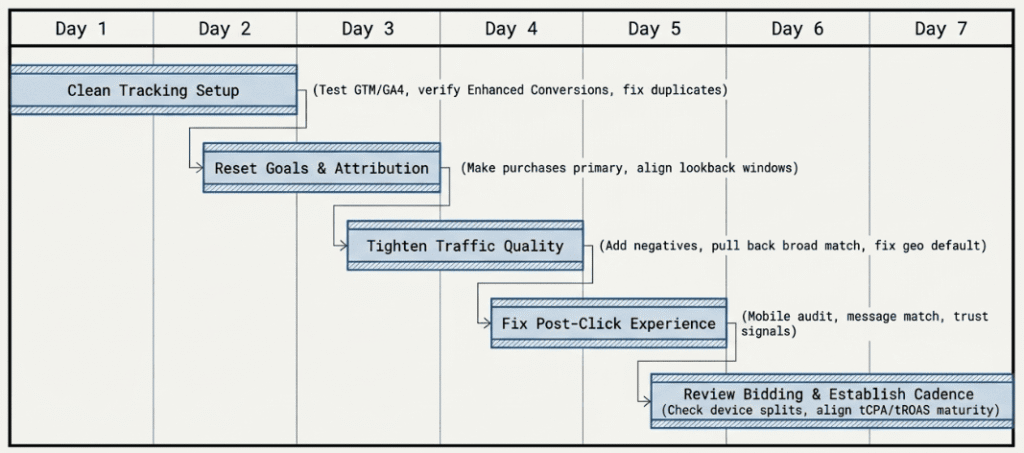
Day 1 and 2: Clean Up the Tracking Setup
- Verify purchase tracking end-to-end: test a live path with Tag Assistant, GTM preview, GA4, and Google Ads.
- Inspect conversion actions: make sure only meaningful business outcomes are included in bidding.
- Check value accuracy: compare platform-reported purchase values against store or backend data.
- Review Enhanced Conversions setup: confirm hashed first-party data is configured correctly if you’re using it.
- Identify duplicate or missing fires, especially around checkout and thank-you page flows.
If you can’t trust the purchase signal, stop here until you can.
Day 3: Reset Goals and Attribution
- Make purchases primary: remove softer actions from the bidding path.
- Move micro-conversions to secondary: keep visibility without letting them steer budget.
- Review conversion window settings: match them to the actual buying cycle length from your own data.
- Cross-check against the source of truth: compare Google Ads to Shopify, Magento, or CRM reporting.
Day 4: Tighten Traffic Quality
- Pull the Search Terms report and add negatives for irrelevant intent patterns.
- Review match types: pull back broad match keywords if the account doesn’t have enough control.
- Fix location targeting: use presence-focused targeting when service area or shipping geography matters.
- Audit click quality: look for suspicious IP, device, and behavioral patterns.
- Conduct keyword research to identify better relevant keywords worth testing.
Day 5: Fix the Post-Click Experience
- Open your top landing pages on mobile and inspect them as a new customer would.
- Check message match: the ad promise should be visible immediately.
- Make the CTA obvious and don’t force users to hunt for it.
- Add trust signals fast: social proof, shipping clarity, returns, and payment reassurance.
- Reduce friction: simplify layout, speed, and decision path.
Day 6: Review Bidding and Campaign Performance
- Check device splits: see whether the mobile is taking too much low-quality traffic.
- Review bidding strategy fit: align Maximize Conversions, target CPA, or tROAS with account maturity and signal quality.
- Review ad extensions: make sure sitelinks, callouts, and structured snippets are active and relevant.
- Avoid major simultaneous changes: one lever at a time.
Day 7: Set Up a Repeatable Operating Cadence
- Weekly: search terms, conversion action review, device breakdown
- Biweekly: landing page performance and audience quality review
- Monthly: attribution sanity check against backend revenue
Most Google Ads conversion problems are fixable. The account usually isn’t broken beyond repair. It’s being managed in the wrong order.
Conclusion
We started with a familiar problem: spend is steady, clicks are coming in, but orders aren’t following. The instinct is to fix the campaign. The actual problem is almost always further back in the chain.
Google Ads conversion failures follow a sequence. Tracking breaks quietly. Goals drift toward soft signals. Targeting widens. Pages lose the ad’s promise before the user even scrolls. Bidding, which should be the fine-tuning layer, ends up amplifying all of it.
Fix in the right order, and most accounts recover faster than expected. Skip to bidding changes first, and you’re just spending more confidently on a broken foundation.
If you’ve worked through this checklist and the account still isn’t converting, the problem is usually structural, either in how the account was built or in the gap between what’s being measured and what the business actually cares about.
That’s the exact problem Aureate Labs is built to solve.
Stop guessing what’s breaking your conversions. Get a full-funnel Google Ads audit from Aureate Labs and find out what’s actually costing you orders.
The brands that win with paid search aren’t always the ones with the biggest budgets. They’re the ones who know exactly what they’re measuring.
Frequently Asked Questions
Why did my Google Ads stop converting overnight?
The most common cause is a tracking break, not a campaign problem. A thank-you page failing to load, a checkout flow change, or an updated GA4 event can cut off purchase signals without any visible error in the dashboard. Start by verifying whether the purchase conversion is still firing correctly before changing anything in the campaign.
How do I check if Google Ads conversion tracking is working?
Use Google Tag Assistant or Google Tag Manager preview mode to walk through a test purchase. Confirm the purchase event fires exactly once, passes a revenue value, and matches what your store backend recorded. Then compare Google Ads conversion numbers against your Shopify or CRM orders for the same period.
What is a good conversion rate for Google Ads eCommerce?
The average conversion rate for eCommerce on Google Search Ads sits around 1.5-3%, though this varies significantly by category, product price, and how well the landing page matches the ad. Focusing on your own trend and comparing it against your backend order data will tell you more than any industry benchmark.
Should I use broad match if my Google Ads aren’t converting?
Generally, no. If you’re already struggling with conversions, broad match keywords tend to widen the problem by pulling in lower-intent queries and irrelevant searches. Narrow your match types first, use phrase match and exact match keywords to get search terms under control, and reintroduce broad match only once conversion feedback is stable.
Why does Google Ads show conversions but Shopify shows fewer orders?
This is usually caused by one of three things: duplicate conversion tags firing on the thank-you page, soft micro-conversions (like “begin checkout”) marked as primary alongside purchases, or attribution window settings that are crediting clicks from much earlier than your actual buying cycle.
What’s the best way to make Google Ads work for a D2C brand?
Making Google Ads work long-term comes down to clean measurement, tight keyword targeting, and a landing page that matches the ad. Success with paid search isn’t about finding a single magic lever. It’s about aligning the full path from search query to purchase, and then giving the bidding system accurate data to optimize from.
Resources:






Post a Comment
Got a question? Have a feedback? Please feel free to leave your ideas, opinions, and questions in the comments section of our post! ❤️