

How Does Google Ads Work? A Complete eCommerce Guide

Google Ads is one of the most powerful customer acquisition channels for eCommerce brands. It’s also one of the easiest to run at a loss without realizing why.
On average, businesses earn $2 for every $1 spent on Google Ads (DemandSage). That upside is real, but so is the gap between accounts that capture it and accounts that don’t.
This guide explains how Google Ads works in practice, from the auction mechanics to campaign types to bidding strategy. It will help you make better decisions, whether you’re just starting or trying to fix an account that’s bleeding margin.
If you’re also thinking about how paid ads fit into a broader growth plan, our eCommerce growth strategy guide is a good place to start.
Key Takeaways
- Google Ads runs on a real-time auction where your bid and Quality Score together decide whether your ad shows and what you pay. Higher bids alone don’t win.
- For eCommerce, Search and Shopping campaigns are your core channels. Shopping attracts high-intent buyers who already see your product and price before clicking.
- Conversion tracking isn’t just a reporting tool. Google uses it to optimize bidding. Bad data means the algorithm learns the wrong things and makes mistakes.
- Performance Max works well at scale, but only if your product feed, tracking, and site experience are already solid. Don’t use it to fix broken fundamentals.
- Your store’s speed, mobile UX, and landing page relevance directly affect your ad costs and conversion rate. Paid media and the storefront are one system, not two separate problems.
What Is Google Ads?
Google Ads is Google’s advertising platform that lets businesses pay to show ads across Google’s properties: Search, Shopping, YouTube, Gmail, and millions of third-party sites in the Display Network. It was previously known as Google AdWords before being rebranded in 2018.
For eCommerce, the most relevant channels are Search and Shopping. These capture demand that already exists. Someone searches for a product you sell, and your ad can appear at that moment.
The fundamental model is pay-per-click (PPC). You don’t pay when your ad is shown. You pay when a searcher clicks your ad.
But understanding that basic mechanics is just the starting point. What determines whether your ad actually shows, where it shows, and what your Google Ads cost ends up being is more nuanced than most guides suggest. The Google Ads platform gives you control over a lot of variables, but only if you understand what each one does.
Unlike Google AdSense, which lets publishers earn money by displaying ads on their sites, Google Ads is where advertisers actually run and manage their campaigns. The two are separate products that work on opposite sides of the same ad ecosystem.
If you’re spending on paid ads alongside SEO, it’s worth understanding how eCommerce AI SEO is changing organic visibility too, since both channels increasingly interact.
How Does the Google Ads Auction Work?
Every time someone searches on Google, an auction runs in milliseconds to decide which ads appear and in what order on search engine results pages. Google search ad spend rose 13% year-over-year in Q4 2025, while clicks hit their highest level in five years and average CPCs held flat (ALMCORP).
More volume at stable cost is unusual, and it makes understanding how the auction works more important than ever.
This happens billions of times a day across search engines worldwide. Many advertisers are running campaigns simultaneously, which means the competition and cost for any given search can shift significantly depending on the time, device, and location.
Here’s the sequence:
1. A user enters a search query. Google determines whether the search is eligible to show ads.
2. Eligible advertisers enter the auction. Your campaign is eligible if you have relevant keywords or product data, an approved ad, and available budget.
3. Google evaluates context. Device type, location, time of day, and audience signals all affect which ads are most competitive for that specific query at that specific moment.
4. Google ranks the ads. The system weighs each ad’s bid amount against its relevance and expected usefulness to determine who gets shown and where.
5. The click is charged. If your ad wins a placement and someone clicks, you pay based on the auction outcome, not simply the maximum bid you entered.
What This Means for eCommerce
You’re not buying a block of traffic. You’re entering thousands of individual auctions, each with a different intent, competition, and economics.
“Running shoes” and “women’s Brooks Ghost 16 size 8” are both running-related searches. But one is early-stage research, and the other is close to a purchase. They should not be in the same campaign with the same bid and the same landing page.
Profitable accounts map campaigns to search intent. They separate high-intent, product-specific searches from broader discovery traffic, so the budget doesn’t get absorbed by clicks that were never going to convert.
What Are Ad Rank and Quality Score?
Ad Rank is what determines whether your ad shows and where it appears in the results. A higher bid helps, but Google doesn’t simply hand the top spot to the highest bidder.
Ad Rank = Bid × Quality Score multiplied by Context
Quality Score is Google’s 1–10 diagnostic rating for how well your ad experience aligns with the searcher’s intent. It’s built from three factors:
| Factor | What Google Is Looking For |
| Expected Click-Through Rate | Is this Ad likely to get clicked for this query? |
| Ad Relevance | Does the Ad copy match what the person searched for? |
| Landing Page Experience | Is the page fast, useful, and relevant after the click? |
Why This Matters for Online Stores
The third factor is where most eCommerce accounts quietly lose money.
If your product page loads slowly, buries shipping information, or doesn’t clearly match what the searcher was looking for, Google sees that as a poor experience. That weakens your Ad Rank, which means you either pay more to hold your position or lose placements to competitors with better-aligned pages.
A strong Quality Score isn’t something you game. It’s a byproduct of having tightly matched keywords, relevant ad copy, and a product page that makes it easy for shoppers to buy. When those things are working, the score takes care of itself.
High-quality ads consistently earn better placement at a lower cost than weak ones with the same bid.
Which Campaign Types Should eCommerce Stores Use?
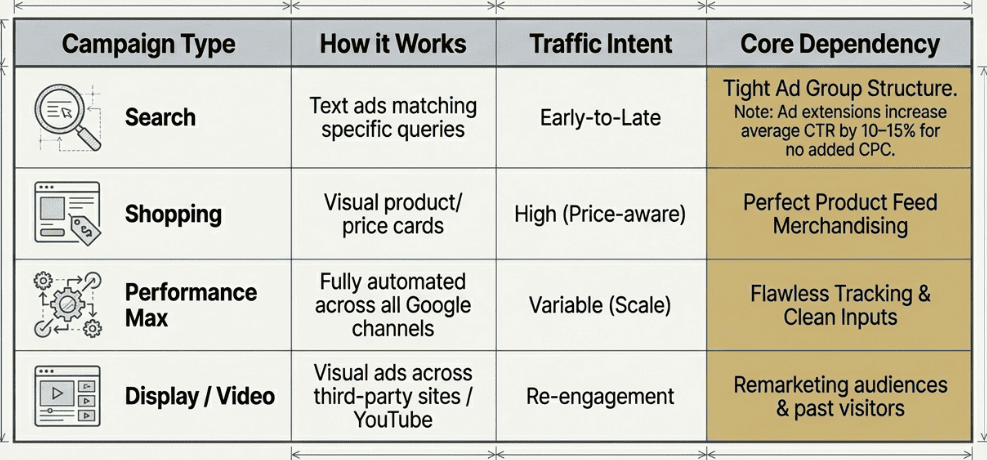
Each campaign type serves a different purpose. Running multiple campaigns without a clear structure is one of the most common reasons eCommerce accounts overspend without seeing proportional returns.
1. Search Campaigns
Google search ads show text ads when people search for terms that match your keywords. Search campaigns are the backbone of most eCommerce accounts.
This is the most controlled campaign type. You choose which queries trigger your ads, write the copy, and decide which page the click lands on. That control makes Search valuable for high-intent product searches where you want to match specific language a buyer uses.
Search works best when:
- You know the exact terms your customers use to find your products
- Your campaign structure mirrors real product categories
- Your landing pages match the intent of each query tightly
Ad groups sit inside each campaign and let you organise keywords and ads around a specific theme or product category. Keeping each group tight, one product type or intent per group, is one of the simplest ways to improve relevance across the whole account.
Ad extensions add extra information to your ads directly in the results: things like store ratings, site links, pricing, and phone calls. They don’t cost extra to use but can significantly improve click-through rate by giving potential customers more reasons to choose your ad over a competitor’s.
Ad extensions increase average click-through rate by 10–15%, which is a meaningful lift for no added cost per click (MarketingLTB).
2. Shopping Campaigns
Google Shopping ads show your product image, title, price, and brand name directly in the search results before the shopper even visits your site.
Because buyers can see the product and price before clicking, Shopping tends to attract higher-intent traffic. Someone who clicks a Shopping ad has already decided the product looks relevant at that price point.
The trade-off is that Shopping performance depends heavily on your product feed. Your feed is the data file you submit to Google Merchant Center that tells Google what you sell. If your product titles are vague, images are weak, or categories are wrong, Google can’t match your products to the right searches.
For Shopify and Magento stores, feed quality is often the biggest lever in Shopping performance. Getting it right means treating your feed like merchandising, not an admin task. A Google Ads practitioner mentioned on Reddit that three fundamentals consistently moved the needle: an optimized product feed, clean conversion tracking, and a realistic budget that matches your product economics.
I’ve managed Google Ads for 9 Figure High Ticket Brands , here’s what I did to make it work.
by u/Single-Sea-7804 in PPC
They noted that mismatched product categories, weak titles, and unoptimized descriptions routinely cause ads to show to the wrong people at the wrong time. This problem compounds significantly with Performance Max. Their core takeaway: as Google moves further toward automation, your feed and your data become your most important assets.
3. Performance Max
Performance Max (PMax) is Google’s fully automated campaign type. It runs Google Ads campaigns across Search, Shopping, YouTube, Display, Gmail, and Maps using a single campaign. Google decides where to serve ads, who to target, and what creative to use based on your assets, feed, and conversion data.
PMax can scale significantly, especially for larger catalogs. But it requires clean inputs to work well:
- A well-structured product feed with accurate titles, GTINs, and categories
- Conversion tracking that reflects real revenue (not inflated micro-events)
- Creative assets specific enough for Google to make good decisions
- A product page experience that converts once traffic lands
If those inputs are messy, PMax will still optimize. It just optimizes toward the wrong outcomes. It’s worth getting Search and Shopping working properly before relying on PMax for scale.
4. Display and Video
Display ads appear on websites and mobile apps across Google’s Display Network. Video ads run on YouTube videos.
These formats are most useful for remarketing (re-engaging people who visited your site), product launches, and keeping higher-consideration products in front of past visitors. They’re less useful as a starting point for stores that haven’t yet established conversion economics on Search or Shopping.
App ads are a separate campaign type worth knowing about if you have a branded app. They run across Google Search, Play, YouTube, and the Display Network, and are optimised specifically to drive installs or in-app actions.
How Does Targeting Work?
Google Ads gives you multiple layers of targeting that work together to define who sees your ads.
- Keywords define which searches can trigger your ads in Search campaigns. The terms you choose determine which buying moments you compete in, so selecting them carefully is one of the most consequential decisions in any account. The Google Keyword Planner is the most accessible tool for this and shows estimated search volume and cost per click for any term you want to evaluate.
- Match types control how closely a query needs to match your keyword. Exact match targets only search that closely mirror your keyword. Broad match casts a wider net and lets Google find related queries, which can surface useful traffic but also attract irrelevant clicks without careful exclusion management.
- Negative keywords tell Google which searches should never trigger your ads. For eCommerce, this is one of the most important ongoing tasks. Without them, broad and phrase match keywords will pull in low-intent or completely off-topic traffic that eats ad spend without converting.
- Audience signals let you layer in information about who the searcher is: past visitors to your site, existing customers, or people Google identifies as likely in-market for products like yours.
- Location targeting lets you restrict ads to the regions you ship to or where demand is strongest. For local or omnichannel retailers, location targeting also helps drive more foot traffic to physical stores by showing ads to people nearby.
- Device targeting lets you adjust bids based on whether someone is on mobile, desktop, or tablet. Mobile behavior often differs significantly from desktop, especially for higher-priced or complex products.
- Dayparting lets you adjust when your ads run or how aggressively you bid at different times of day.
For eCommerce, product catalog segmentation deserves special attention. Grouping hero SKUs, clearance items, high-margin products, and seasonal inventory into separate campaigns lets you apply different bidding logic to each group. Running them all under the same strategy hides waste.
Which Bidding Strategy Should You Use?
Your bidding strategy tells Google how to set bids for each auction. The right choice depends on how mature the account is, how clean your data is, and what your marketing goals are at that stage.
Choosing the right campaign structure and bidding approach together is what separates accounts that scale profitably from those that just burn through budget.
| Strategy | Best Fit | Key Risk |
| Manual CPC | New accounts building data | Time-intensive; requires active management |
| Maximize Clicks | Early campaigns that need traffic volume | Doesn’t prioritize conversion quality |
| Maximize Conversions | Accounts with clean conversion tracking | Chases weak signals if tracking is flawed |
| Target ROAS | Mature stores with reliable revenue data | Needs stable, accurate conversion values to work |
| Target CPA | Service-based or lead-focused stores | Depends on enough conversion history |
The most important principle: don’t use automated bidding to fix a data problem. Smart bidding learns from whatever signal you feed it. If your tracking is incomplete or your conversion actions are misconfigured, automation will scale those mistakes.
A common sequence that works well for new or restructured accounts: start with manual or Maximize Clicks to collect real search term data, then shift to Maximize Conversions once you have consistent purchase tracking, and then move to Target ROAS once you have enough clean data for the algorithm to make good decisions.
Why Does Conversion Tracking Matter?
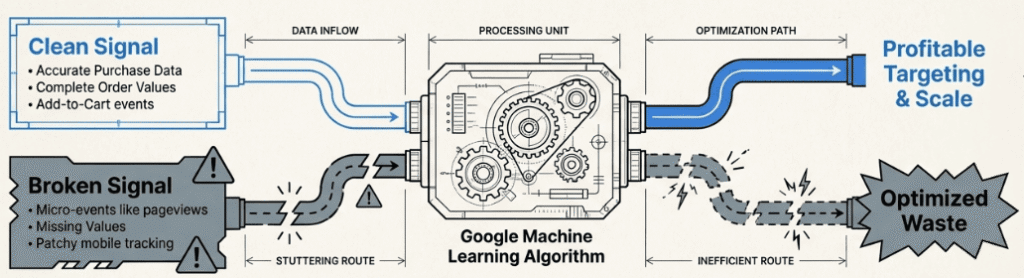
This is the part most guides underemphasize, and it matters more than almost anything else in the account.
Google uses your conversion data for two separate jobs. First, it reports what happened. Second, it uses that data to decide how to bid, who to target, and where to serve ads. If the signal is wrong, the machine learns the wrong lessons. Without accurate tracking, you can’t reliably measure results or know which campaigns are actually driving revenue.
For stores that also generate quality leads or qualified leads before a sale, those actions should be tracked too, with realistic values assigned so bidding doesn’t over-invest in lead volume at the expense of actual purchase revenue.
What to Track
For an eCommerce store, a complete tracking setup typically includes:
- Purchase completion: the primary revenue event; should include accurate order value
- Add to cart: signals product-traffic fit
- Begin checkout: a strong commercial intent signal
- Account creation or newsletter signup: useful if email is a meaningful revenue channel
Tracking only the final purchase means you lose visibility into where the funnel breaks. If shoppers add to cart but don’t reach checkout, the friction is likely on the product page or in cart review. If they reach checkout but don’t buy, it’s often shipping costs, payment options, or trust signals.
Common Tracking Problems
- Duplicate conversions: Fires the purchase event more than once for a single order, inflating reported ROAS.
- Missing purchase values: Sends conversions without accurate revenue data, making Target ROAS unreliable.
- Wrong primary conversion action: Setting micro-events like page views or session duration as primary conversions teaches bidding to optimize for the wrong behavior.
- Patchy mobile tracking: Purchases completed on mobile don’t report correctly, causing the algorithm to under-invest in mobile traffic.
Getting tracking right isn’t glamorous work. But it’s the foundation everything else depends on.
How Does Your Store Affect Ad Performance?
This is the part that often gets overlooked when Google Ads performance is below expectations.
Google’s goal is to show more relevant ads for every search. That means it pays attention to what happens after the click, not just during the auction.
If your product page loads slowly, doesn’t match the query, or makes it difficult to buy, the account pays for it through lower Quality Scores, weaker conversion rates, and higher effective CPCs.
A few things that directly affect paid performance on-site:
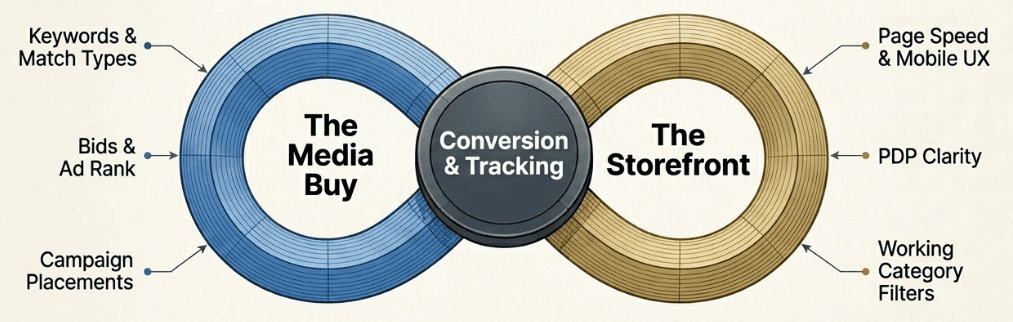
- Page speed: A slow mobile product page will underperform regardless of how well the campaign is structured. Google measures this, and so do shoppers.
- Mobile UX: For most eCommerce categories, the majority of clicks come from mobile. Variant selectors that are hard to use, images that don’t zoom, or checkout flows with too many steps all reduce conversion rate and increase the effective cost per order.
- Product page clarity: Shipping timelines, return policy, size availability, and customer reviews should be visible without scrolling. Shoppers who can’t find that information quickly tend to leave.
- Landing page match: A category-level search should land on a strong collection page with working filters. A product-specific search should land on the PDP, not a category page that makes the shopper search again.
The best-run Google Ads accounts treat paid media and the storefront as one system. Media buying drives the visit. The store decides whether that visit turns into revenue.
What’s the Right Order to Set Up a Google Ads Account?
If you’re building or rebuilding a Google Ads account for an eCommerce store, a logical sequence is:
1. Fix tracking first: Accurate purchase tracking with order values is non-negotiable before spending meaningful budget.
2. Do your keyword research: Identify the terms your customers actually use, then map them to the appropriate campaign and ad group structure before you build anything. Start broad, then refine based on actual search term data once campaigns go live.
3. Clean up the product feed: Product titles, GTINs, images, and categories should be accurate and specific before running Shopping or PMax.
4. Start your first campaign with Search and Standard Shopping: These give the most visibility into which queries are actually driving conversions. If you’re unsure how to structure this, the team at Aureate Labs works specifically with eCommerce brands on exactly this kind of account setup. Use that data before handing control to automation.

5. Add Performance Max once the basics are stable: Once feed quality, tracking, and site experience are solid, PMax can scale what’s already working.
6. Layer in Display and Video for remarketing: Once you have traffic and conversion data, remarketing becomes a cost-effective way to recover shoppers who didn’t convert on the first visit.
Conclusion
We started with a simple reality: businesses earn $2 for every $1 spent on Google Ads, on average. But averages hide a wide gap. Understanding how Google Ads works, from the auction mechanics to Quality Score to bidding strategy, is what separates accounts that capture that upside from ones that quietly burn through budget.
The good news is that nothing here is magic. Accurate tracking, a clean product feed, tightly matched keywords, and a store that loads fast and converts well: these are the actual levers. Get those right and the platform rewards you with better placement at a lower cost.
If you want to know exactly where your account is losing money, get a free Google Ads audit from Aureate Labs and see what a structured account looks like in practice.
After all, knowing how it works is step one. Putting it to work is what actually moves revenue.
FAQs
How do Google Ads work?
Every time someone searches on Google, an instant auction determines which ads appear and in what order. Your position depends on your bid combined with your Quality Score, which reflects how relevant your ad and landing page are to that specific search. You only pay when someone clicks.
How much does Google Ads cost per click?
It varies widely by industry, competition, and keyword intent. Broad terms in competitive categories can cost $2–$10+ per click, while niche product-specific searches can be much cheaper. Your Quality Score plays a direct role: more relevant ads pay less for the same position.
Is $20 a day good for Google Ads?
It can be enough to start collecting real data on what converts, particularly on Search. Just keep expectations realistic. $20/day is roughly $600/month, which limits how quickly you can test and iterate. Focus on one tightly structured campaign rather than spreading it thin.
How long does it take for Google Ads to work?
Most accounts need 2 to 4 weeks of consistent spend before search term data, conversion data, and bidding signals are reliable enough to optimize against. Smart bidding strategies usually need at least 30 conversions in 30 days to perform well.
Resources:






Post a Comment
Got a question? Have a feedback? Please feel free to leave your ideas, opinions, and questions in the comments section of our post! ❤️